A laptop mount can reclaim valuable desk space while raising your screen to a more comfortable viewing height. The right design also helps separate your laptop from your keyboard, monitor, and other everyday accessories.
We selected 10 laptop mounts for small desks across several layouts, including monitor-arm trays, under-desk shelves, and flexible C-clamp stands. Use the guide below to match the mount to your laptop size, desk construction, and preferred setup.
Best 10 Laptop Mounts for Small Desks Picks for 2026
Versatile Desk Arm
HUANUO Laptop and Monitor Mount

- Ventilated 14-by-12-inch laptop tray
- Supports VESA monitors up to 32 inches and 22 pounds
- Clamp or grommet mounting with cable management
Best For: Small desks needing a flexible laptop-or-monitor arm
Under-Desk Space Saver
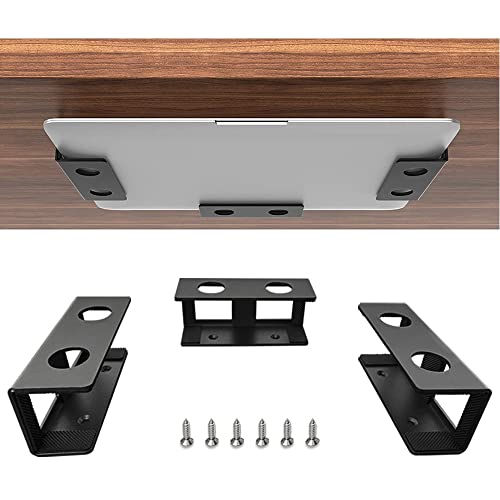
- Stores devices beneath the desk
- Fits devices under 1.5 inches thick
- Silicone padding helps prevent scratches and slipping
Best For: Fixed under-desk storage on compact workstations
Wide Compatibility Pick
WALI Adjustable Laptop Desk Mount

- Fits laptops up to 17 inches and 22 pounds
- Detachable plate supports laptops or VESA monitors
- Offers up to 16 inches of height adjustment
Best For: Adjustable laptop setups that may later use a monitor
Cooling-Focused Arm

- 240-hole ventilated tray fits laptops up to 17 inches
- Removable tray converts the arm for VESA monitors
- Supports up to 22 pounds with cable management
Best For: Small desks needing cooling and laptop-to-monitor flexibility
Best Adjustable C-Clamp Pick

- Fits laptops up to 17 inches and 22 pounds
- Adjustable tilt, swivel, rotation, and height
- Uses C-clamp or grommet mounting
Best For: Flexible laptop positioning on compact desks
Best 2-in-1 Arm Mount
MOUNT PRO Laptop and Monitor Stand

- Holds laptops up to 17 inches
- Converts to a VESA monitor arm
- Offers full-motion adjustment and cable management
Best For: Flexible laptop-and-monitor workstations
Best Adjustable Pick
Suptek Single Laptop Desk Mount

- Detachable laptop tray supports notebook or monitor use
- Fully adjustable arm with broad movement range
- C-clamp and grommet bases included
Best For: Small desks needing a flexible laptop-or-monitor mount
Best for Larger Screens

- Supports laptops up to 17 inches or monitors up to 34 inches
- Full-motion arm reaches up to 17.5 inches high
- Ventilated tray includes pads, guard, and Velcro straps
Best For: Flexible small-desk setups with larger monitor plans
Best Add-On Tray

- Attaches to existing 75x75 or 100x100 VESA arms
- Adjustable clips fit laptops up to 16.5 inches wide
- Ventilated steel tray with stabilizing pads and lips
Best For: Existing monitor-arm owners adding laptop support
Versatile Desk Arm – HUANUO Laptop and Monitor Mount
For shoppers comparing laptop mounts for small desks, this HUANUO model combines a laptop tray and monitor arm in one adjustable setup. Its ventilated 14-by-12-inch tray, cable management, and clamp or grommet installation can help keep a compact workspace organized.
Best For: Small desks where you want to elevate a laptop or add a compatible monitor without using a separate stand.
Pros:
- Supports laptops on a ventilated 14-by-12-inch tray with a 0.8-inch retaining lip.
- Also supports 13- to 32-inch VESA monitors weighing up to 22 pounds.
- Offers tilt, swivel, rotation, and up to 17 inches of height adjustment.
- Includes C-clamp and grommet mounting options plus cable management.
Cons:
- Mounting hardware is specified for wooden desks only.
- Installation requires careful screw tightening and following the included instructions.
This is a flexible choice if your compact desk needs to support either a laptop or a monitor. Check your desk material, thickness, and monitor specifications before buying.
Under-Desk Space Saver – IFCASE Metal Laptop Holder
Unlike articulated laptop mounts for small desks, the IFCASE holder stores your device underneath the desktop. Its slim metal brackets free the work surface for a keyboard, mouse, or other essentials while silicone padding helps protect the stored device.
Best For: Compact workstations where the main goal is hidden, under-desk laptop or accessory storage.
Pros:
- Uses wasted space under the desk to clear the desktop.
- Fits devices less than 1.5 inches thick, including laptops, MacBooks, and Mac mini units.
- Hard aluminum construction includes anti-scratch, non-slip silicone pads.
- Includes screws and a large hole design intended to simplify drilling installation.
Cons:
- Requires a power tool and a desk at least three-quarters of an inch thick.
- It is a fixed storage holder rather than an adjustable viewing mount.
- Device thickness must remain below the stated 1.5-inch limit.
This minimalist option is practical when you want to reclaim surface area rather than raise the laptop for active viewing. Measure both the device and desktop before installation.
Wide Compatibility Pick – WALI Adjustable Laptop Desk Mount
The WALI is a strong contender among laptop mounts for small desks because it raises a laptop while leaving room below for peripherals. Its tray fits notebooks up to 17 inches, and the detachable plate can also accommodate a VESA monitor.
Best For: Users who want a height-adjustable laptop mount with the option to switch to a monitor later.
Pros:
- Supports laptops up to 17 inches and 22 pounds.
- Detachable, height-adjustable plate supports laptops or 75-by-75 and 100-by-100 VESA monitors.
- Provides up to 16 inches of height adjustment, plus tilt, swivel, and rotation.
- Ventilated 14-by-11-inch tray includes a retaining lip for laptop stability.
Cons:
- The laptop tray’s tilt range is limited to plus or minus 15 degrees.
- Compatibility depends on staying within the stated size and 22-pound weight limits.
- As with other desk-mounted arms, proper clamp or grommet installation is important for stability.
WALI offers useful flexibility for a compact desk, especially if your setup may evolve from laptop-only to monitor-based. Confirm the desk thickness and available mounting space first.
Cooling-Focused Arm – HUANUO 2-in-1 Laptop Mount
This HUANUO model is designed for laptop mounts for small desks that need both ergonomic adjustment and airflow. The 13.8-by-11.8-inch tray fits laptops up to 17 inches, while its 240 ventilation holes and removable tray let you switch between laptop and monitor use.
Best For: Compact workspaces where cooling, flexible positioning, and the ability to change between a laptop and monitor matter.
Pros:
- Ventilated tray fits laptops up to 17 inches and includes 240 airflow holes.
- Tray can be removed to support a 15- to 32-inch VESA monitor.
- Supports up to 22 pounds with tilt, swivel, rotation, and a 15-inch pole.
- Includes cable clips and C-clamp or grommet mounting options for wood desks.
Cons:
- Mounting compatibility is limited to wooden desks according to the supplied notes.
- Monitor use requires a compatible 75-by-75 or 100-by-100 VESA pattern.
- Desk thickness must fit the stated clamp or grommet ranges.
This is a versatile pick for a small desk that may alternate between laptop and monitor workflows. Its cooling-oriented tray is a notable advantage, but verify desk construction and VESA compatibility before purchase.
Best Adjustable C-Clamp Pick – VIVO Single Laptop Desk Mount
For small desks that need flexible positioning without permanent drilling, the VIVO STAND-V001L is a practical choice among laptop mounts for small desks. Its ventilated tray supports laptops up to 17 inches and mounts with either a C-clamp or grommet base.
Best For: Users who want a height-adjustable laptop tray with broad compatibility and two mounting options.
Pros:
- Supports laptops up to 17 inches and up to 22 pounds.
- Offers tilt, swivel, rotation, height adjustment, and tray extension.
- Includes C-clamp and grommet mounting options for desks up to the listed thickness limits.
- Detachable cable clips help keep cords organized.
Cons:
- The arm and tray require more installation space than a fixed under-desk holder.
- Its extensive adjustability may be more than needed for a stationary setup.
Choose this model when you want to move a full-size laptop into a comfortable viewing position while keeping the main desk surface clearer. The 22-pound capacity and dual mounting design make it especially versatile for changing workspaces.
Best for Everyday Use – FOROIRON Laptop Holder Tray
The FOROIRON under-desk holder is a compact option for laptop mounts for small desks when preserving legroom is the priority. Its three-piece bracket design allows custom spacing and supports laptops or other devices up to about 1.15 inches thick.
Best For: Small workstations where the laptop needs to be stored beneath the desktop rather than on the work surface.
Pros:
- Moves the laptop under the desk to free surface area and legroom.
- Adjustable bracket spacing accommodates different device widths.
- Steel construction supports up to 30 pounds.
- Felt padding helps protect against scratches, while the side opening supports cable routing.
Cons:
- It is limited to devices up to approximately 1.15 inches thick.
- Screw-in installation requires measuring and fastening the brackets beneath the desk.
- It does not provide the viewing-angle or height adjustment of an articulated arm.
This holder makes the most sense for a laptop that can remain tucked away while connected to external peripherals. Measure the device thickness first, since the slim profile is central to its compatibility.
Best 2-in-1 Arm Mount – MOUNT PRO Laptop and Monitor Stand
The MOUNT PRO combines a laptop tray and monitor arm, making it one of the more versatile laptop mounts for small desks. It holds laptops up to 17 inches, or supports compatible 13- to 32-inch VESA monitors when the tray is removed.
Best For: Multitaskers who want one adjustable mount for a laptop now and a monitor setup later.
Pros:
- Switches between a laptop tray and a VESA monitor mount.
- Provides tilt, swivel, rotation, and height adjustment up to 16.9 inches.
- Ventilated tray includes anti-slip pads and Velcro straps.
- Supports clamp or grommet mounting on desks within the listed thickness range.
Cons:
- Its maximum supported monitor or laptop weight varies by setup, from 4.4 to 19.8 pounds.
- The tray should not be rotated to a vertical position.
- Its dual-purpose design may be unnecessary if you only need a fixed laptop shelf.
This is a strong fit for a small desk that needs to support changing equipment or a more ergonomic screen height. The removable tray and cable management add flexibility, while the mounting choices accommodate different desk layouts.
Best Adjustable Pick – Suptek Single Laptop Desk Mount
For shoppers comparing laptop mounts for small desks, the Suptek Single Laptop Desk Mount is a versatile option that elevates a notebook while keeping the footprint on the desktop relatively compact. Its adjustable arm, ventilated tray, and two mounting methods make it practical for ergonomic home-office setups.
Best For: Small-desk users who want a flexible laptop mount that can also support a separate monitor.
Pros:
- Detachable tray lets the arm hold a laptop or a VESA-compatible monitor.
- Tray ventilation holes and a bottom lip help with airflow and laptop stability.
- Arm offers 180-degree joint swivel, 360-degree monitor rotation, and up to 90-degree tilt.
- Includes both C-clamp and grommet mounting options for desks 10–80 mm thick.
Cons:
- The tray is sized for notebooks up to 15.6 inches.
- It supports monitors only with 75×75 mm or 100×100 mm VESA patterns.
The Suptek stands out when adjustability and mounting flexibility matter most. Its 10 kg arm capacity and cable-management features add utility, though laptop-size and VESA compatibility should be checked before purchase.
Best for Larger Screens – HUANUO 2-in-1 Laptop Mount
The HUANUO 2-in-1 Laptop Mount is a strong contender among laptop mounts for small desks when you want to switch between a notebook and a larger external monitor. It combines a ventilated, padded tray with a height-adjustable arm and broad monitor compatibility.
Best For: Users who want one desk mount for a laptop and monitors up to 34 inches.
Pros:
- Supports notebooks up to 17 inches or monitors from 13 to 34 inches.
- Arm extends up to 18.1 inches and reaches a maximum height of 17.5 inches.
- Tray includes ventilation holes, anti-slip pads, a widened bottom guard, and Velcro straps.
- C-clamp and grommet mounting options accommodate a range of desk thicknesses.
Cons:
- The counterbalanced arm may rise when the laptop is removed, so it should be handled carefully.
- Monitor capacity varies by setup from 4.85 to 19.8 pounds.
With its 2-in-1 design and larger monitor range, the HUANUO is well suited to evolving workstations. Its full-motion adjustment and secure tray are useful on compact desks, provided the desk and display meet the stated mounting requirements.
Best Add-On Tray – Mount-It! VESA Laptop Tray
If you already own a compatible monitor arm, the Mount-It! Laptop Tray is a straightforward way to create a laptop workstation without adding a separate desk stand. This VESA tray can help make small desks more efficient by raising the notebook and leaving more usable surface area below.
Best For: Shoppers who already have a 75×75 mm or 100×100 mm VESA monitor arm.
Pros:
- Converts a compatible existing monitor arm into a laptop mount.
- Adjustable clips fit laptops from 9.5 to 16.5 inches wide.
- Ventilated steel construction helps air escape beneath the laptop.
- Side clips, bottom lips, and traction pads help hold the laptop securely.
Cons:
- A compatible monitor arm or stand is required and is not included.
- It is an add-on tray rather than a complete desk-mounting system.
The Mount-It! is a practical choice when the arm is already in place and you need only a secure laptop platform. Confirm the existing arm’s VESA pattern and available capacity before ordering.
How We Picked the Best Laptop Mounts for Small Desks
We focused on practical space savings, adjustment range, compatibility, and installation style. The lineup includes mounts for laptops alone, combination laptop-and-monitor workstations, and under-desk storage. We also considered tray ventilation, protective surfaces, weight support, VESA compatibility, and whether each design is suitable for a compact desk.
Because desk layouts vary, there is no single best mount for everyone. A sturdy under-desk holder may be ideal for clearing the work surface, while a fully adjustable arm is better for users who frequently switch between sitting and standing positions.
Quick Comparison
- Best for maximum flexibility: A full-motion monitor arm with a laptop tray.
- Best for clearing the desk completely: An under-desk laptop shelf or holder.
- Best for a simple single-screen setup: A C-clamp laptop stand with adjustable extension.
- Best for mixed monitor and laptop use: A 2-in-1 arm supporting both a VESA monitor and notebook tray.
- Best for existing monitor arms: A VESA-compatible laptop tray attachment.
Key Buying Factors for Laptop Mounts for Small Desks
Desk Space and Mounting Method
Measure the available depth and check the rear edge of your desk before buying. C-clamps need enough clearance to tighten securely, while under-desk holders require open space beneath the desktop. Grommet mounts can save edge space but need a suitable cable-management hole.
Laptop Size, Weight, and Tray Fit
Confirm both the maximum screen size and supported weight. A 17-inch notebook may fit within a tray’s width but still be too heavy for an arm rated for lighter devices. Look for raised lips or retaining features if you regularly adjust the mount.
Adjustment and Ergonomics
Height, tilt, swivel, and extension determine how easily you can position the screen. Full-motion arms offer the most flexibility, but longer arms also place greater leverage on the desk clamp. For a mostly fixed setup, a simpler mount may be more stable and easier to install.
Ventilation and Surface Protection
Choose a ventilated metal tray when your laptop will remain closed or run demanding tasks for long periods. Felt, silicone, or rubber padding can help prevent scratches and reduce sliding, especially during arm adjustments.
Who Should Buy Which Laptop Mounts for Small Desks?
Choose an under-desk holder if your priority is a clean, open desktop and you usually use the laptop in one position. These mounts are especially useful for docking a notebook with an external monitor and keyboard.
Choose a monitor-arm laptop mount if you want to raise, tilt, or reposition the laptop alongside a display. Verify VESA requirements and the arm’s combined weight capacity before installation.
Choose a C-clamp adjustable stand if you want straightforward installation without modifying the desk. This is a good fit for renters, temporary workstations, and users who need occasional height adjustment.
Choose a VESA tray attachment if you already own a compatible monitor arm. It can be a cost-effective way to add laptop support, provided the existing arm can safely carry the additional load.