Remote work makes laptops easier to move—and easier to leave exposed. A dependable locking cable can add a practical layer of protection when you work in shared homes, coworking spaces, hotels, or temporary offices.
We selected 10 laptop locking cables for remote work across common security-slot types, locking methods, cable lengths, and mounting options. Use the guide below to narrow the list based on your laptop, workspace, and daily routine.
Best 10 Laptop Locking Cables for Remote Work Picks for 2026
Best Overall Flexibility
Kensington Universal 3-in-1 Combination Laptop Lock

- Fits standard, nano, and wedge-shaped security slots
- Resettable four-digit dial with 10,000 combinations
- Six-foot carbon steel cable
Best For: Remote workers using multiple laptop brands or generations
Best for Slim Laptops
StarTech Slim Nano Combination Lock

- Off-center head helps ultrabooks lie flat
- Nano-slot compatible with rotating lock head
- Resettable four-digit combination
Best For: Ultrabooks and 2-in-1 laptops with Nano slots
Best Simple Budget Option
Sendt Notebook Combination Lock

- Six-foot cable for desk and fixed-object routing
- Four-dial code with up to 10,000 combinations
- Zinc alloy body with anti-reset design
Best For: Laptops with standard Kensington security slots
Best for Devices Without Slots
Universal Adhesive-Plate Laptop Lock

- Adhesive plate adds a locking point to compatible devices
- Works with built-in security slots too
- 5 mm braided cable and four-digit combination
Best For: Laptops, tablets, and devices without security holes
Best Nano-Slot Pick
Kensington Combination Laptop Lock

- 5-foot carbon steel cable
- Resettable four-digit combination
- Slim head for Nano security slots
Best For: Thin laptops with compatible Nano-sized security slots
Best Multi-Pack for Light-Duty Use
MECCANIXITY Retractable Cable Lock
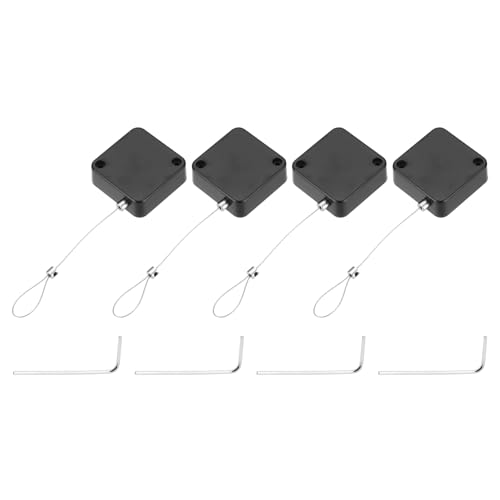
- Four locks in one pack
- Retractable 4.9-foot cables
- Adhesive mounting for smooth surfaces
Best For: General loss prevention across multiple devices
Best Versatile Keyed Option
Laptop Cable Lock with Anchor Plate

- Works with standard laptop slots
- Includes adhesive anchor plate
- 6.5-foot cut-resistant twisted-steel cable
Best For: Mixed devices with or without standard security slots
Best Slot-Free Pick
Universal Audio-Port Laptop Lock

- Works with devices lacking a dedicated lock slot
- Resettable four-digit combination lock
- 1.7-meter cut-resistant steel cable
Best For: Laptops and tablets with a 3.5mm audio port
Best Keyed Multi-Device Set

- Includes two adhesive anchor sets
- Six-foot cut-resistant galvanized steel cable
- Simple key-operated locking system
Best For: Securing multiple laptops, tablets, phones, or monitors
Best Combination Adhesive Kit

- Four-digit combination lock requires no key
- Includes two adhesive anchor-plate sets
- Six-foot cut-resistant galvanized steel cable
Best For: Flat-surface mounting in shared offices and public workspaces
Best Overall Flexibility – Kensington Universal 3-in-1 Combination Laptop Lock
For remote workers who want one dependable solution across multiple computers, this Kensington lock is a versatile choice among laptop locking cables for remote work. Its interchangeable tips support standard, nano, and wedge-shaped security slots, while the resettable combination avoids the need to carry a key.
Best For: Households or teams using laptops with different security-slot designs.
Pros:
- Fits standard, nano, and wedge-shaped laptop security slots.
- Resettable four-number dial provides 10,000 combinations.
- Six-foot carbon steel cable balances reach with cut resistance.
- Unused lock tips stay attached to the tether for convenient storage.
Cons:
- Its interchangeable-tip design may be more than needed for a single compatible laptop.
- It requires a security slot or another compatible attachment point.
The universal fit and combination-retrieval program make this a strong long-term pick for changing devices or shared home-office use. Registering the combination can also help if the code is forgotten.
Best for Slim Laptops – StarTech Slim Nano Combination Lock
Slim notebooks can be awkward to secure when a lock head interferes with the desk or chassis. This StarTech model is designed for nano-slot-compatible ultrabooks and 2-in-1s, making it a practical option when comparing laptop locking cables for remote work.
Best For: Ultrabooks, slim notebooks, and 2-in-1 laptops with Nano security slots.
Pros:
- Off-center lock tip helps a slim laptop lie flat.
- 360-degree rotating lock head can reduce strain on the security slot.
- Resettable four-digit combination offers 10,000 possible codes.
- Six-foot-six-inch cut-resistant cable supports flexible routing around furniture.
Cons:
- Designed around Nano slots rather than standard or wedge-shaped slots.
- Anchors for securing equipment to some flat surfaces are sold separately.
The compact head, spacer, and rotating design are particularly useful at a home desk where a slim laptop needs to remain level. Its broad equipment compatibility also extends to items such as monitors, printers, and docking stations with suitable attachment points.
Best Simple Budget Option – Sendt Notebook Combination Lock
If your laptop has a standard Kensington security slot and you want a straightforward combination lock, the Sendt model keeps the setup simple. It offers a six-foot cable and user-settable code without requiring keys, making it a basic option among laptop locking cables for remote work.
Best For: Standard Kensington-slot laptops used at a home office, school, or library.
Pros:
- Six-foot cable provides useful reach around a desk or fixed object.
- Four-dial combination supports up to 10,000 user-settable combinations.
- Zinc alloy construction and an anti-accidental-reset design.
Cons:
- Does not fit Dell laptops, Kensington Nano slots, or Noble wedge slots.
- Its compatibility is limited to devices with a Kensington security slot.
This is best considered a focused, no-frills choice rather than a universal lock. Confirming the laptop’s slot type before ordering is especially important because the supplied notes exclude several common designs.
Best for Devices Without Slots – Universal Adhesive-Plate Laptop Lock
Some laptops and tablets lack a built-in security slot, which can rule out conventional locks. This kit includes an adhesive lock-slot plate for compatible devices while also supporting laptops with built-in slots, giving remote workers a flexible approach to laptop locking cables for remote work.
Best For: Laptops, tablets, and other devices without built-in security lock holes.
Pros:
- Includes a double-sided adhesive plate for devices without security slots.
- Also works with laptops that have built-in security lock holes.
- Five-millimeter braided cable is described as 30% thicker than normal.
- Four-digit customizable combination provides over 10,000 possible codes.
Cons:
- The adhesive plate must be attached to the device before use.
- Adhesive compatibility and long-term hold may vary by device surface.
- The supplied notes do not specify a warranty period.
The included plate and three spacers make this the most adaptable option in the group for devices that lack a dedicated slot. For built-in-slot laptops, installation is simpler because the lock head can be inserted directly.
Best Nano-Slot Pick – Kensington Combination Laptop Lock
For remote workers who need laptop locking cables for remote work, the Kensington K60214WW is a streamlined choice for thin laptops with compatible Nano security slots. Its 5-foot carbon steel cable, resettable combination, and rotating design suit desks, cafes, shared offices, and travel.
Best For: Thin laptops with Nano-sized security slots and users who prefer a resettable combination over keys.
Pros:
- 5-foot carbon steel cable provides useful reach for anchoring to desks and tables.
- Resettable four-wheel code offers 10,000 possible combinations.
- Slim lock head helps compatible thin laptops lie flat and stable.
- Pivoting lock head and rotating cable can improve access to nearby ports.
Cons:
- Designed for Nano-sized slots, so slot compatibility must be checked before buying.
- Combination locks require remembering the set code.
This is a focused option when your laptop has the right Nano slot. The compact head and flexible cable movement are practical for everyday remote-work setups, while the 5-foot length supports common anchoring points.
Best Multi-Pack for Light-Duty Use – MECCANIXITY Retractable Cable Lock
The MECCANIXITY set offers a compact approach to laptop locking cables for remote work, with four retractable 4.9-foot cable locks. Adhesive patches attach the ends to a device and desktop, making the set useful for general loss prevention in offices, libraries, and cafes.
Best For: Light-duty securing of multiple everyday devices on smooth, clean surfaces.
Pros:
- Four cable locks provide coverage for multiple devices or workstations.
- Retractable 4.9-foot cables allow adjustable length and compact storage.
- Adhesive patches support attachment to devices and tabletops without a standard lock slot.
- Compact, lightweight design is convenient to carry.
Cons:
- The manufacturer states it is not intended as anti-theft protection for valuable items.
- Adhesive installation requires a smooth, clean surface and up to 24 hours for strongest adhesion.
- Its 200 g tension rating indicates a light-duty design.
This set is best viewed as a basic deterrent against casual loss rather than a high-security laptop lock. The four-pack and retractable format are useful when outfitting several shared desks, provided the adhesive mounting method fits your setup.
Best Versatile Keyed Option – Laptop Cable Lock with Anchor Plate
For shoppers comparing laptop locking cables for remote work, this keyed cable lock stands out for its combination of standard-slot compatibility and an included adhesive anchor plate. It can secure many laptops directly and extend compatibility to tablets, phones, and other devices without a standard slot.
Best For: Users who want one cable lock for standard-slot laptops and devices that need an adhesive anchor plate.
Pros:
- Works with most laptops that have standard security slots.
- Anchor plate supports MacBooks, tablets, smartphones, and other devices without standard slots.
- 6.5-foot cable offers extra reach for looping around fixed objects.
- Rotating stainless-steel lock head turns 360 degrees.
Cons:
- Some devices require use of the included I3C adhesive security plate.
- Adhesive mounting may not suit users who prefer not to attach a plate to their device.
- Compatibility still depends on the laptop having a standard slot or a suitable hard surface for the plate.
This is the most adaptable choice of the three for mixed-device households or shared workspaces. Its longer cable and dual mounting approach add flexibility, but check your device and decide whether an adhesive anchor plate is acceptable before purchasing.
Best Slot-Free Pick – Universal Audio-Port Laptop Lock
For laptop locking cables for remote work, this option is useful when your computer lacks a dedicated security slot. Its audio-port anchor, 1.7-meter cut-resistant steel cable, and resettable combination lock provide a flexible way to tether compatible devices to a desk or other fixed structure.
Best For: Remote workers using laptops, tablets, or notebooks with a 3.5mm headphone or AUX port and no built-in lock slot.
Pros:
- Designed for laptops without a dedicated lock slot.
- Uses a resettable four-digit combination with 10,000 possible combinations.
- Long 1.7-meter steel cable supports flexible positioning and cable management.
- Installs in seconds with an audio-port anchor adapter.
Cons:
- Requires a compatible 3.5mm audio port.
- Combination locks may be less convenient for users who prefer keys.
This is a practical choice for shared offices, cafés, and home workstations where a dedicated laptop lock slot is unavailable. Confirm that your device has a suitable audio port before buying.
Best Keyed Multi-Device Set – AboveTEK Adhesive Laptop Lock
Among laptop locking cables for remote work, this keyed AboveTEK kit stands out for users securing more than one device. It includes two adhesive anchor plates, a six-foot cut-resistant galvanized steel cable, and a key-operated lock for laptops, tablets, phones, and monitors.
Best For: Remote workers, offices, and public workspaces that need keyed security for multiple flat-backed devices.
Pros:
- Includes two adhesive sticker and anchor-plate sets for multiple devices.
- Six-foot steel cable allows movement while the device remains tethered.
- Industrial-grade 3M adhesive is designed for most flat surfaces.
- Key operation offers straightforward locking without remembering a combination.
Cons:
- Adhesive anchors are intended for flat surfaces and require careful placement.
- Uses keys rather than a keyless combination lock.
The included spare anchor set adds flexibility for a home office or rotating work devices. It is especially suitable when a laptop or tablet does not offer a compatible built-in locking point.
Best Combination Adhesive Kit – AboveTEK Keyless Device Lock
This AboveTEK kit is a convenient choice for laptop locking cables for remote work when you want adhesive mounting and keyless access. The six-foot cut-resistant galvanized steel cable connects to adhesive anchor plates, while the four-digit combination lock avoids carrying a key.
Best For: Remote workers and small offices securing laptops, tablets, phones, or monitors on flat surfaces in shared or public areas.
Pros:
- Keyless four-digit combination lock simplifies everyday access.
- Includes two sets of adhesive stickers and anchor plates.
- Six-foot cable provides room to move a device while secured.
- Designed for broad use with laptops, tablets, phones, and monitors.
Cons:
- Adhesive fastening is intended for flat surfaces.
- Requires planning the anchor location before installation.
Choose this model if a combination lock is more convenient than keys and your workspace supports adhesive mounting. Its extra anchor set can help protect multiple devices over time.
How We Picked the Best Laptop Locking Cables for Remote Work
We focused on the features that matter in real home-office and mobile-work setups: compatibility with common laptop security slots, cable construction, locking style, portability, installation requirements, and ease of everyday use. The selection includes resettable combination locks, keyed models, Nano-slot-compatible designs, universal options, and kits that use adhesive anchor plates.
Because laptop security slots are not completely standardized, compatibility is especially important. Check your computer’s slot type before buying, and verify whether an adhesive plate or separate anchor is required.
Quick Comparison
| Lock type | Best for | Main advantage | Watch for |
|---|---|---|---|
| Combination | Shared or flexible workspaces | No key to carry | Remembering the code |
| Keyed | Simple, familiar security | Fast physical locking | Keeping the keys accessible |
| Nano-compatible | Thin modern laptops | Designed for smaller slots | Slot compatibility |
| Adhesive-anchor kit | Devices without a built-in slot | Broad device compatibility | Surface preparation and removal |
Key Buying Factors for Laptop Locking Cables for Remote Work
Security-Slot Compatibility
Identify whether your laptop has a standard Kensington-style slot, a Nano security slot, or no built-in slot. Universal claims are useful, but they still require checking the product’s supported hardware and attachment method.
Locking Method
Combination locks are convenient for hot desks and travel because there is no key to misplace. Keyed locks may be preferable if you want a straightforward mechanism and do not mind carrying or storing a key. Resettable combinations offer useful control when multiple people share an office.
Cable Length and Construction
Around 5 to 6 feet gives most users enough reach to connect a laptop to a desk leg or other fixed point without excessive slack. Look for a sturdy steel cable and a locking head that fits securely; remember that a cable deters opportunistic theft but is not a substitute for supervision or a locked room.
Installation and Portability
For frequent travel, prioritize a compact cable that coils easily and attaches to existing furniture. Adhesive plates can expand compatibility for tablets and slotless devices, but they need a clean, suitable surface and careful placement before use.
Who Should Buy Which Laptop Locking Cables for Remote Work?
Choose a combination lock if you work in coworking spaces, shared rooms, or hotels and want keyless convenience. Choose a keyed model if you prefer a familiar locking process and can keep a spare key secure. Choose a Nano-compatible cable for a thin laptop with a Nano-style security slot, but confirm the slot before ordering. Choose an adhesive-anchor kit for an iPad, tablet, monitor, or laptop without a usable built-in slot. For a household with several devices, a multi-pack or universal design can simplify deployment, provided each device is compatible.