Accurate color starts with a calibrated display. Even a high-quality monitor can show images too warm, too cool, too bright, or with inaccurate contrast, making photo editing and print preparation less predictable.
These monitor calibrators for photography cover practical entry-level tools, advanced colorimeters for HDR displays, and camera-to-screen kits designed to create a more consistent workflow from capture through final output.
Best 10 Monitor Calibrators for Photography Picks for 2026
Best Beginner Pick

- Guided single-click calibration
- Room-light monitoring and profile changes
- Calibrates multiple laptop and desktop monitors
Best For: First-time photographers calibrating standard laptop and desktop displays
Versatile Pro Workflow
Calibrite ColorChecker Display Pro

- Repeatable optical profiling
- Ambient-light and projector profiling support
- Works with ccProfiler or i1Profiler
Best For: Creative users working with multiple displays or projectors
Advanced Hybrid Workflow Pick
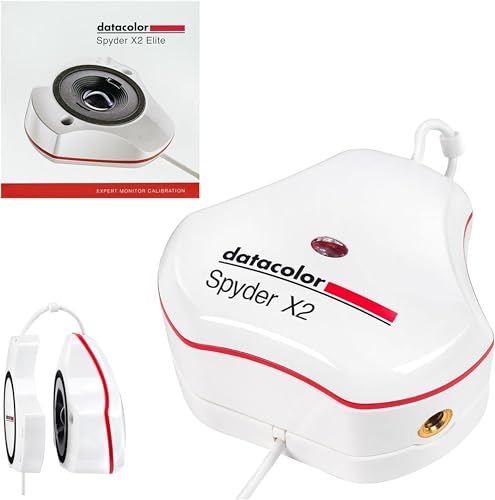
- Video and cinema targets for hybrid workflows
- Advanced controls, soft proofing, and Studio Match
- USB-C connection with USB-A adapter
Best For: Photographers who also edit video or use multiple monitors
Simple Starter Pick

- Three-step setup with calibration in about 90 seconds
- Supports up to three connected displays
- Advanced features available through software upgrades
Best For: Creators seeking quick, straightforward screen calibration
High-Luminance Capture Kit
Video Photo Kit with Display Plus HL

- Profiles displays up to 10,000 nits
- Includes ColorChecker Passport Video 2
- Supports camera matching and white balance
Best For: Hybrid photo and video creators using high-brightness displays
Simple Dual-Display Choice
Display 123 Monitor Colorimeter

- Uses a guided Easy 1 2 3 workflow
- Calibrates up to two displays
- Includes before-and-after comparison
Best For: Photographers wanting simple two-monitor calibration
RAW Workflow Kit

- Profiles high-brightness modern displays
- Includes ColorChecker Passport Photo 2
- Supports custom RAW camera profiles
Best For: RAW photographers building a capture-to-edit color workflow
Best Beginner Pick – Datacolor Spyder X Pro
For photographers seeking monitor calibrators for photography, the Datacolor Spyder X Pro emphasizes quick setup and approachable color management. Its lens-based color engine, room-light monitoring, and guided workflow are designed to help establish a more consistent starting point for editing.
Best For: First-time users who want straightforward calibration for laptop and desktop displays.
Pros:
- Single-click calibration and a wizard workflow with 12 predefined targets.
- Room-light monitoring supports automatic profile changes.
- SpyderProof provides before-and-after comparisons using your own images.
- Supports calibration of multiple laptop and desktop monitors.
Cons:
- Its feature set is oriented toward ease of use rather than highly specialized workflow control.
- The supplied notes do not specify support for modern OLED or mini-LED displays.
The Spyder X Pro is a practical entry point when simplicity matters. Its fast, guided process and comparison tools make it easier to see how calibration affects photographic images.
Versatile Pro Workflow – Calibrite ColorChecker Display Pro
The Calibrite ColorChecker Display Pro is a flexible choice among monitor calibrators for photography, with software support through ccProfiler or i1Profiler. Its optical design is intended to deliver repeatable profiling across different display types, while the diffuser arm adds useful measurement and projector-profiling functions.
Best For: Photographers and creative professionals who want repeatable display profiling with projector support.
Pros:
- Optical design supports repeatable results on the same display and across display types.
- Works with ccProfiler or i1Profiler software.
- Rotatable diffuser arm supports ambient-light measurement and tabletop projector profiling.
- Integrated tripod mount is useful for projector profiling in larger venues.
Cons:
- Software setup may offer more control than beginners need.
- The supplied notes do not describe a high-luminance sensor for extremely bright HDR displays.
Choose this model if repeatability and broader profiling flexibility are more important than the simplest possible workflow. The diffuser arm and tripod mount make it especially adaptable for mixed display and projector environments.
Best Modern-Display Pick – Datacolor Spyder Monitor Calibrator
This Datacolor model is a strong option for photographers comparing monitor calibrators for photography across newer display technologies. It supports OLED, mini-LED, and Apple Liquid Retina XDR displays, while its DevicePreview feature helps simulate how photos may appear on other devices.
Best For: Photographers using newer laptop or desktop displays who want fast, adaptable calibration.
Pros:
- Supports OLED, mini-LED, and Apple Liquid Retina XDR displays.
- Calibration takes about 90 seconds according to the supplied notes.
- DevicePreview Beta simulates how photos may appear on other devices.
- Ambient-light monitoring can warn you to recalibrate or adjust profiles automatically.
Cons:
- DevicePreview is identified as a beta feature.
- Advanced customization may require moving beyond the preset calibration option.
For modern display owners, this Spyder combines broad compatibility with a quick workflow. It is particularly appealing when room lighting changes or when checking how edits may translate beyond the primary monitor.
Best for HDR and Bright Displays – Calibrite Display Plus HL
The Calibrite Display Plus HL is built for photographers and video professionals evaluating monitor calibrators for photography on exceptionally bright screens. Its high-luminance sensor measures up to 10,000 nits, and the PROFILER software provides detailed controls for HDR-capable monitors, projectors, and multi-display setups.
Best For: HDR workflows, bright OLED or mini-LED displays, and professionals matching multiple monitors.
Pros:
- Measures displays up to 10,000 nits for high-luminance calibration.
- Supports LCD, mini-LED, OLED, Apple XDR, and compatible projectors.
- PROFILER offers Basic and Advanced modes plus custom patch sets and shared presets.
- Includes validation tools, uniformity checks, and multi-monitor profiling.
Cons:
- Its advanced controls may be excessive for casual photo editing.
- The supplied notes emphasize HDR and professional workflows rather than a simplified beginner experience.
This is the most specialized option in the group for very bright and HDR-oriented displays. Its standards support, validation tools, and multi-monitor features make it a strong fit when consistent technical monitoring matters.
Advanced Hybrid Workflow Pick – Spyder X2 Elite
For photographers who also edit video or create digital designs, the Datacolor Spyder X2 Elite is one of the more feature-rich monitor calibrators for photography. It combines guided presets with advanced controls, supporting consistent color across demanding creative workflows.
Best For: Photographers, hybrid photo/video creators, and users calibrating multiple monitors.
Pros:
- Includes Rec. 709 and Rec. 2020 video and cinema targets.
- Offers advanced display mapping, analysis, soft proofing, and unlimited calibration settings.
- Studio Match supports multiple-monitor calibration.
- Uses a native USB-C connection and includes a USB-A adapter.
Cons:
- The extensive controls may be more than beginners need.
- Software activation and download are required.
The X2 Elite is a strong choice when photography is only part of your workflow. Its presets can help newer users get started, while customized controls and Studio Match give experienced creators room to fine-tune their setup.
High-Brightness Display Pick – Calibrite Display Pro HL
The Calibrite Display Pro HL is designed for photographers working with bright modern displays. Its high-luminance sensor measures up to 3000 nits and works with LCD, mini-LED, OLED, and compatible projector technologies, making it a versatile option among monitor calibrators for photography.
Best For: Photo professionals using HDR, high-brightness, OLED, mini-LED, or Apple XDR displays.
Pros:
- Measures displays up to 3000 nits.
- PROFILER software includes Basic and Advanced modes with customizable white point, luminance, contrast, and gamma.
- Provides profile validation, uniformity checks, flare correction, and Quick Check tools.
- Supports multiple displays, custom patch sets, and Mac or Windows systems.
Cons:
- Its advanced profiling features may be unnecessary for casual users.
- Requires software and a compatible Mac or Windows computer.
Choose the Display Pro HL if your workflow depends on accurate results from bright or HDR-capable screens. The validation and uniformity tools are particularly useful when you need to verify a display before delivering client work.
Simple Starter Pick – Datacolor SpyderExpress
The Datacolor SpyderExpress is aimed at creators who want a straightforward way to improve screen color before editing. It is a practical entry point among monitor calibrators for photography, with a three-step setup and claimed calibration time of about 90 seconds.
Best For: Photographers, designers, and content creators who want quick, uncomplicated calibration.
Pros:
- Simple download, plug-in, and three-step setup.
- Claims to deliver edit-ready color in about 90 seconds.
- Supports up to three connected displays per workstation.
- Supports current Liquid Retina XDR displays, including the MacBook M4 mini-LED screen.
Cons:
- Advanced features such as ambient-light adjustment and multi-display profiling require software upgrades.
- OLED and advanced mini-LED support also require an upgrade.
SpyderExpress makes the most sense for users who value speed and simplicity over extensive manual controls. Its upgrade path lets you add selected features later without replacing the hardware.
High-Luminance Capture Kit – Video Photo Kit with Display Plus HL
For photographers and hybrid creators comparing monitor calibrators for photography, this kit combines high-brightness display profiling with a physical camera reference target. It is designed to support a consistent workflow from capture and white balance through editing and delivery.
Best For: Photographers and videographers using bright mini-LED, OLED, or Apple XDR displays who also need camera matching and on-set color references.
Pros:
- Display Plus HL measures and profiles displays up to 10,000 nits.
- ColorChecker Passport Video 2 supports white balance, exposure control, and camera matching.
- Includes multiple video, grayscale, white-balance, and 24-color targets.
- Supports Windows and macOS through Calibrite PROFILER software.
Cons:
- Its video-focused reference tools may be more than a still photographer needs.
- Software download is required.
This is the most comprehensive option for creators who need both monitor calibration and capture-side references. Its high-luminance capability makes it particularly suitable for modern, very bright professional displays.
Simple Dual-Display Choice – Display 123 Monitor Colorimeter
For photographers seeking approachable monitor calibrators for photography, the Calibrite Display 123 emphasizes a guided setup rather than a complex control panel. Its Easy 1 2 3 workflow helps establish more reliable color for editing and supports matching two displays.
Best For: Photographers and creators who want straightforward calibration for a one- or two-monitor workspace.
Pros:
- Guided Easy 1 2 3 software workflow simplifies setup.
- Supports calibration of up to two displays.
- Includes a before-and-after comparison check.
- Offers Native or Photo brightness target selection.
Cons:
- It is a monitor-focused tool and does not include a camera reference target.
- The supplied notes do not specify support for high-luminance displays or advanced custom targets.
The Display 123 is a practical entry point when ease of use and dual-screen consistency matter most. Choose it over a larger kit if your priority is calibrating displays without adding capture-reference accessories.
RAW Workflow Kit – Photo Kit with Display Pro HL
This photo-oriented kit pairs a high-luminance monitor calibrator with a ColorChecker Passport Photo 2. Among monitor calibrators for photography, it stands out for connecting display profiling with custom camera profiles, white balance, and RAW editing consistency.
Best For: Still photographers who shoot RAW and want a capture-to-edit workflow across modern laptop and desktop displays.
Pros:
- Display Pro HL supports mini-LED, OLED, and Apple XDR displays.
- ColorChecker Passport Photo 2 supports custom camera profiles for RAW workflows.
- Helps establish consistent white balance and exposure references.
- Calibrite PROFILER provides presets and adjustable white-point and gamma targets.
Cons:
- Its camera-profiling features may be unnecessary for photographers who only need screen calibration.
- It is a larger, more involved kit than a basic monitor colorimeter.
This is the strongest fit for photographers who want control over both camera input and display output. It is especially compelling for RAW work where repeatable profiles and a neutral editing baseline can reduce color guesswork.
How We Picked the Best Monitor Calibrators for Photography
We focused on the features that matter most to photographers: measurement accuracy, supported display technologies, software quality, ease of use, and workflow flexibility. The selection includes colorimeters for standard LCD monitors as well as newer OLED, Mini LED, and high-brightness HDR screens.
We also considered whether each option suits occasional home editing, frequent print work, professional retouching, or combined photo and video production. Bundles with camera color targets are included for photographers who want more consistent color from capture to display.
Quick Comparison
| Best For | What to Look For |
|---|---|
| Basic photo editing | Simple software, automatic profiling, and broad monitor compatibility |
| Print and professional retouching | Greater measurement control, customizable targets, and repeatable profiles |
| HDR, OLED, or Mini LED displays | A high-brightness sensor designed for modern display technologies |
| Photo and video workflows | Support for wider brightness ranges and camera color targets |
| Multiple computers or displays | Flexible software, profile storage, and compatibility across operating systems |
Key Buying Factors for Monitor Calibrators for Photography
Display Compatibility and Brightness Range
Check whether the colorimeter supports your panel type and peak brightness. Standard LCD tools may be sufficient for conventional monitors, while OLED, Mini LED, and HDR displays can require a newer sensor capable of measuring much brighter screens.
Calibration Controls
Entry-level products typically emphasize a fast, guided workflow. Advanced models may let you adjust white point, luminance, gamma, ambient-light behavior, and profiling conditions. More control is useful when matching a monitor to a print workflow or studio standard.
Software and Operating-System Support
The software is as important as the hardware. Look for clear instructions, automatic profile creation, ambient-light options, and support for your computer’s operating system. A straightforward workflow helps ensure you recalibrate regularly rather than treating calibration as a one-time setup.
Color Targets and Accessories
A monitor calibrator corrects the display, but a camera color target can also improve consistency during capture. Photo and video kits are worth considering if you photograph products, reproduce artwork, or need dependable color across camera, monitor, and editing software.
Who Should Buy Which Monitor Calibrators for Photography?
Choose an entry-level calibrator if you mainly edit personal photos and want a more trustworthy screen without complex setup. Step up to a professional colorimeter if you print regularly, deliver client work, or need detailed control over luminance and color profiles.
For OLED, Mini LED, or very bright HDR monitors, prioritize a model specifically designed for those displays. Photographers who also shoot or edit video should consider a high-brightness option or a bundle that includes a camera color target. If ease of use matters most, select a guided model with a simple profiling process and recalibrate whenever you change displays, lighting conditions, or major monitor settings.