A laptop display can look bright and impressive while still showing inaccurate color. The right calibrator helps create a more reliable baseline for photo editing, design, video work, and print preparation.
We compared 10 monitor calibrators for laptops across ease of use, sensor capability, software workflow, display brightness support, and value so you can choose with confidence.
Best 10 Monitor Calibrators for Laptops Picks for 2026
Best Beginner Pick

- Guided, single-click calibration
- Room-light monitoring and automatic profile changing
- Calibrates multiple laptops and desktops
Best For: First-time users and photographers
Best Portable Option
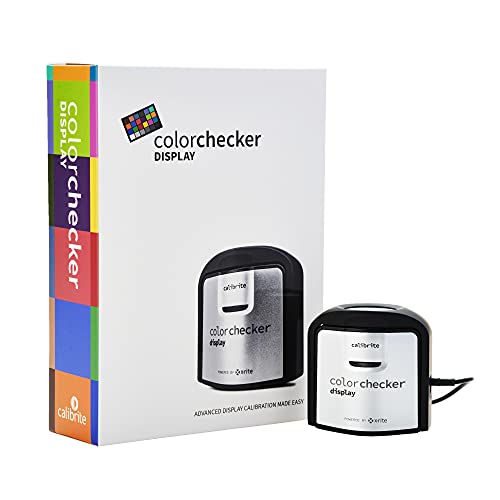
Calibrite ColorChecker Display
- Compact and self-contained
- Repeatable profiling across display types
- Supports projector profiling and ambient-light measurement
Best For: Traveling creators and monitor/projector users
Best Pro-Level Choice
Calibrite ColorChecker Display Pro

- Works with ccProfiler or i1Profiler
- Repeatable profiling across display types
- Includes projector and ambient-light features
Best For: Experienced users needing detailed profiling
Best Overall

- Supports modern OLED, Mini LED, and XDR displays
- Fast standard calibration with deeper calibration available
- Advanced analysis, 3D LUT, and multi-monitor features
Best For: Serious creators needing detailed calibration and broad display compatibility
Best Easy-Start Option

- Three-step setup and roughly 90-second calibration
- Supports Liquid Retina XDR laptop displays
- Optional upgrades add advanced workflow features
Best For: New or casual creators wanting quick, straightforward calibration
Complete Photo Workflow Kit

- Pairs display calibration with camera profiling
- Includes ColorChecker Passport Photo 2
- Supports RAW workflows and modern displays
Best For: Photographers seeking consistent capture-to-edit color
Simple Calibration Choice

- Guided Easy 1 2 3 workflow
- Calibrates up to two displays
- Includes before-and-after checking
Best For: Creators wanting simple laptop or dual-display calibration
Best Beginner Pick – Datacolor Spyder X Pro
The Datacolor Spyder X Pro is a practical choice if you are comparing monitor calibrators for laptops and want a straightforward path to more consistent color. Its lens-based color engine, guided workflow, and quick calibration make it approachable for first-time users, while support for multiple displays adds flexibility.
Best For: First-time photographers and users calibrating multiple laptop or desktop displays.
Pros:
- Single-click calibration and a wizard-based workflow simplify setup.
- Room-light monitoring can help maintain more appropriate display brightness and contrast.
- SpyderProof provides a before-and-after comparison using your own images.
- Software supports calibration of multiple laptops and desktop monitors.
Cons:
- The feature set may be more than needed for users who only calibrate one display occasionally.
- The supplied notes do not indicate phone compatibility.
Choose the Spyder X Pro when ease of use matters as much as color accuracy. It offers useful automation without removing access to more advanced calibration targets.
Best Portable Option – Calibrite ColorChecker Display
The Calibrite ColorChecker Display is a compact option among monitor calibrators for laptops, with a self-contained design and intuitive ccStudio software. Its optical design is intended to provide repeatable results across the same display and different display types, and it can also handle projector profiling.
Best For: Mobile creators who need a portable colorimeter for monitors and occasional projector calibration.
Pros:
- Compact, portable design is convenient for laptop-based workflows.
- Intuitive ccStudio software helps simplify operation.
- Optical design supports repeatable color matching across display types.
- Rotatable diffuser arm supports ambient-light measurement, tabletop projector profiling, and optic protection.
Cons:
- Its projector-profiling features may be unnecessary for users focused only on laptop screens.
- The supplied notes do not list advanced customization controls.
This model makes sense when portability and repeatability are priorities. The integrated tripod mount and diffuser arm also give it useful flexibility beyond standard laptop calibration.
Best for Modern Laptop Displays – Datacolor Spyder Monitor Calibrator
This Datacolor model is a strong contender for monitor calibrators for laptops with newer panel technologies. It supports OLED, mini-LED, and Apple Liquid Retina XDR displays, completes calibration in about 90 seconds, and includes ambient-light monitoring for changing work environments.
Best For: Laptop and desktop users working with newer display technologies and changing room light.
Pros:
- Supports a broad range of current laptop and desktop displays, including OLED and mini-LED.
- DevicePreview Beta can simulate how photos may appear on other devices.
- Fast calibration provides an accurate starting point in about 90 seconds.
- Preset and customizable settings accommodate both beginners and experienced users.
Cons:
- DevicePreview is identified as a beta feature.
- A nonstandard battery is listed among the power requirements.
For owners of premium or newer laptops, this Spyder model offers particularly relevant compatibility. Its combination of fast setup, flexible controls, and light-aware profiling makes it well suited to modern digital workflows.
Best Pro-Level Choice – Calibrite ColorChecker Display Pro
The Calibrite ColorChecker Display Pro is designed for users who want more control from monitor calibrators for laptops and projectors. It pairs with ccProfiler or i1Profiler software and uses an optical design aimed at repeatable profiling across display types.
Best For: Experienced photographers, designers, and users who need detailed monitor or projector profiling.
Pros:
- ccProfiler or i1Profiler software supports a more powerful profiling workflow.
- Optical design promotes repeatable results on the same display and across display types.
- Rotatable diffuser arm supports projector profiling, ambient-light measurement, and optic protection.
- Integrated tripod mount is useful for projector profiling in larger venues.
Cons:
- The more advanced software may be less approachable than a basic guided calibrator.
- Projector-oriented features may be unnecessary for users calibrating only one laptop.
- The listed warranty requires registration within 30 days and applies to authorized purchases.
Select the Display Pro when repeatability and profiling flexibility matter more than the simplest possible workflow. It is a better fit for demanding users who work across multiple display types or use projectors.
Best Overall – SpyderPro Monitor Calibrator
For photographers, designers, and video editors comparing monitor calibrators for laptops, the SpyderPro offers broad display support, fast standard calibration, and detailed analysis tools. Its USB-C connection and included USB-A adapter make it practical for newer laptops and desktops.
Best For: Serious creators who need advanced calibration and multi-display consistency.
Pros:
- Supports OLED, QD-OLED, Mini LED, Liquid Retina XDR, and other backlight types.
- Standard calibration can produce professional-grade results in about 90 seconds.
- Includes display analysis, 3D LUT export, projector calibration, and multi-monitor tools.
- Works with Windows and macOS and supports unlimited displays per computer capability.
Cons:
- Its advanced feature set may be more than casual users need.
- Some capabilities depend on compatible displays or software workflows.
The SpyderPro is the most feature-rich option here, especially for users working across multiple screens or demanding support for modern, bright display technologies. It is a strong fit when calibration depth matters more than simplicity.
Best for HDR Workflows – Calibrite Display Plus HL
The Calibrite Display Plus HL is a strong choice among monitor calibrators for laptops when HDR brightness and professional video standards are priorities. Its high-luminance sensor measures displays up to 10,000 nits and works with Calibrite PROFILER software on Mac and Windows.
Best For: Video editors and colorists calibrating bright HDR, OLED, Mini LED, or XDR displays.
Pros:
- Measures ultra-bright displays up to 10,000 nits.
- Supports LCD, Mini LED, OLED, Apple XDR displays, and compatible projectors.
- PROFILER software offers custom patch sets, presets, and advanced controls.
- Includes validation, uniformity, and multi-monitor profiling tools.
Cons:
- Its advanced HDR capability may be unnecessary for standard-brightness screens.
- Warranty registration is required, and authorized-market purchase restrictions apply.
Choose the Display Plus HL if you need to make reliable grading decisions on very bright HDR displays. Its validation tools also make it useful for repeatable team or multi-screen workflows.
Best Easy-Start Option – Datacolor SpyderExpress
For creators seeking approachable monitor calibrators for laptops, Datacolor SpyderExpress keeps the process simple: download the software, connect the device, and follow three steps. It delivers edit-ready color in about 90 seconds and supports up to three connected displays per workstation.
Best For: New or casual creators who want quick, reliable screen calibration.
Pros:
- Simple three-step setup with calibration in about 90 seconds.
- Supports Liquid Retina XDR displays, including the MacBook M4 mini-LED screen.
- Can save profiles and calibrate up to three connected displays per workstation.
- Optional software upgrades add ambient-light adjustment and multi-display profiling.
Cons:
- Advanced OLED and Mini LED support requires a software upgrade.
- Advanced features are not included at the base level.
SpyderExpress is the clearest pick for users who want accurate color without a complicated workflow. It covers everyday monitors and newer XDR laptop screens, while optional upgrades provide a path to more advanced functionality.
High-Luminance Precision Pick – Display Pro HL
For shoppers comparing monitor calibrators for laptops, the Calibrite Display Pro HL is a strong choice for modern high-brightness screens. Its high-luminance sensor measures up to 3000 nits and works with LCD, mini-LED, OLED, and compatible projector displays.
Best For: Photographers, designers, and creative professionals who need advanced control and reliable profiling across bright laptop, desktop, or HDR displays.
Pros:
- Measures displays up to 3000 nits, including high-brightness and HDR panels.
- Supports Mac and Windows through Calibrite PROFILER software.
- Offers white-point, luminance, contrast, gamma, validation, uniformity, and flare-correction tools.
- Can profile multiple monitors and includes a USB-C to USB-A adapter and travel pouch.
Cons:
- Advanced controls may be more than casual users need.
- Its feature set is geared toward serious color-managed workflows rather than simple one-click calibration.
The Display Pro HL is the most capable option here for demanding display work, especially when calibrating bright modern panels or matching multiple screens. It is a practical investment when color consistency matters more than simplicity.
Complete Photo Workflow Kit – Display Pro HL Photo Kit
This Calibrite kit combines one of the more capable monitor calibrators for laptops with a ColorChecker Passport Photo 2. It is designed to help photographers create a consistent workflow from RAW capture and camera profiling through monitor-based editing.
Best For: Photographers who want both accurate display calibration and custom camera profiles for RAW still photography.
Pros:
- Combines the Display Pro HL colorimeter with ColorChecker Passport Photo 2.
- Supports calibration of modern laptop and desktop displays, including mini-LED, OLED, and Apple XDR panels.
- Enables custom camera profiles, white-balance references, and exposure consistency for RAW workflows.
- Includes PROFILER software with presets and adjustable targets such as white point and gamma.
Cons:
- More specialized and potentially unnecessary if you only need monitor calibration.
- The kit is focused on photography rather than general-purpose display setup.
For photographers building a capture-to-edit color workflow, this kit offers more value than a standalone calibrator. The included Passport Photo 2 extends the process beyond the screen, helping reduce color variation from camera capture through final editing.
Simple Calibration Choice – Display 123
The Calibrite Display 123 is an approachable option for shoppers looking for monitor calibrators for laptops without a complicated setup. Its Easy 1 2 3 software workflow guides the process, while the before-and-after check makes the calibration change easy to review.
Best For: Photographers and creators who want straightforward calibration for one or two displays with minimal technical adjustment.
Pros:
- Uses a guided Easy 1 2 3 software workflow.
- Supports up to two displays for a more consistent dual-screen workspace.
- Offers Native or Photo brightness targets and a before-and-after comparison.
- Compact USB-C colorimeter includes an adjustable counterweight for screen placement.
Cons:
- Provides fewer advanced customization tools than the Display Pro HL.
- Its simpler workflow may be less suitable for highly specialized color-management needs.
The Display 123 is a sensible entry point for routine photo editing and general creative work. Choose it when ease of use and two-display support matter more than high-luminance measurement or extensive profiling controls.
How We Picked the Best Monitor Calibrators for Laptops
We evaluated these models by looking at the factors that matter most in real laptop workflows: calibration accuracy, supported display types, software simplicity, sensor range, connection requirements, and long-term usefulness. We also considered whether a device is better suited to occasional photo editing, professional color work, modern high-brightness panels, or users who want the simplest possible setup.
Because laptop screens vary widely—from standard IPS and LCD panels to OLED and mini-LED displays—no single calibrator is ideal for everyone. The strongest choices offer a practical balance between dependable measurements and an efficient calibration process.
Quick Comparison
| Best For | Look For |
|---|---|
| General photo editing | Reliable colorimeter with straightforward profiling software |
| Professional photography and design | More advanced controls, profiling options, and repeatable results |
| OLED or mini-LED laptops | Sensor support for high brightness and newer display technologies |
| Beginners | Guided software, simple setup, and minimal manual adjustment |
| Photo-to-print workflows | Calibrator bundled with a color reference chart or camera tool |
Key Buying Factors for Monitor Calibrators for Laptops
Display Technology and Brightness
Check whether the calibrator is designed for your laptop’s panel. Standard LCD displays have different measurement needs from OLED and mini-LED screens, particularly when the panel reaches very high brightness. If you use an HDR-capable laptop, prioritize a model with an appropriate high-luminance sensor.
Software and Workflow
The hardware is only part of the process. Good profiling software should guide you through setup, identify the display, and create a usable profile without unnecessary complexity. Advanced users may prefer manual controls, while beginners often benefit from a simplified workflow.
Accuracy and Consistency
Look for a colorimeter designed to produce repeatable measurements. Calibration is most useful when you can return to a consistent reference point over time, especially if your laptop is used alongside an external monitor.
Connectivity and Compatibility
Confirm that the calibrator works with your operating system and that its cable or adapter suits your laptop. USB-C connectivity can be especially convenient on newer ultraportables, but an included adapter may also solve compatibility issues.
Extra Color Tools
Some kits include color charts or photography accessories. These are valuable if you need to evaluate camera color as well as your screen, but they may add cost if your only goal is display calibration.
Who Should Buy Which Monitor Calibrators for Laptops?
Choose an entry-level model if you mainly edit photos occasionally and want a guided way to improve your laptop’s default color. Choose a professional calibrator if color consistency affects paid photography, design, publishing, or video work.
Choose a high-brightness model for OLED, mini-LED, or HDR laptops where ordinary calibration hardware may not measure the panel’s luminance range effectively. Choose a photo kit if you want a more complete capture-to-edit workflow with a color reference tool included.
Whichever model you select, calibrate under stable room lighting, avoid changing display settings during the process, and recalibrate periodically. A calibrator improves the accuracy of your working profile, but it cannot correct a damaged panel, extreme viewing-angle shifts, or inconsistent ambient light.