The right external GPU enclosure can transform a compatible laptop into a more capable gaming, editing, or workstation system without replacing the computer itself. The ten options in this roundup cover full-size enclosures, compact docks, and newer OCuLink designs.
Before choosing, check your laptop’s port standard, operating-system support, graphics-card clearance, power requirements, and whether you need an enclosure, a dock, or a separate power supply.
Best 10 External GPU Enclosures for Laptops Picks for 2026
Classic Desktop Expansion
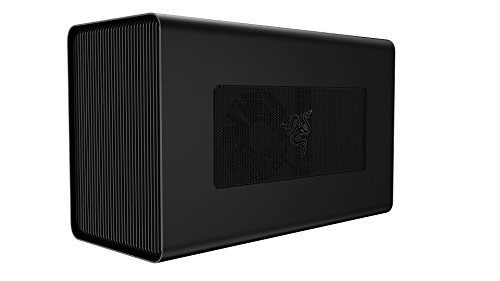
- Fits full-size GPUs up to three slots wide
- Built-in 650W PSU with 100W laptop charging
- Windows support plus compatible AMD-only macOS support
Best For: Thunderbolt 3 laptop owners with a desktop GPU
Ready-to-Use Compact Power

- Pre-installed Radeon RX 7600M XT with 8GB GDDR6
- USB4 and OCuLink connectivity
- Compact enclosure with 65W reverse charging
Best For: Windows users wanting a portable all-in-one eGPU
Next-Generation Desktop GPU Support

- Fits NVIDIA or AMD GPUs up to four slots wide
- Thunderbolt 5-compatible with up to 80Gbps bandwidth
- Up to 140W USB-C power delivery and active cooling
Best For: Windows 11 users building a high-end upgradeable eGPU setup
Compact Thunderbolt Pick

- Complete kit with PSU, cables, and carrying case
- Fits select GPUs up to 205mm long
- Provides 85W PD, 15W PD, and DisplayPort
Best For: Portable Thunderbolt or USB4 laptop and handheld setups
High-Compatibility Thunderbolt Choice

- Supports broad NVIDIA and AMD GPU families
- Includes 85W and 15W PD Thunderbolt ports
- Uses an Intel JHL7440/7450 controller
Best For: Versatile laptop, NUC, and handheld Thunderbolt setups
High-Bandwidth OCuLink Pick
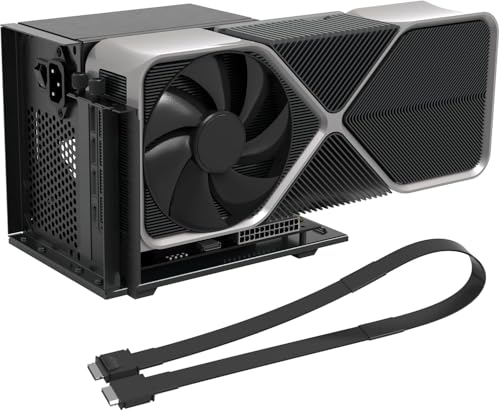
- PCIe 4.0 x4 interface rated at 64Gbps
- Open frame accommodates any GPU size
- Includes shielded 19.7-inch OCuLink cable
Best For: Native OCuLink laptops, mini PCs, and handhelds
Best Connected Hub Design
ANQ-L336 Thunderbolt eGPU Enclosure

- Supports Thunderbolt 3/4 and USB4
- Includes 85W power delivery
- Adds USB-A and Thunderbolt hub ports
Best For: Laptop and handheld users needing charging plus expansion
Best Portable OCuLink Design

- Detachable design aids transport and storage
- PCIe 4.0 x4 OCuLink performance
- Supports large cards such as RTX 4090
Best For: Portable open-dock setups with an existing ATX power supply
Classic Desktop Expansion – Razer Core X
The Razer Core X is a straightforward choice among external gpu enclosures for laptops when you already own a compatible desktop graphics card. Its spacious aluminum enclosure supports full-size cards up to three slots wide, while the built-in 650W power supply can deliver up to 100W to a connected laptop over Thunderbolt 3.
Best For: Windows Thunderbolt 3 users and Mac users with compatible AMD graphics cards who want a roomy enclosure with an included power supply.
Pros:
- Supports full-size PCIe graphics cards up to three slots wide.
- Includes a 650W ATX power supply.
- Provides up to 100W laptop charging through Thunderbolt 3.
- Works with Windows and compatible macOS systems.
Cons:
- Graphics card is not included.
- macOS support is limited to compatible AMD cards; NVIDIA cards are not supported.
- Requires a Thunderbolt 3 laptop with external-graphics support.
The Core X makes sense if you want to reuse or install a desktop GPU without buying a separate power supply. Confirm your laptop’s Thunderbolt and operating-system compatibility before purchasing.
Ready-to-Use Compact Power – NIMO RX 7600M XT eGPU
The NIMO RX 7600M XT is a convenient all-in-one option among external gpu enclosures for laptops. It arrives with the graphics processor and 240W power supply installed, connects through USB4 or OCuLink, and provides a compact way to add graphics performance to compatible Windows laptops, mini PCs, or handhelds.
Best For: Windows users who want a portable, preconfigured eGPU for gaming, video editing, 3D work, or local AI workloads.
Pros:
- Includes an AMD Radeon RX 7600M XT with 8GB of GDDR6 memory.
- Supports USB4 and OCuLink connectivity.
- Compact 0.8L design weighs about 3.9 pounds.
- Offers 65W reverse charging and HDMI 2.1 and DisplayPort 2.0 outputs.
Cons:
- Compatibility is specified for Windows devices with USB4 or OCuLink.
- Unlike modular enclosures, the included graphics hardware is not presented as user-upgradable.
- Its 65W charging output may not suit every high-power laptop.
Because the GPU and power supply are already installed, this dock avoids the extra parts and setup required by traditional enclosures. Check that your laptop supports USB4 or OCuLink and that its display requirements match the available outputs.
Modular High-Bandwidth Dock – MINISFORUM DEG2 USB4 V2
The MINISFORUM DEG2 is a flexible pick among external gpu enclosures for laptops for users who want to supply their own desktop graphics card and power supply. It combines USB4 V2 and OCuLink connectivity with support for standard ATX or SFX power supplies, plus an M.2 2280 slot for keeping storage alongside the GPU.
Best For: Enthusiasts building a customizable eGPU setup for high-bandwidth graphics, AI models, project files, or multiple host devices.
Pros:
- Supports USB4 V2/TB5-compatible operation up to 80Gbps and OCuLink up to 64Gbps.
- Accepts standard ATX and SFX power supplies.
- Includes an M.2 2280 NVMe slot.
- Hardware switching enables docking or pure GPU performance modes.
Cons:
- Power supply and graphics card are not included in the supplied product information.
- Requires compatible ATX or SFX hardware for a complete setup.
- Its advanced connectivity may be unnecessary for users seeking a simple plug-and-play enclosure.
The DEG2 stands out for modularity rather than simplicity. It is a strong fit when you want to choose your own GPU and PSU, but budget for those components and verify that your host supports the intended USB4 or OCuLink connection.
Next-Generation Desktop GPU Support – Razer Core X V2
The Razer Core X V2 is designed for newer external gpu enclosures for laptops, supporting Windows 11 devices with Thunderbolt 4, Thunderbolt 5, or USB4. It accepts NVIDIA and AMD desktop cards up to four slots wide, adds PCIe Gen 4 support, and can provide up to 140W of USB-C power delivery.
Best For: Windows 11 laptop, handheld, and other compatible-device owners who want a spacious, upgradeable enclosure for a modern desktop GPU.
Pros:
- Supports NVIDIA and AMD graphics cards up to four slots wide.
- Designed for Thunderbolt 5 bandwidth up to 80Gbps and also supports Thunderbolt 4 and USB4 devices.
- Provides up to 140W USB-C power delivery.
- Includes active cooling with a 120mm fan and tool-free thumbscrew installation.
Cons:
- Graphics card and power supply are sold separately.
- Compatibility is specified for Windows 11 devices.
- Mac devices with M1 or later chipsets do not support eGPUs.
Choose the Core X V2 if you want room for large current-generation cards and the flexibility to replace both the GPU and ATX power supply. It is best suited to buyers who already have, or plan to purchase, the required components and a compatible high-speed host connection.
Compact Thunderbolt Pick – Portable 240W eGPU Enclosure
For shoppers comparing external gpu enclosures for laptops, this GOLDSOUN dock is a convenient complete kit for compatible Thunderbolt 3, Thunderbolt 4, or USB4 devices. It includes a 240W power supply, cables, and a carrying case, while supporting select NVIDIA and AMD cards up to 205mm long.
Best For: Laptop, NUC, and handheld users who want a portable Thunderbolt/USB4 enclosure with included power accessories.
Pros:
- Includes a 240W PSU, Thunderbolt 4 cable, 8-pin PCIe cable, and carrying case.
- Supports compatible NVIDIA and AMD GPUs up to 205mm in length.
- Offers 85W and 15W PD charging ports plus DisplayPort output.
- Compact aluminum chassis supports Windows 10/11 and Linux.
Cons:
- Graphics card is not included.
- Type-C connectivity requires Thunderbolt 3/4 or USB4 support.
- PCIe data transfer is limited to PCIe 3.0 x16.
This is a practical all-in-one choice when portability and included accessories matter. Confirm your GPU dimensions and host-device protocol before ordering, since ordinary USB-C is not sufficient.
High-Compatibility Thunderbolt Choice – VK-Y900 eGPU Enclosure
This VIKINYEE VK-Y900 is aimed at users seeking external gpu enclosures for laptops with broad NVIDIA and AMD graphics-card support. It uses an Intel JHL7440/7450 controller, accepts an ATX power supply, and provides 85W charging through a Thunderbolt connection.
Best For: Laptop, handheld, and NUC owners who need wide GPU compatibility, 85W laptop charging, and a one-year warranty.
Pros:
- Supports a wide range of NVIDIA RTX and AMD Radeon cards, including newer listed series.
- Official Intel Thunderbolt controller is designed for stable data transfer.
- Dual Thunderbolt ports provide 85W and 15W PD, plus DisplayPort.
- Supports 30W Turbo Mode on the ROG Ally X through 85W PD pass-through.
Cons:
- Requires an ATX power supply, which is not specified as included.
- Compatibility requires Thunderbolt 3/4 or USB4 on the host device.
- The Apple Silicon Mac LLM feature is intended for AI development, not gaming or 3D rendering.
The VK-Y900 stands out for its stated GPU range and charging support, but the separate ATX power requirement should be included in your setup budget. Check the host connection and intended workload carefully.
High-Bandwidth OCuLink Pick – PCIe 4.0 External GPU Dock
Among external gpu enclosures for laptops, this VORZOKISPL dock targets systems with a native OCuLink connection or an available M.2 NVMe or desktop PCIe slot used with a separate adapter. Its PCIe 4.0 x4 interface is rated at 64Gbps, and its open frame accommodates GPUs without a stated size limit.
Best For: OCuLink-equipped laptops, mini PCs, and handhelds prioritizing bandwidth and an open-frame GPU layout.
Pros:
- PCIe 4.0 x4 OCuLink interface is rated for 64Gbps.
- Open-frame structure supports any GPU size according to the supplied notes.
- Includes a 19.7-inch shielded SFF-8611 cable and detachable connection ends.
- Provides LED indicators, auto-start, forced modes, and an ATX power bracket.
Cons:
- Not compatible with USB-C, USB4, or Thunderbolt.
- GPU and ATX power supply are not included.
- Requires assembly, driver installation, and no hot-plugging.
This dock can be a strong performance-oriented option for a native OCuLink system, but it is less plug-and-play than Thunderbolt enclosures. Verify the port type, obtain suitable ATX power, and allow time for assembly.
Maximum GPU Flexibility – MINISFORUM DEG1 OCuLink eGPU Dock
The MINISFORUM DEG1 is a compact option among external gpu enclosures for laptops and compatible mini PCs, using an OCuLink PCIe 4.0 x4 connection and an open PCIe x16 slot. It supports high-end cards such as the RTX 4090 and RX 7900 XTX, while letting you use a standard ATX or SFX power supply.
Best For: Users who want to pair a laptop or compatible mini PC with a powerful desktop GPU and already have a suitable ATX or SFX power supply.
Pros:
- Supports GPUs including the RTX 4090 and RX 7900 XTX.
- Uses PCIe 4.0 x4 over OCuLink for high-bandwidth connectivity.
- Accepts standard ATX and SFX power supplies.
- Compact 10.64-by-6.87-by-1.6-inch design with a two-year warranty.
Cons:
- OCuLink does not support hot-plugging; the computer must be turned off before connection changes.
- GPU and power supply requirements may add to the total setup cost.
- The follow-start feature is limited to MINISFORUM mini PCs using original wires.
The DEG1 is a straightforward, high-performance dock for buyers prioritizing GPU compatibility and interchangeable desktop power supplies. Its OCuLink connection requires careful handling and shutdowns, so it is less convenient than a plug-and-play Thunderbolt enclosure.
Best Connected Hub Design – ANQ-L336 Thunderbolt eGPU Enclosure
The ANQ-L336 combines an external GPU dock with hub features, making it a versatile choice among external gpu enclosures for laptops. Its certified JHL7440 controller supports Thunderbolt 3, Thunderbolt 4, and USB4 systems, with PCIe 4.0 x4 connectivity, 85W power delivery, and support for NVIDIA and AMD graphics cards.
Best For: Laptop, mini PC, and handheld users who want an eGPU dock that also provides charging and additional connectivity.
Pros:
- Works with Thunderbolt 3, Thunderbolt 4, and USB4 devices.
- Supports NVIDIA and AMD GPUs, with stated support for AMD 9000-series cards.
- Provides up to 85W PD charging, including support for ROG Ally X 30W Turbo Mode.
- Includes a 10Gbps USB-A port and two Thunderbolt 4 ports for hub functionality.
Cons:
- Power supply is not included and must be ATX, SFX, FLEX, or DC 12V compatible.
- NVIDIA RTX 50-series support is limited compared with other NVIDIA series.
- The listed warranty is one year.
The ANQ-L336 is the most flexible connectivity-focused option here, especially for USB4 laptops and handheld PCs. Its combination of eGPU support, 85W charging, and hub ports is useful, but buyers should confirm host compatibility and budget for a separate power supply.
Best Portable OCuLink Design – OwlTree PCIe 4.0 eGPU Dock
The OwlTree PCIe 4.0 eGPU Dock is a detachable OCuLink solution for laptops and mini PCs. It provides a PCIe x16 slot with PCIe 4.0 x4 transfer capability, supports standard ATX power supplies, and includes a flexible shielded cable designed for easier storage and portability.
Best For: Users seeking a portable OCuLink dock for full-size graphics cards and who already own a standard ATX power supply.
Pros:
- Supports graphics cards of various sizes, including RTX 4090 and RX 7900 XTX examples.
- Detachable design improves portability and storage.
- Includes a thin, flexible, shielded 50 cm OCuLink cable.
- Gold-plated contacts and status LEDs support reliable connections and monitoring.
Cons:
- GPU and power supply are not included.
- Supports standard ATX power supplies only.
- OCuLink is not hot-pluggable; the computer must be turned off before unplugging.
This OwlTree dock is a practical choice when portability and broad GPU size compatibility matter more than an enclosed chassis. Its ATX-only power requirement and manual shutdown procedure make it best suited to users comfortable assembling and managing an open eGPU setup.
How We Picked These External GPU Enclosures for Laptops
We selected models representing the main connection standards and enclosure styles available in 2026: Thunderbolt 3 and 4, USB4, Thunderbolt 5 compatibility, and OCuLink. We considered GPU support, bandwidth, power-delivery capability, card clearance, cooling design, included or required power supplies, operating-system compatibility, and ease of installation.
Because specifications vary considerably, verify the manufacturer’s current compatibility list before buying. A high-wattage enclosure is not automatically the best choice if your laptop lacks the required port or your graphics card will not fit.
Quick Comparison
| Type | Best For | Main Advantage | Watch Out For |
|---|---|---|---|
| Thunderbolt 3/4 | Most modern laptops | Broad compatibility and simple cabling | Lower bandwidth than OCuLink or newer standards |
| USB4 | Flexible laptop and handheld setups | Good connectivity across newer devices | USB4 performance and eGPU support can vary |
| OCuLink | Maximum performance from compatible systems | Direct PCIe connectivity and low overhead | Usually requires a separate power supply and cable management |
| Full enclosure | Quiet, protected desktop-style setups | Integrated power and cooling | Larger footprint and less portability |
| Open eGPU dock | Large GPUs and flexible builds | Easy access and broad card compatibility | Exposed hardware and commonly separate PSU requirements |
Key Buying Factors for External GPU Enclosures for Laptops
Connection and Laptop Support
Confirm that your laptop supports external graphics over its specific Thunderbolt, USB4, or OCuLink port. A USB-C connector alone does not guarantee eGPU functionality. Also check operating-system support, firmware requirements, and whether the laptop can route display output correctly.
GPU Size, Power, and Cooling
Measure the graphics card’s length, height, slot thickness, and power-connector position against the enclosure’s specifications. High-end cards may need a four-slot design or an open dock. Check the PSU wattage and connector support as well; some docks require a separate ATX or SFX power supply.
Bandwidth and Display Setup
Thunderbolt and USB4 are convenient but share bandwidth with other traffic. OCuLink can offer stronger direct PCIe performance, though it is less universal. For the best results, connect monitors directly to the external GPU when possible rather than routing the signal back through the laptop.
Portability and Expandability
Choose an enclosed model for protection, integrated power, and a cleaner desk setup. An open dock is often better for testing GPUs, upgrading frequently, or using unusually large cards. Extra features such as USB ports, an M.2 slot, and power delivery can make a dock more useful beyond graphics.
Who Should Buy Which External GPU Enclosures for Laptops?
Choose a Thunderbolt enclosure such as a Razer Core-style design if you want the simplest, most polished setup for a compatible Windows or Mac laptop. Select a USB4 model if you use a newer laptop or gaming handheld and want broader device flexibility. Choose an OCuLink dock when your system has a native OCuLink port and performance matters more than portability or enclosure protection.
For a powerful desktop GPU, prioritize card clearance and PSU flexibility. For travel or occasional use, consider a compact dock with a manageable cable setup. If your laptop lacks supported Thunderbolt, USB4, or OCuLink eGPU connectivity, an external enclosure is unlikely to provide a worthwhile upgrade.