Old prints, slides, and negatives can fade, collect dust, and become difficult to share. The right photo scanner makes it easier to preserve those memories as high-quality digital files while reducing visible flaws.
We compare flatbed, film, feeder-style, and standalone models to help you choose the best fit for family archives, creative projects, and everyday photo backup.
Best 10 Photo Scanners with Digital Ice Picks for 2026
Professional Detail

- 6400-dpi resolution with a CCD sensor
- Dual-lens system for optimized results
- 4.0 Dmax for tonal and shadow detail
Best For: High-detail photo and film archiving
Film-to-Screen Convenience
KODAK Slide N Scan Film Scanner

- Handles 135, 110, and 126 film formats
- Includes a 5-inch LCD preview screen
- Saves scans directly to an SD card
Best For: Simple slide and negative digitization
Fast Batch Archiving

- Automatic feeder holds up to 30 photos
- Scans 4-by-6 photos at about one per second
- Captures photos at up to 600 dpi
Best For: High-volume print-photo digitization
Simple Print Scanning
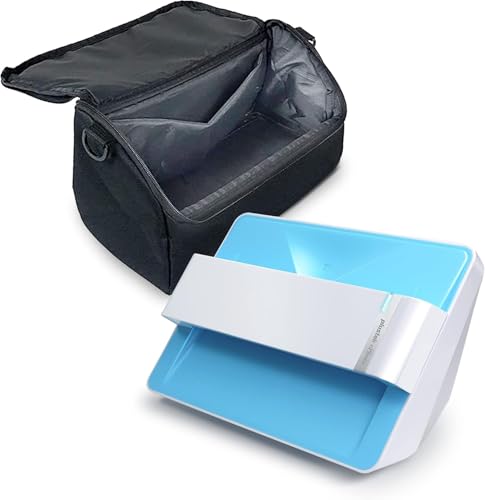
- Supports common print sizes through 8-by-10
- Offers 300- and 600-dpi scanning
- Includes faded-photo enhancement tools
Best For: Easy home scanning of printed photos
High-Resolution Choice

- 6400 dpi photo scanning
- 48-bit color and 16-bit grayscale
- Dual-lens system for photos and slides
Best For: Detailed photo and slide archiving
Standalone Memory Converter
DigitPro M129A Photo, Slide & Negative Scanner

- No computer or drivers required
- 5-inch HD viewing screen
- Includes SD card and three-year warranty
Best For: Simple home conversion of photos, slides, and negatives
Best with Extra Features
Epson Perfection V600 Photo Scanner

- 6400 x 9600 dpi scanning for detailed enlargements
- Digital ICE removes dust and scratches
- Supports prints, slides, negatives, and medium-format film
Best For: High-resolution photo and film digitization
Best Computer-Free Option
ClearClick QuickConvert 2.0 Scanner

- Scans without a computer or drivers
- Handles 4x6 photos and multiple film formats
- Saves JPEGs to an SD card with a preview LCD
Best For: Quick, portable photo and film conversion
Best Versatile Restoration Scanner
Epson Perfection V550 Photo Scanner

- Digital ICE reduces dust and scratches on film
- 6400 dpi optical resolution for large enlargements
- Scans photos, film, documents, and supports OCR
Best For: Mixed photo, film, and document archiving
Professional Detail – Epson Perfection V850 Pro
For demanding photo archiving, the Epson Perfection V850 Pro is a strong choice among photo scanners with digital ICE. Its 6400-dpi resolution, CCD sensor, dual-lens system, and 4.0 Dmax are designed for detailed scans with smooth tonal gradations and fine shadow detail.
Best For: Photographers, serious archivists, and users who want high-resolution scans from prints and film.
Pros:
- 6400-dpi resolution supports highly detailed scans.
- Dual-lens system selects the appropriate lens for the material.
- 4.0 Dmax helps preserve smooth gradations and shadow detail.
- Supports Windows and Mac operating systems listed by Epson.
Cons:
- Large and heavy at 20.9 pounds.
- USB connection requires a computer-based setup.
- Its pro-oriented features may be more than casual users need.
The V850 Pro is the most detail-focused option in this group. Choose it when scan quality and tonal range matter more than portability or rapid batch throughput.
Film-to-Screen Convenience – KODAK Slide N Scan Film Scanner
The KODAK Slide N Scan is a convenient film-focused alternative for users comparing photo scanners with digital ICE. It handles 135, 110, and 126 negatives plus 50mm slides, and includes a 5-inch LCD for previewing and editing scans without relying entirely on a computer.
Best For: Families digitizing mixed collections of slides and film negatives with a simple standalone workflow.
Pros:
- Supports multiple negative formats and 50mm slides.
- 22-megapixel capture and a large 5-inch LCD display.
- Can save files directly to an SD or SDHC card.
- Includes film adapters, USB and HDMI cables, and a cleaning brush.
Cons:
- SD or SDHC card is not included.
- Designed for film and slides rather than standard photo prints.
- Uses a CMOS sensor and 24-bit color depth.
Its large screen, easy-loading trays, and direct-to-card workflow make this a user-friendly film digitizer. It is less suitable if your main collection consists of flat photo prints.
Fast Batch Archiving – Epson FastFoto FF-640
The Epson FastFoto FF-640 is built for speed, making it a practical option for large photo collections alongside other photo scanners with digital ICE. Its automatic feeder holds up to 30 photos and can scan 4-by-6 images at about one photo per second under the stated test conditions.
Best For: Users who need to digitize thousands of loose prints quickly with an automatic feeder.
Pros:
- Scans up to about one photo per second under specified conditions.
- Automatic feeder accommodates up to 30 photos.
- Supports scans up to 600 dpi.
- Software helps restore, save, organize, and share images.
Cons:
- 600-dpi maximum is lower than the V850 Pro’s resolution.
- Requires a USB-connected computer and Windows 7 or later minimum requirements.
- Automatic feeding may be less suitable for unusually delicate originals.
The FF-640 prioritizes throughput over ultra-high resolution. It is the better fit for large print archives where finishing the project quickly matters more than extracting maximum detail.
Simple Print Scanning – Plustek Photo Scanner Z300
The Plustek Z300 offers a straightforward way to scan everyday prints, making it a practical entry point for shoppers considering photo scanners with digital ICE. It supports common photo sizes from 3-by-5 through 8-by-10, scans at 300 or 600 dpi, and connects by USB to Mac or PC systems.
Best For: Home users who want an easy, compact workflow for scanning common print-photo sizes.
Pros:
- Supports 3-by-5, 4-by-6, 5-by-7, and 8-by-10 photos.
- Scans a 4-by-6 photo in about two seconds at 300 dpi.
- Includes image-enhancement tools for faded photos.
- Works with Windows 7 through 11 and Mac OS X 10.10 to 15.x.
Cons:
- Requires inserting photos one at a time.
- Maximum optical resolution is 600 dpi.
- Uses a USB connection rather than direct-to-card storage.
The Z300 is an accessible choice for household photo projects and routine print scanning. Its single-photo feed is simpler than a batch system but may take longer for very large collections.
High-Resolution Choice – Epson Perfection V800
For demanding photo archiving, the Epson Perfection V800 is a strong option among photo scanners with digital ice-style restoration needs, delivering high-resolution scans with detailed color and tonal reproduction. Its dual-lens system is designed to optimize scans across different media, including photos and slides.
Best For: Photographers and serious archivists who prioritize resolution, color depth, and shadow detail.
Pros:
- 6400 dpi resolution with up to 9600 dpi listed scanner resolution
- 48-bit color and 16-bit grayscale depth for detailed tonal range
- 4.0 Dmax and a dual-lens system support fine detail and smooth gradations
- Supports photo and slide scanning with Windows and Mac compatibility
Cons:
- At 20.9 pounds, it is relatively heavy for a home scanner
- USB connectivity may feel less convenient than wireless options
- Listed operating-system support includes older Windows and macOS versions
The V800 is best suited to users who want maximum control over scan quality rather than the quickest workflow. Its high bit depth, Dmax rating, and dual-lens design make it a compelling archival-focused choice.
Fast Family Archive Scanner – Canon imageFORMULA RS40
The Canon imageFORMULA RS40 is a practical pick among photo scanners with digital ice-style enhancement features, especially for large batches of mixed photos and documents. Its automatic feeder scans both sides at up to 40 items per minute, while bundled software adds photo enhancement tools such as red-eye correction and face smoothing.
Best For: Families and home offices digitizing varied photo collections, receipts, cards, and documents efficiently.
Pros:
- Automatic feeder holds up to 60 items
- Scans both sides of photos and documents at up to 40 items per minute
- Handles Polaroids, receipts, cards, IDs, and photos in varying sizes
- Includes enhancement software and supports Windows and Mac
Cons:
- 8-bit color and grayscale depth are less suited to demanding archival work
- Uses USB rather than a wireless connection
- Its 1200 dpi setting is listed as interpolated
The RS40 favors speed and convenience over maximum optical detail. It is a sensible choice when you need to process a varied collection quickly and want software tools for basic photo cleanup.
Standalone Memory Converter – DigitPro M129A Photo, Slide & Negative Scanner
The DigitPro M129A offers a straightforward approach to photo, slide, and negative conversion without requiring a computer. For shoppers comparing photo scanners with digital ice-style restoration workflows, this model emphasizes simple previews, one-touch operation, and direct JPEG storage rather than desktop scanning software.
Best For: Beginners and families who want to digitize prints, 35mm slides, and 135 or 110 negatives without installing drivers.
Pros:
- Standalone operation with no computer, app, or driver required
- Large 5-inch HD viewing screen for previewing scans
- Supports printed photos, slides, negatives, and business cards
- Includes an 8GB SD card and a three-year warranty
Cons:
- Uses a CMOS sensor and lists 1080P resolution rather than a high optical dpi rating
- Scans save as JPEGs, limiting the listed output format flexibility
- The supplied notes do not list digital ICE or automated dust and scratch removal
The M129A is appealing for accessible, offline digitizing and quick family projects. Choose it for ease of use and broad media support, not for the fine-grained control expected from a dedicated archival scanner.
Best with Extra Features – Epson Perfection V600 Photo Scanner
For detailed photo scanners with digital ice, the Epson Perfection V600 is a strong flatbed option for digitizing prints, slides, negatives, and medium-format film. Its 6400 x 9600 dpi capability supports large enlargements, while the built-in transparency unit accommodates mounted 35mm slides, negatives, and medium-format film.
Best For: Photo enthusiasts who want high-resolution scans and broad film-format support.
Pros:
- Digital ICE technology helps remove dust and scratches from scans.
- Scans 35mm slides, negatives, medium-format film, photos, and documents.
- 6400 x 9600 dpi resolution supports enlargements up to 17 x 22 inches.
- ReadyScan LED technology avoids warm-up time and reduces power consumption.
Cons:
- Wired USB 2.0 connectivity requires a computer connection.
- Its flatbed design is less convenient for rapid batch scanning.
The V600 is a versatile choice when image quality, restoration features, and film flexibility matter more than portability or one-touch scanning speed.
Best Computer-Free Option – ClearClick QuickConvert 2.0 Scanner
The ClearClick QuickConvert 2.0 offers a simple alternative among photo scanners with digital ice, although its supplied features focus on fast conversion rather than Digital ICE restoration. It scans photos, slides, and several film formats without a computer, saving JPEG files directly to an SD memory card.
Best For: Users who prioritize portable, computer-free scanning of small photo and film collections.
Pros:
- Scans without a computer or drivers.
- Converts photos, slides, and negatives in about 2–3 seconds each.
- Built-in rechargeable battery supports cord-free scanning.
- Includes a 5-inch preview LCD and saves JPEG files to an SD card.
Cons:
- Does not provide Digital ICE technology according to the supplied specifications.
- Supports 4×6 photos or smaller, but not 5×7 photos.
- Each item must be scanned individually because there is no autofeeder.
This model is convenient for quick, casual digitization, but shoppers specifically seeking dust- and scratch-removal features should consider a scanner with confirmed Digital ICE support.
Best Versatile Restoration Scanner – Epson Perfection V550 Photo Scanner
The Epson Perfection V550 is a capable choice for photo scanners with digital ice, combining 6400 dpi optical resolution with built-in film scanning and photo-restoration tools. Digital ICE helps reduce the appearance of dust and scratches on film, while Easy Photo Fix is designed to restore faded photos.
Best For: Home users who need one scanner for photos, film, documents, and basic OCR.
Pros:
- Digital ICE technology helps remove the appearance of dust and scratches on film.
- 6400 dpi optical resolution supports enlargements up to 17 x 22 inches.
- Built-in transparency unit scans 35mm slides, negatives, and film.
- Can scan multiple photos with automatic edge detection and separate file saving.
Cons:
- Hi-Speed USB 2.0 connectivity requires a wired computer setup.
- The supplied specifications list a one-year limited warranty.
With film restoration, faded-photo correction, document scanning, and OCR support, the V550 is a well-rounded flatbed for mixed home archiving needs.
How We Picked the Best Photo Scanners with Digital Ice
We focused on scanning quality, supported media, ease of use, workflow speed, and long-term practicality. Digital ICE is especially important for film and transparency work because it uses infrared-based detection to identify dust and many surface scratches, reducing manual cleanup. We also considered optical resolution rather than relying on exaggerated interpolated figures, along with software compatibility, connectivity, feeder design, and whether a scanner requires a computer.
The products in this roundup cover different needs: high-resolution flatbeds for serious archiving, automatic feeders for large print collections, and compact film or photo scanners for convenient sharing.
Quick Comparison
- Best for high-end film and photo work: Epson Perfection V850 Pro.
- Best for fast batches of prints: Epson FastFoto FF-640.
- Best for general home scanning: Epson Perfection V600 or V550.
- Best for simple film and slide conversion: KODAK Slide N Scan or ClearClick QuickConvert 2.0.
- Best for quick individual prints: Plustek Photo Scanner Z300.
- Best for mixed photo and document jobs: Canon imageFORMULA RS40.
Key Buying Factors for Photo Scanners with Digital Ice
Media and Format Support
Confirm that the scanner handles the materials in your collection. Flatbeds are versatile for loose prints, mounted photos, books, slides, and negatives. Film-focused models may be faster for strips and slides but less useful for oversized or irregular prints. If you have 110, 126, or other less-common film formats, check the included holders before buying.
Resolution and Image Quality
Higher optical resolution helps when enlarging small negatives or restoring cropped portions of prints. For ordinary 4-by-6-inch photos, a good 600 dpi scan is often sufficient; film and detailed restoration work benefit from substantially higher optical resolution. Color depth, tonal range, and software controls can matter as much as the headline dpi number.
Speed and Workflow
A flatbed offers careful placement and broad compatibility but requires handling each item. An automatic feeder can save substantial time when scanning hundreds of loose prints, while a standalone scanner may be preferable when you want quick, computer-free transfers. Check feeder restrictions and the scanner’s ability to handle different photo sizes.
Digital ICE and Software
Digital ICE can reduce dust and scratches on compatible film and transparencies, but it does not repair every defect and may not apply to ordinary reflective prints. Review supported operating systems, included scanning software, file formats, and color-restoration tools before committing.
Who Should Buy Which Photo Scanners with Digital Ice?
Choose a premium Epson flatbed if image quality, film preservation, and enlargement flexibility matter most. Choose a feeder-based Epson or Canon if you have a large print collection and value throughput. A V600 or V550 is a sensible middle ground for households scanning both photos and film. For occasional slides, negatives, or quick sharing, a KODAK, ClearClick, or similar standalone film scanner keeps the process simple. If portability and minimal setup are priorities, the Plustek Z300 is a practical choice for individual photos.