Powered USB hubs make it easier to connect storage drives, webcams, keyboards, printers, and other peripherals without overloading a computer’s built-in ports.
We selected 10 options ranging from compact five-port models to high-capacity USB 3.2 hubs, focusing on port count, transfer speeds, charging support, power delivery, controls, and everyday usability.
Best 10 Powered USB Hubs Picks for 2026
Best Adjustable USB Hub
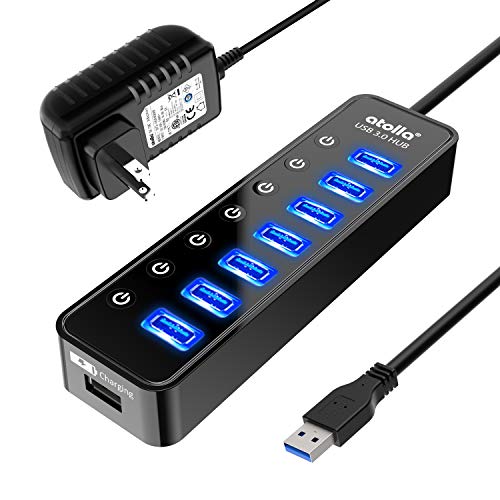
- Seven 5Gbps USB 3.0 data ports
- Individual on/off switches
- Dedicated smart charging port
Best For: Users managing multiple peripherals
Best USB-C Power Hub

- 15 USB-C and USB-A connections
- 10Gbps USB 3.2 data speeds
- 100W PD port with 65W adapter
Best For: USB-C workstations and creators
Best Protected USB Hub
TP-Link UH720 7-Port USB 3.0 Hub

- Seven 5Gbps USB 3.0 data ports
- Two 2.4A smart charging ports
- Multiple circuit and surge protections
Best For: Reliable home and office expansion
Best High-Capacity USB Hub

- Ten USB 3.0 ports
- Individual switches and LED indicators
- Includes 60W power adapter
Best For: Desktops with many USB peripherals
Best High-Capacity Pick

- 16 ports with up to 10Gbps transfer speeds
- 96W adapter supports multiple connected devices
- Individual switches and aluminum housing
Best For: Busy workstations with many high-speed USB peripherals
Best Value Expansion
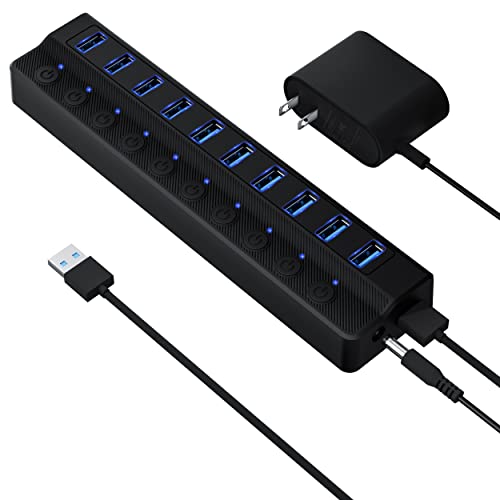
- Ten USB 3.0 ports with 5Gbps transfer
- Individual switches with LED status lights
- Includes a 12V/2A power adapter
Best For: Everyday home-office and desktop peripheral expansion
Best for Controlled Charging

- Ten 5Gbps data ports plus a 2.4A charging port
- Individual switches and LED indicators
- 36W adapter with overheat safeguards
Best For: Mixed peripheral and phone or tablet charging setups
Best High-Speed Expansion

- 10Gbps USB-C and USB-A data ports
- Two dedicated 45W USB-C charging ports
- 65W adapter with angled aluminum design
Best For: USB-C laptops and fast peripheral transfers
Best for Maximum Port Count

- Ten USB 3.0 data ports plus charging port
- Individual switches and LED indicators
- Long cables and 12V/3A power adapter
Best For: Large USB-A workstation setups
Best Compact Control

- Four 5Gbps USB 3.0 data ports
- Dedicated USB-C charging outlet
- Individual switches with soft LEDs
Best For: Small desks and everyday USB peripherals
Best Adjustable USB Hub – 7-Port Atolla USB 3.0 Hub
This Atolla model is a practical choice among powered USB hubs if you want fast peripheral expansion with hands-on control. It provides seven USB 3.0 data ports, a dedicated smart charging port, individual on/off switches, and a 5V/4A power adapter.
Best For: Desktops and laptops with several peripherals, especially users who want to switch individual devices off without unplugging them.
Pros:
- Seven USB 3.0 data ports support transfer speeds up to 5Gbps.
- Individual switches make it easy to control connected peripherals.
- Dedicated charging port can provide up to 2.4A with the included adapter.
- Plug-and-play support works across Windows, Mac OS X, and Linux systems.
Cons:
- The dedicated charging port is separate from the seven data ports.
- The enclosure is plastic rather than aluminum.
Choose this hub if port-by-port control matters as much as expansion. Its straightforward design and included power adapter make it a useful everyday powered USB hub for mixed peripherals.
Best USB-C Power Hub – Gîtfos 15-in-1 USB 3.2 Hub
This Gitfos unit is one of the most feature-rich powered USB hubs in the group, combining USB-C and USB-A connectivity with 10Gbps data ports and high-power charging options. It includes a 65W power adapter and is designed for USB-C or Thunderbolt 3/4 hosts.
Best For: USB-C laptop users, creators, and workstations that need many data and charging connections in one desktop hub.
Pros:
- Offers 15 connections, including USB-C and USB-A data and charging ports.
- USB 3.2 data ports support speeds up to 10Gbps.
- Includes a 100W USB-C PD port and a 65W DC power adapter.
- Aluminum construction, an angled design, and non-slip feet support desk use.
Cons:
- All ports do not support video output.
- The included power adapter must be connected for the hub to work.
- It is not compatible with older USB-A-only Macs or Thunderbolt 2 systems.
This is the strongest choice for a modern USB-C setup that prioritizes port count, fast transfers, and charging flexibility. Check the power and compatibility requirements carefully before buying.
Best Protected USB Hub – TP-Link UH720 7-Port USB 3.0 Hub
The TP-Link UH720 is a dependable option among powered USB hubs for users who want seven USB 3.0 data ports plus two dedicated smart charging ports. Its protection circuitry and included 12V/4A adapter make it suited to a busy desktop setup.
Best For: Home and office users who need reliable expansion, separate charging ports, and broad operating-system compatibility.
Pros:
- Seven USB 3.0 data ports support transfer speeds up to 5Gbps.
- Two 5V/2.4A smart charging ports are designed for phones, tablets, and other USB devices.
- Includes overheat, overload, overvoltage, short-circuit, and surge protection.
- Supports Windows, Mac, Chrome, and Linux with plug-and-play operation.
Cons:
- The hub uses a larger plastic enclosure than some compact alternatives.
- Its data ports are USB 3.0 rather than faster USB 3.2 ports.
The UH720 stands out for balanced everyday functionality and protection features. It is a sensible pick when charging convenience and established compatibility are more important than maximum data speed.
Best High-Capacity USB Hub – SABRENT 10-Port USB 3.0 Hub
The SABRENT HB-BU10 is a strong pick among powered USB hubs when your priority is connecting many USB peripherals at once. It expands one USB 3.0 port into ten, with individual power switches, LED indicators, and a 60W power adapter.
Best For: Desktop users with numerous drives, card readers, phones, and other USB accessories that need independent port control.
Pros:
- Ten USB 3.0 ports provide broad peripheral expansion.
- Each port has its own power switch and blue LED indicator.
- Supports data transfer speeds up to 5Gbps.
- Includes a 60W 12V/5A power adapter and USB 3.0 cable.
Cons:
- It does not list dedicated smart charging ports.
- The warranty is limited to one year.
- Its ABS plastic enclosure may be less premium than aluminum designs.
For a crowded desk, the HB-BU10’s ten ports and individual switches are its main advantages. It is particularly useful when you regularly connect and disable several USB devices without removing their cables.
Best High-Capacity Pick – ACASIS 16-Port USB 3.2 Hub
If you need a large, dependable connection point, this powered USB hub combines 16 USB 3.2 ports with up to 10Gbps data transfer. Its 96W adapter, aluminum housing, and individual switches make it well suited to demanding desktop setups.
Best For: Workstations that regularly connect many high-speed USB devices.
Pros:
- Sixteen ports support extensive peripheral expansion.
- USB 3.2 transfer speeds reach up to 10Gbps, with supplied testing reporting read speeds of 919MB/s and write speeds of 909MB/s.
- Individual switches, surge protection, and an aluminum housing improve convenience and thermal management.
- The included 96W adapter provides stable power, while fast-charging ports deliver up to 5V/1.5A.
Cons:
- Its large 16-port design is more than many basic setups need.
- The unit is relatively heavy at 781g.
- It requires a separate power connection rather than relying solely on the host computer.
Choose the ACASIS when port count and high-speed data handling matter most. It is a particularly capable option for a fixed workstation with several drives and peripherals.
Best Value Expansion – ONFINIO 10-Port USB 3.0 Hub
For straightforward desktop expansion, this powered USB hub adds 10 USB 3.0 ports and supports transfer speeds up to 5Gbps. The 12V/2A adapter, plug-and-play setup, and individual LED-lit switches keep everyday device management simple.
Best For: Home offices and general-purpose setups that need several extra USB ports.
Pros:
- Adds ten USB 3.0 ports for drives, printers, cameras, keyboards, and other peripherals.
- Supports up to 5Gbps data transfer and works with USB 3.0, 2.0, 1.1, and 1.0 devices.
- Individual switches and LED indicators make it easy to control and monitor each port.
- Includes a 12V/2A power adapter and requires no drivers.
Cons:
- Its 5Gbps USB 3.0 speed is lower than newer 10Gbps hubs.
- The plastic enclosure may offer less heat dissipation than an aluminum model.
- The supplied adapter is intended for stable operation, so this is not a cable-only hub.
The ONFINIO focuses on practical expansion rather than premium materials or top-tier speeds. It is a sensible choice when ten individually controlled USB ports cover your needs.
Best for Controlled Charging – JESWO 11-Port USB 3.0 Hub
This powered USB hub balances data expansion with a dedicated charging port. It offers 10 USB 3.0 data ports at up to 5Gbps plus one smart charging port, with independent switches, LED indicators, and a 36W adapter for stable operation.
Best For: Users who want to manage several peripherals while charging a phone or tablet.
Pros:
- Provides ten 5Gbps USB 3.0 data ports and one charging port rated up to 2.4A.
- Individual on/off switches and LEDs allow quick control and connection checks.
- The included 12V/3A, 36W adapter supports stable power delivery and includes overheat safeguards.
- Compatible with Windows, Mac OS, and Linux, with a 100cm USB cable and 120cm power cord.
Cons:
- The hub must be connected to its power adapter for full functionality.
- Data transfer is limited to USB 3.0 speeds rather than 10Gbps USB 3.2 performance.
- The plastic enclosure may be less robust than an aluminum alternative.
The JESWO is a practical middle ground for mixed setups. Its separate charging port and clear per-port controls make it especially convenient for home offices and multitasking desks.
Best High-Speed Expansion – 9-Port USB 3.2/C Hub
This powered USB hub is aimed at users who need a mix of fast data ports and dedicated USB-C charging. It offers 10Gbps USB 3.2 connections, 5Gbps USB 3.0 ports, and a 65W adapter to help maintain stable performance when several peripherals are connected.
Best For: USB-C laptop users, creative workflows, and desktops needing fast file transfers plus dedicated device charging.
Pros:
- Combines USB-C and USB-A ports, including 10Gbps and 5Gbps data connections.
- Includes two dedicated USB-C PD charging ports rated up to 45W.
- Angled aluminum design and included 65W power adapter support a tidy desktop setup.
Cons:
- Does not provide video output.
- PD charging ports do not support data transfer.
- Not recommended for charging computers or other high-power devices, and simultaneous SSD use is discouraged.
Choose this model when port variety and faster transfers matter more than display connectivity. Its charging ports are useful for phones and tablets, but buyers should keep the data and charging functions separate.
Best for Maximum Port Count – 11-Port USB 3.0 Hub
For a desk with many USB accessories, this powered USB hub provides ten USB 3.0 data ports and one dedicated charging port. Individual switches and status LEDs make it practical for managing keyboards, storage devices, printers, and other peripherals without repeatedly unplugging them.
Best For: Workstations with numerous USB-A peripherals and users who want per-port power control.
Pros:
- Provides 10 USB 3.0 data ports plus one dedicated charging port.
- Individual on/off switches and LEDs simplify device management.
- Includes a 12V/3A adapter and long cables for flexible placement.
- Supports USB 3.0, 2.0, 1.1, and 1.0 peripherals with plug-and-play operation.
Cons:
- Data transfer is limited to USB 3.0 speeds up to 5Gbps.
- The dedicated charging port is not a data port.
- Offers USB-A connectivity rather than USB-C data ports.
This is a strong choice for a busy desktop where port quantity and individual control are priorities. Its dedicated charging outlet adds convenience, while the powered design helps accommodate a larger collection of peripherals.
Best Compact Control – 5-Port USB 3.0 Hub
This powered USB hub offers a simpler way to expand one USB connection into four USB 3.0 data ports, with a separate USB-C charging outlet. Individual switches and soft LEDs provide convenient control, making it a practical option for smaller desks and everyday computer accessories.
Best For: Users who need a compact powered hub for keyboards, mice, printers, flash drives, and USB-C device charging.
Pros:
- Adds four USB 3.0 data ports with transfer speeds up to 5Gbps.
- Dedicated USB-C charging port can deliver up to 2.4 amps with the adapter connected.
- Individual switches and soft status LEDs help control connected devices.
- Supports USB 3.0, 2.0, 1.1, and 1.0 peripherals without additional drivers.
Cons:
- The USB-C charging port does not support data transfer.
- It may not provide enough power for some high-power external drives.
- Has fewer ports than the larger 11-port model.
This model balances basic expansion with useful per-port controls without taking up much space. It is best suited to everyday peripherals and device charging rather than demanding, high-power storage setups.
How We Picked the Best Powered USB Hubs
We compared these Powered USB Hubs by looking at the features that matter most in real desktop and workstation setups: available port count, USB generation, advertised data rates, included power adapter, charging functionality, physical controls, status indicators, and connection types. We also considered whether each hub is better suited to basic peripherals, high-bandwidth storage, or mixed device collections.
A powered hub can provide more consistent operation than a bus-powered model when several devices are connected at once. However, the included adapter and the computer’s own USB connection still affect overall performance. Charging ports may also work differently from data ports, so check the specifications before assuming every port supports both functions.
Quick Comparison
| What to Compare | Best For |
|---|---|
| 5–7 ports | Basic peripherals and smaller desks |
| 8–11 ports | General workstations with multiple accessories |
| 15–16 ports | Large setups and frequent device expansion |
| USB 3.0 | Everyday accessories and standard external drives |
| USB 3.2 or 10Gbps | Faster storage and high-bandwidth transfers |
| USB-C, PD, or smart charging | Newer devices and charging-focused setups |
Key Buying Factors for Powered USB Hubs
Port Count and Layout
Choose enough ports for your current devices plus a few extras. Front-facing ports are convenient for flash drives and temporary connections, while a compact layout may be better for a crowded desk.
Speed and USB Compatibility
USB 3.0 is suitable for many keyboards, mice, cameras, and everyday storage devices. If you regularly move large video files or use fast SSDs, prioritize a model advertising USB 3.2 or 10Gbps performance. Actual speeds depend on the connected device, cable, host port, and workload.
Power and Charging
Check the adapter’s wattage and whether charging ports are separate from data ports. Power delivery support can be useful for compatible USB-C devices, but it does not automatically make every hub a laptop dock or guarantee full-speed charging on every connection.
Switches, LEDs, and Build
Individual switches let you disconnect accessories without removing cables, while LEDs make active ports easier to identify. Consider cable length, adapter size, heat dissipation, and whether the hub will remain stationary or travel with a laptop.
Who Should Buy Which Powered USB Hubs?
Choose a smaller five- to seven-port hub if you need extra connections for a keyboard, mouse, printer, and occasional storage. An eight- to 11-port model is a practical choice for most home offices, creators, and gaming desks. If you connect many drives or peripherals at the same time, a 15- or 16-port hub offers more room to grow.
For simple accessories, USB 3.0 provides a sensible balance of compatibility and cost. For frequent large-file transfers, select a USB 3.2 or 10Gbps option and use matching cables and host ports. Buyers who need to charge newer devices should prioritize USB-C or smart-charging features, while anyone troubleshooting a busy setup may appreciate individual switches and clear LEDs.