A wall-mounted monitor can free up valuable desk space, improve screen positioning, and create a cleaner home office setup. The right model depends on your monitor size, weight, VESA pattern, and preferred range of movement.
We selected 10 monitor wall mounts covering single and dual screens, ultrawide displays, compact monitors, and heavier installations. Use the guide below to compare compatibility and choose a mount that fits your workspace.
Best 10 Monitor Wall Mounts for Home Offices Picks for 2026
Best Dual-Monitor Ergonomics
HUANUO Gaming Dual Monitor Wall Mount

- Supports two 17–32-inch screens up to 17.6 lb each
- ±90° swivel, ±35° tilt, and 360° rotation
- Cable management and wood, concrete, or brick installation
Best For: Flexible dual-monitor home office setups
Best Compact Single-Monitor Value

- Fits 13–32-inch screens up to 33 lb
- 15-inch extension retracts to 2 inches
- Tilt, swivel, and rotation for flexible positioning
Best For: Single-monitor desks with limited surface space
Best Large-Screen Versatility
Pipishell Full Motion Wall Mount

- Handles screens up to 43 inches and 44 lb
- Supports 75x75mm to 200x200mm VESA patterns
- 14.59-inch extension and 360° rotation
Best For: Large monitors and ultrawide home office displays
Best Ultrawide Pick
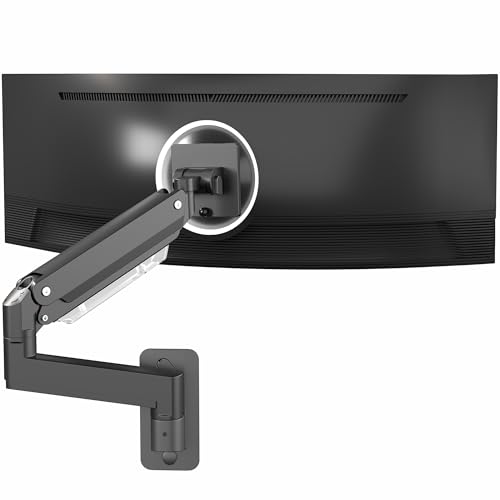
- Supports ultrawide monitors up to 49 inches
- Holds up to 44 pounds with pneumatic adjustment
- Includes cable management and wood/concrete hardware
Best For: Large ultrawide home-office setups
Best Dual-Monitor Choice
Full-Motion Two-Screen Wall Mount

- Holds two 17- to 32-inch monitors
- Supports up to 19.8 pounds per arm
- Offers gas-spring height adjustment and cable management
Best For: Compact two-monitor workstations
Best Compact Single-Monitor Pick

- Fits 17- to 32-inch VESA monitors
- Offers 7 inches of pneumatic height adjustment
- Supports up to 15.4 pounds and folds toward the wall
Best For: Lighter single-monitor home-office setups
Best for Tight Spaces

- Supports 13-34-inch monitors up to 19.8 pounds
- 20.47-inch extension with 12.2-inch height adjustment
- Compatible with studs, concrete, and brick walls
Best For: Compact desks and wall-side home office setups
Best for Easy Installation

- Supports 13-32-inch monitors up to 19.8 pounds
- Extends up to 21.6 inches with full-motion adjustment
- Includes cable management and labeled installation parts
Best For: Remote workstations needing flexible positioning and guided setup
Best for Curved and Ultrawide Screens

- Supports compatible flat, curved, and ultrawide screens
- Gas-spring arm offers up to 11 inches of height adjustment
- Includes a three-bolt wall plate and cable management
Best For: Curved or ultrawide monitor home-office setups
Best Dual-Monitor Ergonomics – HUANUO Gaming Dual Monitor Wall Mount
For home offices using two larger screens, the HUANUO is one of the more capable monitor wall mounts for home offices. It supports two 17- to 32-inch monitors weighing up to 17.6 pounds per arm, with broad adjustment options for a more comfortable workstation.
Best For: Dual-monitor desks that need flexible positioning, cable organization, and support for larger screens.
Pros:
- Supports two 17- to 32-inch monitors up to 17.6 pounds each.
- Offers ±90° swivel, ±35° tilt, and 360° rotation for landscape or portrait use.
- Compatible with wood studs, solid concrete, and brick, with built-in cable management.
Cons:
- Requires two monitors with 75x75mm or 100x100mm VESA patterns.
- Wall installation is not described for drywall alone.
Choose this model when your home office needs a sturdy dual-screen setup with substantial movement and ergonomic height adjustment. Its lifetime warranty and included hardware add reassurance for a permanent installation.
Best Compact Single-Monitor Value – WALI Full Motion Wall Mount
The WALI 1330LM is a straightforward option for monitor wall mounts for home offices where one compact screen needs to clear desk space. It fits 13- to 32-inch displays up to 33 pounds and can extend or retract to suit different desk layouts.
Best For: Single-monitor workstations that need a long-reaching, full-motion mount at a compact size.
Pros:
- Supports 13- to 32-inch screens up to 33 pounds.
- Provides ±15° tilt, 180° swivel, and 360° rotation.
- Extends 15 inches and retracts to 2 inches from the wall.
Cons:
- Drywall alone is not supported; installation is intended for wood studs, brick, or concrete.
- Its 75x75mm to 100x100mm VESA range is narrower than some larger universal mounts.
This WALI is a practical pick if your office needs one adjustable screen and substantial reach from the wall. Its 10-year warranty and US-based customer support provide useful long-term support.
Best Counterbalance Dual Mount – VIVO Articulating Wall Mount
The VIVO MOUNT-V002G combines two mechanical spring arms with tool-free height adjustment, making it a strong contender among monitor wall mounts for home offices. It supports two 17- to 32-inch screens and helps move the displays off the desk for a cleaner setup.
Best For: Dual-monitor users who prioritize quick height changes and counterbalanced arm movement.
Pros:
- Holds two monitors weighing 4.4 to 19.8 pounds per arm.
- Mechanical spring arms provide toolless, instant height adjustment.
- Includes mounting hardware and cable management, with 180° swivel and 360° rotation.
Cons:
- Screens cannot rest flush against the wall side by side.
- VESA compatibility is limited to 75x75mm and 100x100mm patterns.
Consider this VIVO when frequent height changes are part of your workflow, such as alternating between seated and standing work. The counterbalance design is useful, but the arm geometry needs more clearance than a fixed or closely folding mount.
Best Large-Screen Versatility – Pipishell Full Motion Wall Mount
For home offices using a larger monitor or an ultrawide display, the Pipishell offers broad compatibility compared with many monitor wall mounts for home offices. It supports 13- to 43-inch screens up to 44 pounds and accepts VESA patterns from 75x75mm to 200x200mm.
Best For: Large monitors, ultrawide screens, or workstations that may also accommodate a TV-sized display.
Pros:
- Supports screens up to 43 inches and 44 pounds.
- Fits VESA patterns from 75x75mm through 200x200mm.
- Extends 14.59 inches, retracts to 2.7 inches, and rotates 360°.
Cons:
- Its tilt range is comparatively modest at +9°/-11°.
- Maximum swivel depends on screen size.
- Single-stud installation may require careful placement for larger displays.
This Pipishell is the most adaptable choice here for a large or unusually spaced VESA display. Verify the screen dimensions, weight, and mounting pattern before ordering, especially when installing a heavy monitor on a single stud.
Best Ultrawide Pick – Premium 49-Inch Monitor Arm
For home offices built around a large display, this VIVO wall mount stands out among monitor wall mounts for home offices because it supports ultrawide screens up to 49 inches while offering flexible positioning. Its heavy-duty aluminum arm, pneumatic adjustment, and included wood and concrete/brick installation hardware make it a strong choice for a substantial single-monitor setup.
Best For: Home offices using a large ultrawide or heavy single monitor.
Pros:
- Supports ultrawide monitors up to 49 inches and screens weighing up to 44 pounds.
- Offers tilt, swivel, rotation, and 13 inches of pneumatic height adjustment.
- Includes cable management, a quick-release VESA plate, and mounting hardware for wood and concrete/brick walls.
Cons:
- Non-VESA monitors require an adapter, which is not included.
- Its 44-pound capacity may be more than needed for smaller, lighter screens.
This is the most capable option here for a large ultrawide workspace. Confirm your monitor’s VESA pattern and wall construction before installation.
Best Dual-Monitor Choice – Full-Motion Two-Screen Wall Mount
This Mount-It! dual monitor bracket is a practical option among monitor wall mounts for home offices when two screens are essential but desk space is limited. Its counterbalanced gas-spring arms support separate height adjustment, while tilt, swivel, and rotation help you arrange each 17- to 32-inch display.
Best For: Compact home offices, gaming rooms, and two-monitor workstations.
Pros:
- Supports two 17- to 32-inch monitors, with up to 19.8 pounds per arm.
- Provides tool-free height adjustment plus tilt, swivel, and rotation.
- Arms extend up to 16.6 inches and include integrated cable management.
- Includes screws, anchors, washers, and VESA screws for installation.
Cons:
- Limited to monitors with 75x75mm or 100x100mm VESA patterns.
- Requires sufficient wall space for two articulating arms.
Choose this model when dual-screen productivity matters more than having the simplest installation. Check both monitor weights and the available wall area before mounting.
Best Compact Single-Monitor Pick – Adjustable 17- to 32-Inch Arm
For a standard single-screen desk, this VIVO model keeps monitor wall mounts for home offices straightforward and space-conscious. It fits 17- to 32-inch VESA monitors, folds back toward the wall when needed, and provides pneumatic height adjustment alongside broad positioning controls.
Best For: Standard single-monitor home-office desks using lighter displays.
Pros:
- Fits 17- to 32-inch monitors with 75x75mm or 100x100mm VESA patterns.
- Provides tilt, swivel, rotation, and 7 inches of height adjustment.
- Supports monitors up to 15.4 pounds and includes installation hardware and instructions.
- Can fold back against the wall to help save desk space.
Cons:
- Supports less weight than the other listed mounts.
- The monitor must weigh at least 4.4 pounds for proper arm counterbalance.
- Non-VESA compatibility is not specified.
This is a sensible fit for a conventional, lighter monitor and a tidy workstation. Verify the monitor’s weight falls within the stated counterbalance range before buying.
Best for Tight Spaces – ErGear Full-Motion Wall Mount
For home offices where desk space is limited—or where a thick desktop makes a clamp awkward—the ErGear is one of the more flexible monitor wall mounts for home offices. It supports 13- to 34-inch monitors up to 19.8 pounds and can pull the screen close for detailed work or fold it back toward the wall.
Best For: Compact desks, wall-side workstations, and users who want substantial extension and height adjustment.
Pros:
- Fits 13- to 34-inch monitors up to 19.8 pounds with 75×75 or 100×100 VESA patterns.
- Extends to 20.47 inches, retracts to 3.54 inches, and offers 12.2 inches of height adjustment.
- Provides tilt, swivel, and 360-degree rotation for portrait or landscape viewing.
- Mounts to wood studs, concrete, or brick and keeps support off the desktop.
Cons:
- It must not be mounted to drywall alone.
- Its 34-inch compatibility may be more than needed for smaller office monitors.
Choose this model when positioning range and desk clearance matter most. Its long extension and compact retraction make it particularly practical for small or corner workspaces, provided the wall structure is suitable.
Best for Easy Installation – MOUNT PRO Single Monitor Arm
The MOUNT PRO is a practical choice among monitor wall mounts for home offices if you want broad positioning control and a relatively straightforward setup. Its articulated arm supports 13- to 32-inch monitors up to 19.8 pounds, with cable management and compatibility with wood studs and solid concrete walls.
Best For: Remote workers, students, and home-office users who value easy assembly and flexible monitor positioning.
Pros:
- Offers tilt, swivel, rotation, and extension up to 21.6 inches.
- Supports 13- to 32-inch monitors weighing 4.4 to 19.8 pounds with 75×75 or 100×100 VESA patterns.
- Includes an integrated, detachable cable-management system.
- Comes with labeled parts, clear instructions, and lifetime technical support.
Cons:
- It is not compatible with 1000R, 1500R, or 1800R curved screens.
- Installation requires a wood stud or solid concrete wall; the supplied anchor is intended for solid concrete.
This mount stands out for its long reach and installation guidance. Check your wall construction and monitor curvature before buying, then adjust the arm to your monitor’s weight for the intended movement and stability.
Best for Curved and Ultrawide Screens – AVLT Full-Motion Wall Mount
The AVLT is a strong contender for monitor wall mounts for home offices that use flat, curved, or ultrawide displays. It supports screens up to 32 inches and 19.8 pounds, while its gas-spring arm, wall plate, and cable channels help create a cleaner and more adjustable workstation.
Best For: Users with compatible curved or ultrawide monitors who want gas-spring adjustment and organized cabling.
Pros:
- Supports flat, curved, and ultrawide 13- to 32-inch monitors up to 19.8 pounds.
- Works with 75×75 and 100×100 VESA mounting patterns.
- Gas-spring adjustment provides up to 11 inches of height adjustment.
- Three-bolt wall plate and integrated cable clips help provide stable, tidy installation.
Cons:
- Its maximum supported screen size is 32 inches.
- Wall installation requires a suitable cement, brick, or wood wall.
The AVLT is worth considering when screen compatibility and cable organization are priorities. Its gas-spring design is suited to frequent repositioning, while the three-bolt wall plate adds a substantial mounting base for supported wall types.
How We Picked the Best Monitor Wall Mounts for Home Offices
We focused on mounts that offer practical compatibility, useful adjustment, and clear capacity for common home-office displays. The selection includes single- and dual-monitor models, full-motion arms, fixed-position options, and designs rated for standard screens through large ultrawides.
We also considered VESA support, stated weight limits, screen-size ranges, height adjustment, tilt and swivel movement, and whether the mount is better suited to a compact desk, a productivity workstation, or a heavier display. Always verify the manufacturer’s specifications and your wall construction before installation.
Quick Comparison
| Best For | What to Look For |
|---|---|
| Single standard monitor | 13-32-inch support, 75×75 or 100×100 VESA compatibility |
| Dual-monitor workstation | Two independently adjustable arms and sufficient per-arm capacity |
| Ultrawide display | Higher weight rating, wider VESA support, and a reinforced arm |
| Flexible positioning | Full-motion tilt, swivel, rotation, and height adjustment |
| Large or unusual screens | Broad screen-size range and a mount rated for the display’s exact weight |
Key Buying Factors for Monitor Wall Mounts for Home Offices
Monitor Size, Weight, and VESA Pattern
Check the monitor’s actual weight without its original stand, then compare it with the mount’s per-arm limit. A mount rated for a large screen is not automatically suitable for every heavy display. Confirm the mounting-hole pattern, commonly 75x75mm or 100x100mm, before buying.
Wall Type and Installation
Wall mounts must be secured to appropriate structural support. Stud-mounted installation is generally more dependable than fastening into drywall alone, unless the product specifically supports another approved method. Use suitable hardware for the wall and allow room for cables and movement.
Range of Adjustment
Full-motion arms are useful if you switch between sitting positions, share a screen, or need to reduce glare. Tilt and swivel help fine-tune viewing angles, while height adjustment can improve posture. If the monitor rarely moves, a simpler arm may provide better value and stability.
Cable Management and Desk Layout
Consider where cables will run after the monitor is moved off the desk. Built-in cable channels can keep the installation neat, but you may still need extra cable length. Measure the distance from the wall to your preferred viewing position, especially with deep desks or curved displays.
Who Should Buy Which Monitor Wall Mounts for Home Offices?
Choose a single-arm model if you use one conventional monitor and want to reclaim desk space. A dual-arm mount is the better fit for multitasking, research, trading, or content workflows that depend on two screens. For a 49-inch ultrawide or another unusually large display, prioritize the model with the clearest high-capacity rating and compatible VESA dimensions.
For the most flexible home office, choose a full-motion mount with independent adjustment. If your priority is a straightforward installation for a smaller screen, a compact wall mount may be easier to position and less visually bulky. Before ordering, confirm the monitor’s dimensions, weight, VESA pattern, wall type, and the mount’s maximum extension.