A laptop locking cable is a simple way to add physical security to a home office, especially when your workspace is shared, near an entryway, or used by multiple people. The right model should match your laptop’s security slot and provide a dependable anchor point.
We’ve selected 10 laptop locks spanning standard, Nano, and wedge-style slots, plus universal designs and adhesive anchors for devices without built-in slots. Use the guide below to compare compatibility, locking styles, cable construction, and everyday usability before buying.
Best 10 Laptop Locking Cables for Home Offices Picks for 2026
Best Keyed Kensington Lock

- 6-foot carbon-steel cable
- Pivoting 10mm lock head
- Fits standard Kensington slots
Best For: Home offices with standard Kensington-slot devices
Best Desktop Security Kit
Kensington Peripherals Locking Kit 2.0
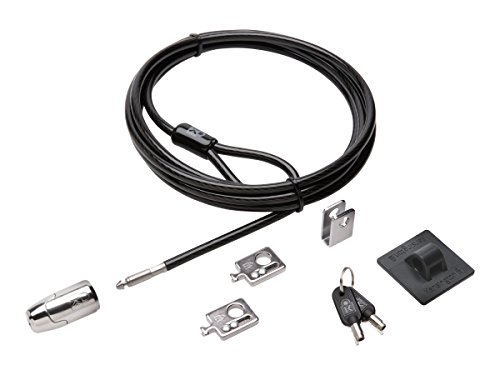
- 8-foot cut-resistant cable
- Includes two K-Slot adapters
- Secures peripherals and slotless devices
Best For: Desktop workstations with multiple accessories
Best Universal Combination Lock

- Supports three slot types
- Resettable four-digit combination
- 6.6-foot vinyl-coated steel cable
Best For: Home offices with mixed laptop brands
Best Dell Laptop Lock
Kensington N17 Combination Cable

- Fits Dell and Alienware wedge slots
- Resettable four-wheel combination
- 6-foot carbon-steel cable
Best For: Compatible Dell and Alienware laptops
Most Versatile Kit
Laptop and Tablet Security Cable

- Includes lock, two keys, and two adhesive anchor plates
- 6.6-foot, 5 mm steel cable
- Supports standard slots and compatible non-slot devices
Best For: Home offices securing mixed personal and shared electronics
Best Universal Fit
Kensington 3-in-1 Combination Lock

- Fits standard, nano, and wedge-shaped slots
- Resettable four-number combination
- Six-foot carbon steel cable
Best For: Home offices with laptops from multiple brands
Simple Keyed Pick
Manhattan 4.6-Foot Laptop Lock

- Keyed lock includes two keys
- 4.6-foot steel cable with PVC jacket
- Designed for compatible K-slot devices
Best For: Single K-slot laptops and monitors in home offices
Everyday Combination Protection

- Broad compatibility for laptops, tablets, monitors, and more
- Keyless 4-digit combination with thousands of codes
- Lightweight design and tool-free setup
Best For: Portable, key-free protection for compatible home-office devices
Universal Slot Flexibility
AboveTEK 3-in-1 Laptop Cable Lock

- Supports K-Slot, Nano, and Wedge slots
- Resettable 4-digit combination with 10,000 codes
- 360-degree rotating head and durable steel cable
Best For: Multi-device home offices needing broad slot compatibility
Keyed Multi-Device Security
AboveTEK Laptop and Tablet Lock

- Includes two adhesive anchor sets
- 6-foot galvanized steel cable
- Secures laptops, tablets, phones, and monitors
Best For: Home offices protecting mixed devices without standard security slots
Best Keyed Kensington Lock – Standard T-Bar Laptop Cable
For home offices using laptops or other equipment with a standard Kensington security slot, this keyed option is a straightforward choice among laptop locking cables for home offices. Its 6-foot carbon-steel cable anchors to a desk or other fixed structure, while the pivoting lock head is designed for easier positioning.
Best For: Home-office laptops, monitors, desktops, and other devices with a Kensington security slot.
Pros:
- Works with laptops, desktops, monitors, TVs, projectors, docking stations, and hard drives that have a Kensington slot.
- 6-foot carbon-steel cable has a plastic sheath and is designed to resist cutting attempts.
- Hidden-pin tubular lock and pivoting 10mm head support secure, accessible locking.
Cons:
- Does not fit 2016-and-newer Dell devices using the wedge lock slot.
- Some HP devices use a NanoSaver slot instead and require a different lock.
- Uses a key rather than a resettable combination.
This is a versatile keyed lock when your home-office equipment uses the standard T-Bar slot. Confirm the device slot before buying, especially for newer Dell laptops and select HP models.
Best Desktop Security Kit – Kensington Peripherals Locking Kit 2.0
If your home office includes a desktop PC and several accessories, this kit offers broader coverage than a basic laptop cable. It combines an 8-foot carbon-steel cable with adapters, a cable trap, and an anchor plate for devices that lack a built-in Kensington security slot.
Best For: Desktop workstations and home offices that need to secure a computer plus peripheral accessories.
Pros:
- 8-foot carbon-steel cable anchors to a desk, table, or fixed structure.
- Includes two K-Slot adapters and a cable trap for securing peripheral accessories.
- Anchor plate helps secure devices without a Kensington security slot.
- Anti-pick Hidden Pin Technology supports the 5mm keyed locking system.
Cons:
- The kit is more involved than a single laptop lock.
- Uses standard keys rather than a combination mechanism.
- Designed primarily for desktop computers and peripherals rather than a compact travel setup.
Choose this kit when a home-office workstation includes multiple components or equipment without built-in lock slots. Its longer cable and included accessories make it a practical desktop-focused solution.
Best Universal Combination Lock – StarTech 3-in-1 Laptop Cable
For households with laptops from different brands, this universal combination model is a flexible pick among laptop locking cables for home offices. Its interchangeable tips support Kensington-style K-Slot, Nano, and Noble Wedge slots, while the resettable four-digit code removes the need to manage keys.
Best For: Multi-device home offices with laptops that use different security-slot formats.
Pros:
- Three interchangeable lock tips support K-Slot, Nano, and Noble Wedge compatibility.
- Resettable four-digit combination provides up to 10,000 possible codes.
- 6.6-foot vinyl-coated steel cable is tested to 88 pounds of force.
- Rotating ball-joint head and included hook-and-loop strap improve positioning and cable management.
Cons:
- The 4.4mm cable is thinner than some heavier-duty cable options.
- Compatibility still depends on the laptop having one of the supported slot types.
- A combination lock may be less suitable for users who prefer keyed access.
This is the most adaptable choice in the group for a mixed-device home office. Check that each laptop uses a supported slot, then use the appropriate interchangeable tip.
Best Dell Laptop Lock – Kensington N17 Combination Cable
Kensington N17 Dell Laptop Computer Lock, Combination Security Locking Cable (K68008WW) Black
Check Price On AmazonDell and Alienware owners should look for a lock made specifically for the wedge slot. This Kensington N17 model uses a push-button connection, a resettable four-wheel combination, and a 6-foot carbon-steel cable for securing compatible laptops to a desk or other fixed structure.
Best For: Dell and Alienware laptops with a wedge-type lock slot in a home office.
Pros:
- Designed to fit Dell and Alienware laptops with wedge-type lock slots.
- Resettable four-wheel code offers 10,000 possible combinations.
- Push-button design supports one-handed engagement.
- 6-foot carbon-steel cable anchors to a desk, table, or fixed structure.
Cons:
- Not a universal lock for standard Kensington or Nano slots.
- Requires a compatible Dell or Alienware wedge slot.
- Combination settings must be remembered because there is no key backup.
For a compatible Dell or Alienware laptop, this purpose-built lock avoids the fit issues that can occur with standard T-Bar models. Verify that the computer has the wedge-type slot before ordering.
Most Versatile Kit – Laptop and Tablet Security Cable
For home offices that need to secure more than a standard laptop, this laptop locking cable kit combines a 6.6-foot steel cable with both a keyed lock and adhesive anchor plates. It can connect directly to devices with a standard 3 x 7 mm security slot or help secure compatible non-slot devices such as tablets and phones.
Best For: Home offices with laptops, tablets, monitors, or other shared electronics to secure.
Pros:
- Includes two keys and two self-adhesive anchor plates.
- 6.6-foot, 5 mm steel cable offers flexible reach around desks and table legs.
- Works with standard security slots and compatible smooth, flat devices using the anchor plates.
Cons:
- Adhesive anchors require clean surfaces and waiting time before use.
- Keyed design means keeping track of the included keys.
This is the most adaptable option in the group, particularly if your home office includes devices without built-in security slots. Allow the adhesive to bond fully before relying on an anchor plate.
Best Universal Fit – Kensington 3-in-1 Combination Lock
The Kensington 3-in-1 is a practical choice for home offices with laptops from different brands or generations. Its interchangeable tips fit standard, nano, and wedge-shaped security slots, while the resettable four-number combination avoids the need to manage a physical key.
Best For: Households or workspaces with multiple laptops using different security-slot designs.
Pros:
- Fits standard, nano, and wedge-shaped laptop security slots.
- Resettable four-number dial provides 10,000 possible combinations.
- Six-foot carbon steel cable offers useful reach and theft resistance.
Cons:
- Designed for devices with compatible security slots.
- Combination retrieval depends on Kensington’s registration program if the code is forgotten.
Its universal tip system makes this a strong long-term pick when device compatibility is the main concern. The combination format also simplifies access for a shared home workspace.
Simple Keyed Pick – Manhattan 4.6-Foot Laptop Lock
The Manhattan Laptop Lock is a straightforward option for a compatible laptop, monitor, or other device with a built-in K-slot. Its keyed lock, two included keys, and 4.6-foot steel cable provide a simple way to tether equipment to a desk or other fixed object in a home office.
Best For: Home-office users who want a basic keyed cable for K-slot-equipped devices.
Pros:
- Includes two keys for the radial lock.
- 4.6-foot steel cable reaches common desk and table anchors.
- PVC jacket helps protect nearby surfaces from scratches.
Cons:
- Only fits devices with a compatible built-in K-slot.
- Its 3 mm cable is narrower than the cables in the other listed options.
This is a compact, uncomplicated choice when your device already has a K-slot and you prefer a traditional key. Verify the slot type before buying, since it does not provide the multi-slot tips or adhesive anchors found on the other options.
Everyday Combination Protection – HOX 4-Digit Laptop Cable Lock
For shoppers comparing laptop locking cables for home offices, the HOX 4-Digit Laptop Cable Lock offers a keyless way to help secure compatible laptops, monitors, tablets, and other electronics. Its lightweight design and tool-free setup make it practical for everyday use or occasional travel.
Best For: Home-office users who want portable, combination-based protection for multiple compatible devices.
Pros:
- Works with laptops, MacBooks, tablets, iPads, monitors, and other compatible electronics.
- Keyless 4-digit combination lock offers thousands of possible codes.
- Lightweight, portable construction with quick tool-free setup.
Cons:
- Compatibility depends on the device having a suitable security connection.
- Combination locks require you to remember the selected code.
Overall, the HOX is a straightforward choice when convenience and broad device compatibility matter. It is especially useful for desks and shared spaces where a portable, key-free lock is preferable.
Universal Slot Flexibility – AboveTEK 3-in-1 Laptop Cable Lock
Among laptop locking cables for home offices, the AboveTEK 3-in-1 model stands out for supporting K-Slot, Nano, and Wedge security slots. Its resettable 4-digit lock, rotating head, and steel cable provide flexible everyday protection, provided you confirm your laptop’s slot type first.
Best For: Home-office users with devices using different security-slot standards who want one combination lock system.
Pros:
- Designed for K-Slot, Nano, and Wedge slots with included secure spacers.
- Galvanized steel cable and zinc alloy lock head offer durable construction.
- Resettable 4-digit combination, 360-degree rotating head, and 12-month warranty.
Cons:
- You need to check your laptop’s slot type before purchasing.
- The combination must be programmed and remembered rather than opened with a key.
The AboveTEK is the most adaptable option of the three for households with different laptop brands or security-slot formats. Its universal design adds convenience, but slot verification is essential for a proper fit.
Keyed Multi-Device Security – AboveTEK Laptop and Tablet Lock
For laptop locking cables for home offices that also cover tablets and phones, the AboveTEK Laptop Lock combines a 6-foot steel cable with adhesive anchor plates. The keyed design is simple to operate, while two anchor sets let you secure multiple compatible devices or relocate the hardware as needed.
Best For: Home offices securing tablets, smartphones, laptops, monitors, or display devices with adhesive anchors.
Pros:
- Includes two adhesive sticker-and-anchor sets for multiple devices.
- 6-foot galvanized steel cable supports movement while secured.
- Key operation is quick and simple, with broad device applications.
Cons:
- Adhesive anchors require suitable flat surfaces and proper installation.
- Uses keys, so you must keep track of them.
- Adhesive attachment may be less convenient than built-in laptop security slots.
This kit is a practical alternative when a device lacks a standard locking slot or when you want to secure phones and tablets alongside a laptop. Its adhesive-anchor approach offers flexibility, but surface suitability should be considered before installation.
How We Picked These Laptop Locking Cables for Home Offices
We focused on practical security features rather than appearance alone. The selection includes keyed and resettable combination locks, universal 3-in-1 designs, standard K-Slot models, Dell N17 compatibility, and kits with adhesive anchor plates. We also considered cable length, steel construction, included keys or resettable codes, and whether a lock can secure tablets or peripherals in addition to a laptop.
Compatibility is the most important filter. A strong cable is not useful if its locking head does not fit your computer’s security slot, so verify the slot type and manufacturer requirements before ordering.
Quick Comparison
| Lock type | Best for | Main advantage | Watch for |
|---|---|---|---|
| Standard keyed K-Slot | Older laptops and desktops | Simple, familiar operation | Requires the correct slot |
| Combination | Shared home offices | No key to store | Codes must be managed carefully |
| Universal 3-in-1 | Mixed-device households | Supports multiple slot formats | Usually costs more |
| Adhesive-anchor kit | Slotless laptops and tablets | Works with more devices | Needs a clean, suitable surface |
Key Buying Factors for Laptop Locking Cables for Home Offices
Slot Compatibility
Check whether your laptop uses a standard T-Bar or K-Slot, Nano, wedge, or Dell N17 slot. Universal heads offer broader compatibility, but they still should be confirmed against your exact model.
Keyed Versus Combination Access
Keyed locks are straightforward and often convenient for one person. Combination locks work well when several household members need access, although a forgotten code can be inconvenient. Resettable combinations are useful when you want to change access later.
Cable Length and Anchoring
A cable around 6 feet gives more flexibility around a desk leg or fixed furniture. Choose an anchor that cannot be easily lifted or moved. Adhesive plates can help with slotless devices, but install them only on compatible, clean surfaces and allow the adhesive to cure as directed.
What Is Included
Look for included keys, anchor plates, adapters, and clear setup instructions. A kit may be a better value if you need to secure a laptop, monitor, tablet, or other peripheral at the same workstation.
Who Should Buy Which Laptop Locking Cables for Home Offices?
- Choose a standard keyed lock if your laptop has a K-Slot and you want the simplest setup.
- Choose a combination lock if you share the office or do not want to keep track of a key.
- Choose a universal 3-in-1 lock if your household uses laptops with different security-slot formats.
- Choose an adhesive-anchor kit for compatible laptops or tablets without a built-in locking slot.
- Choose a longer cable when your desk layout requires routing around substantial fixed furniture.
For most home offices, prioritize exact slot compatibility, a secure fixed anchor, and a locking style everyone who uses the workspace can operate consistently.