Large and ultrawide monitors can save desk space, improve viewing comfort, and create a cleaner workstation—but only when the wall mount matches the screen’s weight, size, and VESA pattern.
We selected 10 monitor wall mounts for heavy devices across single-screen, stacked, workstation, and TV-style designs. Use the guide below to narrow your choice by capacity, adjustability, installation needs, and workspace.
Best 10 Monitor Wall Mounts for Heavy Devices Picks for 2026
Heavy-Duty Flex Pick
monTEK 17–57" Gas Spring Wall Mount
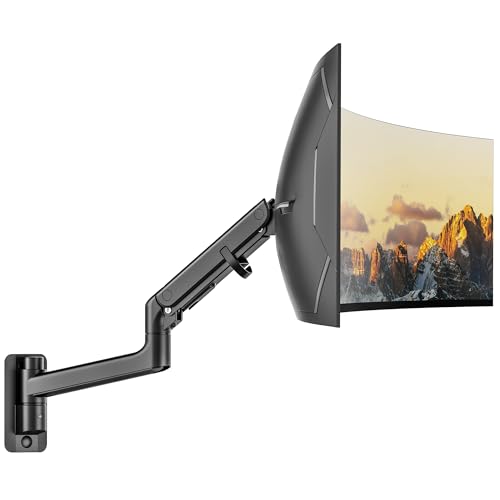
- Supports up to 59.4 lb and 57-inch screens
- Full-motion gas-spring adjustment
- Retracts close to the wall
Best For: Large ultrawide and curved monitors
Triple-Screen Workhorse
WALI Stacked Triple Monitor Wall Mount

- Supports one 49-inch center monitor
- Accommodates two side monitors up to 34 inches
- Independent full-motion adjustments
Best For: Three-monitor workstations and control setups
Low-Profile Ultrawide Pick
VIVO Telescoping Ultrawide Wall Mount

- Holds up to 49-inch, 44-pound screens
- Telescoping arms slide from 1.5 to 10.3 inches
- Pre-assembled steel design
Best For: Close-to-wall ultrawide installations
Complete Wall Workstation
Mount-It! Ultrawide Arm and Tray

- Supports 17–49-inch screens up to 44 lb
- Includes keyboard tray and CPU mount
- Offers broad monitor positioning adjustments
Best For: Wall-mounted office and industrial workstations
Heavy-Duty TV Pick
Amazon Basics Full-Motion Mount

- Supports up to 80 pounds and 55-inch displays
- 180° swivel with adjustable tilt
- Includes installation accessories
Best For: Heavy flat panels using a single-stud mount
Ultrawide Flexibility Pick

- Holds ultrawides up to 49 inches and 44 pounds
- Extends up to 23.9 inches with full rotation
- Gas spring tested for 20,000-plus fatigue cycles
Best For: Large ultrawide monitors on solid mounting surfaces
Best for Comfort

- Supports up to 49 inches and 44 pounds on wood studs
- 6.3 inches of height adjustment
- Sits 4.25 inches from the wall
Best For: Low-profile ultrawide monitor workstations
Maximum Capacity Pick
ARES WING 24–57-Inch Ultrawide Wall Mount
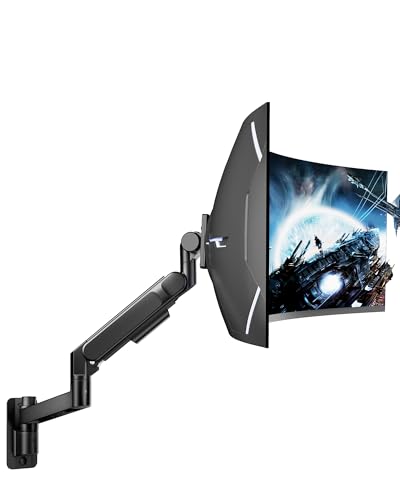
- Holds monitors up to 60 pounds and 57 inches
- Bearing head helps with heavy-screen tilt adjustments
- Steel-and-aluminum build with cable management
Best For: Oversized ultrawide monitors in gaming or professional workstations
Balanced Heavy-Display Option
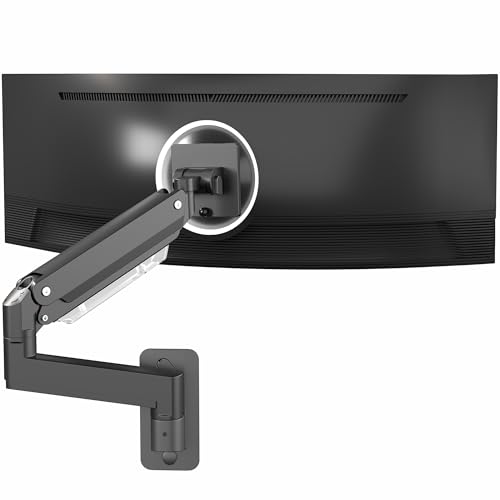
- Holds up to 44 pounds and supports ultrawides up to 49 inches
- Spring-assisted arm provides adjustable positioning
- Quick-release VESA plate and fold-back design save space
Best For: Single heavy ultrawide or curved monitors
Heavy-Duty Flex Pick – monTEK 17–57" Gas Spring Wall Mount
For shoppers comparing monitor wall mounts for heavy devices, the monTEK stands out with support for large 17–57-inch displays weighing up to 59.4 pounds. Its gas-spring arm offers broad positioning while helping reclaim desk space.
Best For: Heavy ultrawide, curved, and professional monitors in home-office or gaming setups.
Pros:
- Supports screens up to 59.4 pounds and 57 inches.
- Offers tilt, swivel, rotation, and up to 11 inches of height adjustment.
- Retracts close to the wall and includes cable management.
- Works with wood studs, brick, and concrete walls.
Cons:
- Not intended for drywall-only installation.
- Only compatible with 75x75mm and 100x100mm VESA patterns.
- A VESA adapter is not included for monitors without compatible holes.
The monTEK is a strong choice when weight capacity and full-motion adjustment matter most. Verify both the monitor’s VESA pattern and the wall structure before installation.
Triple-Screen Workhorse – WALI Stacked Triple Monitor Wall Mount
Among monitor wall mounts for heavy devices, this WALI system is designed for three-screen setups, supporting a center display up to 49 inches and side monitors up to 34 inches. Its adjustable arms help create a flexible, space-saving workstation.
Best For: Triple-monitor office, design, streaming, and monitoring setups.
Pros:
- Supports a center monitor up to 44 pounds and side monitors up to 22 pounds each.
- Provides independent tilt, swivel, and rotation adjustments.
- Telescoping arms can extend or slide together for stability and a lower-profile fit.
- Includes cable clips and supports wood studs, brick, and concrete walls.
Cons:
- Requires more wall space and planning than a single-monitor mount.
- Side arms are limited to monitors up to 34 inches and 22 pounds each.
- Compatibility is limited to 75x75mm and 100x100mm VESA patterns.
This WALI mount makes sense for users who need three displays without desk stands. Check the combined layout, wall structure, and individual monitor weights before mounting.
Low-Profile Ultrawide Pick – VIVO Telescoping Ultrawide Wall Mount
The VIVO telescoping mount is a practical option for monitor wall mounts for heavy devices when a clean, close-to-wall installation is important. It supports ultrawide screens up to 49 inches and 44 pounds with a compact sliding-arm design.
Best For: Single 49-inch ultrawide monitors where a low-profile wall position is preferred.
Pros:
- Supports ultrawide screens up to 49 inches and 44 pounds.
- Telescoping arms adjust from 1.5 to 10.3 inches for support and clearance.
- All-steel construction is designed for wood studs, brick, or concrete.
- Pre-assembled design includes a detachable VESA plate and cable clips.
Cons:
- Tilt range is limited to +7.5° to -7.5°.
- Swivel range decreases as the arms are compressed.
- Designed for 49-inch screens rather than a broad range of display sizes.
Choose the VIVO when low-profile positioning and telescoping support are more important than extensive articulation. Confirm the monitor uses a 75x75mm or 100x100mm VESA pattern.
Complete Wall Workstation – Mount-It! Ultrawide Arm and Tray
For buyers seeking monitor wall mounts for heavy devices plus a complete workstation, the Mount-It! system combines an ultrawide monitor arm, keyboard tray, and separate CPU wall mount. It supports 17–49-inch displays up to 44 pounds.
Best For: Standing workstations, warehouses, control rooms, production floors, and offices needing desk and floor space.
Pros:
- Supports flat, curved, and ultrawide monitors from 17 to 49 inches.
- Offers tilt, swivel, rotation, and gas-spring height adjustment.
- Includes a padded keyboard tray and adjustable CPU wall mount.
- Provides cable management and a limited lifetime warranty.
Cons:
- More involved than a monitor-only wall mount because it includes several components.
- Monitor capacity is limited to 44 pounds.
- Installation requires a single wood stud, brick, or solid concrete wall; drywall alone is not specified.
This is the most complete option for building a wall-mounted workstation rather than simply lifting a monitor off the desk. Its added tray and CPU support are useful when the entire setup needs to move onto the wall.
Heavy-Duty TV Pick – Amazon Basics Full-Motion Mount
For shoppers comparing monitor wall mounts for heavy devices, this Amazon Basics full-motion mount supports displays up to 80 pounds and 55 inches. Its single-stud design works with wood studs, concrete, and brick, while tilt and swivel adjustments help position the screen comfortably.
Best For: Heavy flat panels or smaller monitors using compatible VESA patterns in a single-stud installation.
Pros:
- Supports displays up to 80 pounds and 55 inches.
- Offers up to 180° swivel and +10° to -5° tilt.
- Includes mounting hardware, bubble level, template, and manual.
Cons:
- Designed for single-stud mounting rather than a wider multi-stud bracket.
- Its listed VESA range ends at 15.7 by 15.7 inches.
This is a straightforward heavy-load option when your screen fits the supported size and VESA range and the wall provides a suitable stud, concrete, or brick mounting surface.
Ultrawide Flexibility Pick – ARES WING Wall Mount Arm
Among monitor wall mounts for heavy devices, the ARES WING stands out for ultrawide screens from 17 to 49 inches and loads up to 44 pounds. Its gas-spring arm provides broad adjustment, while the manufacturer recommends mounting it to a wood stud, solid concrete, or brick wall for security.
Best For: Large ultrawide or curved monitors that need extensive positioning flexibility and desk-space savings.
Pros:
- Supports 17- to 49-inch monitors weighing up to 44 pounds.
- Provides +50° to -20° tilt, 180° swivel, 360° rotation, and up to 23.9 inches of extension.
- Includes cable management and retracts to about 5 inches from the wall.
- Internal gas spring passed 20,000-plus fatigue tests.
Cons:
- Should not be installed using the included anchor on drywall or wood alone.
- Non-VESA monitors require a separate VESA adapter.
Choose this arm when you want premium range of motion for a heavy ultrawide, but plan the wall attachment carefully and confirm the monitor has a 75×75 or 100×100 VESA pattern.
Best for Comfort – VIVO MOUNT-VW49A Wall Mount
The VIVO MOUNT-VW49A is a practical choice among monitor wall mounts for heavy devices when you need support for a 17- to 49-inch ultrawide. It holds up to 44 pounds on a wood stud, offers height adjustment and articulation, and sits only 4.25 inches from the wall.
Best For: Ultrawide monitor workstations that benefit from a low-profile mount and quick height changes.
Pros:
- Supports screens up to 49 inches and 44 pounds when wood-stud mounted.
- Offers 6.3 inches of height adjustment and 360° rotation.
- Provides +50° to -45° tilt and 40° swivel.
- Low-profile design extends only 4.25 inches from the wall.
Cons:
- Drywall-only capacity is limited to 17.6 pounds.
- Its 75x75mm or 100x100mm VESA compatibility may require an adapter for other patterns.
This mount balances heavy-screen capacity with a compact profile, making it a strong fit for standing workstations when installed on a wood stud and paired with a compatible VESA display.
Heavy-Duty Flexibility – MOUNTUP 22–43-Inch Monitor Wall Mount
For shoppers comparing monitor wall mounts for heavy devices, the MOUNTUP is built for 22- to 43-inch flat, curved, and ultrawide displays weighing up to 33.1 pounds. Its broad VESA support and full-motion adjustment make it a flexible choice, provided you can install it on a wood stud, brick, or concrete wall.
Best For: Home offices, studios, and workspaces using large curved or ultrawide monitors.
Pros:
- Supports screens from 2.2 to 33.1 pounds and up to 43 inches.
- Works with VESA patterns from 75×75 mm through 200×200 mm using the included extender.
- Offers tilt, swivel, rotation, up to 27.59 inches of extension, and 13.2 inches of height adjustment.
- Includes cable management, a detachable VESA plate, and installation hardware.
Cons:
- Not intended for drywall-only installation.
- Requires checking the display’s VESA pattern and wall structure before purchase.
The MOUNTUP stands out when compatibility and adjustability matter more than supporting the very largest displays. Its 33.1-pound capacity is substantial, while the wider VESA range helps accommodate monitors that other arms may not fit.
Maximum Capacity Pick – ARES WING 24–57-Inch Ultrawide Wall Mount
Among monitor wall mounts for heavy devices, the ARES WING is designed for especially large displays, supporting ultrawide and curved monitors up to 57 inches and 60 pounds. Its bearing-head design is intended to make angle adjustments smoother when handling a heavy screen.
Best For: Professional workstations and gaming setups with oversized ultrawide monitors.
Pros:
- Supports monitors up to 57 inches and 60 pounds.
- Uses a bearing head for easier tilt adjustment under heavy loads.
- Provides tilt, swivel, and screen rotation for ergonomic positioning.
- Steel-and-aluminum construction includes integrated cable management.
Cons:
- VESA support is limited to 75×75 and 100×100 mm.
- Non-VESA screens require a separate adapter.
- Installation should be on a wood stud, solid concrete, or brick wall.
The ARES WING is the strongest option of these three for very large, heavy ultrawide displays. Before ordering, verify both the monitor’s VESA pattern and the wall’s ability to provide a secure mounting point.
Balanced Heavy-Display Option – VIVO MOUNT-V101G1 Wall Mount
The VIVO MOUNT-V101G1 is a practical choice among monitor wall mounts for heavy devices when you need support for one ultrawide display without a bulky desktop base. Its aluminum arm holds up to 44 pounds and folds back toward the wall when the monitor is not in use.
Best For: Users mounting a single ultrawide or curved monitor up to 49 inches on a wood, concrete, or brick wall.
Pros:
- Supports one monitor weighing up to 44 pounds and measuring up to 49 inches.
- Spring-assisted adjustment helps accommodate different monitor weights.
- Offers tilt, swivel, rotation, and 13 inches of height adjustment.
- Includes a quick-release VESA plate and cable management.
Cons:
- VESA compatibility is limited to 75×75 and 100×100 mm.
- A VESA adapter is required for monitors without mounting holes and is not included.
- Installation hardware is specified for wood and concrete/brick walls, not drywall alone.
VIVO offers a useful middle ground between capacity and adjustability. It supports heavier screens than many standard monitor arms, while its quick-release bracket and fold-back design are convenient for a streamlined workspace.
How We Picked the Best Monitor Wall Mounts for Heavy Devices
We focused on mounts designed for larger displays, including ultrawide monitors, stacked multi-monitor configurations, and flat panels. The selection reflects several installation styles: gas-spring arms for flexible positioning, fixed or telescoping brackets for wide screens, articulating TV mounts, and wall-mounted workstations with keyboard support.
We also considered the practical details that matter after installation: advertised screen range, weight capacity, VESA compatibility, tilt and swivel movement, wall clearance, cable management, and whether the mount is intended for one monitor or multiple displays. Always verify the manufacturer’s current specifications before buying, particularly for curved screens and heavier panels.
Quick Comparison
| Best for | Look for | Mount style |
|---|---|---|
| One large ultrawide | High weight rating and broad screen support | Heavy-duty single arm or bracket |
| Stacked displays | Multiple VESA positions and total-load capacity | Triple-monitor wall mount |
| Desk-free workstations | Keyboard tray and reinforced wall attachment | Wall workstation |
| TV-sized flat panels | TV VESA support, tilt, and swivel range | Articulating TV mount |
| Limited wall clearance | Low-profile design or telescoping adjustment | Fixed or retractable mount |
Key Buying Factors for Monitor Wall Mounts for Heavy Devices
Weight Capacity and Screen Size
Do not choose based on diagonal size alone. Compare your monitor’s actual weight—without the original stand—with the mount’s per-screen and total capacity. Leave a safety margin for accessories such as a webcam, light bar, or specialized adapter.
VESA Pattern and Hardware
Check the monitor’s VESA mounting pattern, commonly expressed in millimeters, and confirm that the bracket includes compatible screws and spacers. Some large or curved displays require longer hardware or a particular adapter arrangement.
Wall Structure and Installation
A heavy display should attach to studs, masonry, or another properly reinforced surface—not just drywall anchors unless the manufacturer specifically permits that installation. Identify stud spacing, assess the wall material, and use a level during installation. For especially large screens, a second person is helpful.
Movement and Viewing Position
Gas-spring and articulating arms offer better reach, tilt, and swivel adjustment, while low-profile brackets sit closer to the wall and usually move less. Make sure the arm can hold the screen securely at the extension you plan to use; leverage increases when the display is pulled away from the wall.
Cable Clearance and Long-Term Stability
Look for cable channels, adequate connector clearance, and a locking or tightening mechanism that can compensate for screen weight. Recheck fasteners after installation and whenever you change the monitor.
Who Should Buy Which Monitor Wall Mounts for Heavy Devices?
Choose a Single-Monitor Arm for Flexibility
Single-screen arms suit users who frequently adjust distance, height, or viewing angle. They are a strong choice for one ultrawide monitor when the wall and mount capacity are properly matched.
Choose a Stacked Mount for Multi-Screen Layouts
A stacked or triple mount makes sense for monitoring, trading, editing, and productivity setups that need several displays while preserving desk space. Confirm both the combined weight limit and the available adjustment range.
Choose a Wall Workstation for a Desk-Free Setup
A wall workstation is best when you want the monitor and keyboard mounted together. It can work well in compact offices, standing work areas, and utility spaces, provided the wall can support the full assembly.
Choose a TV-Style Mount for a Large Flat Panel
An articulating TV mount is often the practical option for a heavier flat display or a screen used across a room. Prioritize VESA compatibility, wall clearance, and smooth access to rear ports over computer-monitor-style height adjustment.