A wall-mounted monitor can free valuable desk space while making it easier to switch between seated and standing work. The right setup depends on screen size, monitor weight, VESA compatibility, and how much adjustment you need.
We compared 10 monitor wall mounts for standing desks, including single-screen arms, dual-monitor systems, laptop platforms, keyboard trays, and heavy-duty configurations for larger displays.
Best 10 Monitor Wall Mounts for Standing Desks Picks for 2026
Best Overall Wall Mount
VIVO Single Monitor Wall Mount

- Fits 17-32-inch monitors up to 17.6 pounds
- Provides tilt, swivel, rotation, and height adjustment
- Low-profile 5.1cm wall clearance
Best For: Single-monitor standing workstations
Best for Dual Screens
ErGear Adjustable Dual Monitor Arm

- Holds two 13-32-inch monitors
- Independent adjustment for each screen
- Tool-free VESA mounting and cable clips
Best For: Wooden desks with dual-monitor setups
Best Long-Reach Option
MOUNT PRO Laptop and Monitor Wall Mount

- Extends up to 28 inches from the wall
- Works with laptops or 21-32-inch monitors
- Includes ventilated tray and cable management
Best For: Sit-stand setups needing laptop and monitor flexibility
Best for Large Multi-Monitor Setups
VIVO Triple Monitor Desk Mount
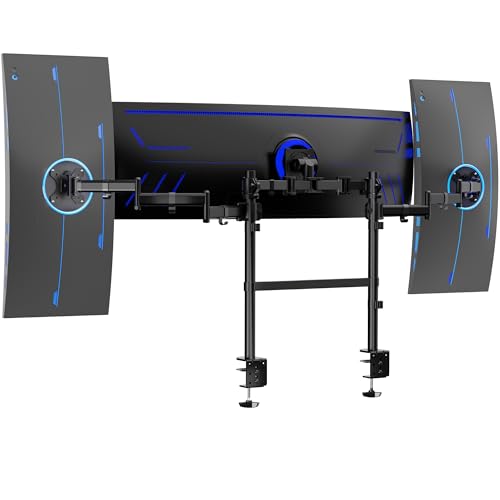
- Supports a center ultrawide up to 49 inches
- Accommodates two side screens up to 38 inches
- Dual clamps fit desks up to 3.3 inches thick
Best For: Large ultrawide and triple-monitor workstations
Best Heavy-Duty Workstation
Sit-Stand Monitor Wall Mount Arm

- 19.9-inch height adjustment with full rotation and dual swivel points
- Includes keyboard tray, CPU holder, and cable routing
- Lifetime warranty; mounts to wood studs or concrete
Best For: Shared workstations and complete wall-mounted setups
Best Full-Motion Value
PEGZONE Single Monitor Wall Mount

- Fits 17-32-inch monitors up to 19.8 pounds
- Wide tilt range plus swivel and rotation adjustments
- Supports stud, brick, and concrete installation
Best For: Compact offices and flexible single-monitor setups
Best Desk-Mounted Alternative
NB SmooVex Mechanical Spring Arm

- Mechanical spring arm for monitors up to 32 inches
- 230mm height travel with broad tilt and rotation adjustment
- C-clamp and grommet installation options
Best For: Renters and setups where wall drilling is impractical
Space-Saving Workstation
Height-Adjustable Keyboard Wall Mount

- 25-inch keyboard-and-mouse tray
- Adjustable height with 25-degree tilt
- Monitor mount sold separately
Best For: Shared or compact wall-mounted standing workstations
Flush Dual-Screen Setup
Telescoping Desk Monitor Mount

- Supports two monitors up to 32 inches
- Arms create a flush-to-wall setup
- C-clamp or grommet installation
Best For: Dual-screen desks needing flexible, non-wall installation
Ergonomic Dual-Monitor Mount

- Holds two screens up to 32 inches
- Swivels, tilts, rotates, and adjusts vertically
- Fits wood studs, concrete, and brick
Best For: Adjustable dual-monitor standing desks with wall space
Best Overall Wall Mount – VIVO Single Monitor Wall Mount
For shoppers comparing monitor wall mounts for standing desks, the VIVO MOUNT-VW01A is a straightforward single-screen option with useful ergonomic adjustment. It supports 17- to 32-inch monitors up to 17.6 pounds and mounts to wood studs or drywall.
Best For: Single-monitor standing workstations that need a low-profile, height-adjustable wall mount.
Pros:
- Supports 17- to 32-inch screens with 75x75mm or 100x100mm VESA patterns.
- Offers tilt, swivel, 360-degree rotation, and 16cm of height adjustment.
- Sits only 5.1cm from the wall and includes a three-year warranty.
Cons:
- Supports only one monitor.
- Hardware for curved or recessed monitor backs is not included.
The VIVO is a practical pick when you want to reclaim desk space without giving up portrait orientation or basic positioning flexibility. Its 17.6-pound capacity makes it best suited to standard single-monitor setups.
Best for Dual Screens – ErGear Adjustable Dual Monitor Arm
Although it is a tabletop mount rather than a true wall mount, the ErGear dual monitor arm is worth considering alongside monitor wall mounts for standing desks when you need two independently positioned screens. It fits 13- to 32-inch monitors and supports up to 19.8 pounds total.
Best For: Wooden standing desks that need flexible dual-monitor positioning and cable organization.
Pros:
- Supports two flat or curved monitors with 75x75mm or 100x100mm VESA patterns.
- Offers independent height, tilt, swivel, and rotation adjustments.
- Includes tool-free VESA mounting, cable clips, and a five-year warranty.
Cons:
- It mounts to a desk, not directly to a wall.
- The manufacturer recommends installation on a wooden desk without an obstructing underside crossbeam.
Choose the ErGear when dual-screen flexibility matters more than wall installation. Its clamp or grommet mounting options can free desk space while retaining a wide range of monitor movement.
Best Long-Reach Option – MOUNT PRO Laptop and Monitor Wall Mount
The MOUNT PRO XPR3721 stands out among monitor wall mounts for standing desks when you need extra reach or laptop compatibility. Its arm extends up to 28 inches from the wall and converts between a ventilated laptop tray and a VESA monitor mount.
Best For: Sit-stand workstations, laptops, or monitors that require extended reach from a sturdy wall.
Pros:
- Supports 11- to 17-inch laptops and 21- to 32-inch monitors weighing 4.4 to 19.8 pounds.
- Provides up to 28 inches of reach, plus tilt, swivel, and rotation.
- Includes a ventilated tray, adjustable straps, cable management, and mounting hardware.
Cons:
- Must not be installed into drywall alone.
- The monitor function requires removing the laptop tray and using a compatible VESA pattern.
This is a versatile choice for users who alternate between a laptop and external monitor. The long arm supports broad positioning changes, but installation requires a wood stud, cement wall, or concrete brick wall.
Best for Large Multi-Monitor Setups – VIVO Triple Monitor Desk Mount
For large displays, the VIVO STAND-V300CU offers a heavy-duty alternative to monitor wall mounts for standing desks. This clamp-on setup supports a center ultrawide up to 49 inches and two side screens up to 38 inches, with dual poles for added positioning flexibility.
Best For: Large, multi-monitor standing desks using an ultrawide center display and side screens.
Pros:
- Supports a center screen up to 49 inches and side monitors up to 38 inches.
- Provides height adjustment, tilt, swivel, and 360-degree rotation.
- Dual heavy-duty C-clamps fit desks up to 3.3 inches thick and support straight or corner desks.
Cons:
- It is a tabletop mount rather than a wall mount.
- Three same-size screens will not align in a horizontal array.
- The center monitor’s capacity varies between curved and flat displays.
The STAND-V300CU is designed for demanding workstation layouts rather than minimalist single-screen setups. Its substantial size and clamp-based installation make it most appropriate for sturdy desks with enough surface and rear clearance.
Best Heavy-Duty Workstation – Sit-Stand Monitor Wall Mount Arm
For shared offices, labs, and other work areas that need monitor wall mounts for standing desks, this Mount-It! system goes beyond the screen. It combines a height-adjustable monitor arm with a keyboard tray, CPU holder, and cable routing, while supporting installation on a wood stud or concrete wall.
Best For: Shared workstations, busy offices, labs, and floor-space-conscious home offices.
Pros:
- Gas-spring adjustment provides 19.9 inches of height travel, 360-degree rotation, two 180-degree swivel points, and 15-degree tilt.
- Includes a 26-inch keyboard tray and adjustable CPU holder, helping move the entire workstation off the floor.
- Supports 4.4-17.6-pound monitors with 75x75mm or 100x100mm VESA patterns.
- Includes mounting hardware, cable routing, and a lifetime manufacturer warranty.
Cons:
- Requires a secure wood-stud or concrete installation; it is not intended for drywall alone.
- Its 26-inch screen-size range tops out below some larger-monitor setups.
- The complete system weighs 28.9 pounds, so installation may require more planning than a basic arm.
This is the most complete option of the three for creating a wall-mounted sit-stand station. Choose it when you need the keyboard and computer tower off the floor as well as the monitor, rather than a monitor arm alone.
Best Full-Motion Value – PEGZONE Single Monitor Wall Mount
This PEGZONE model is a straightforward choice for monitor wall mounts for standing desks when you want broad viewing adjustment without occupying desk space. Its mechanical spring arm fits many 17- to 32-inch flat or curved screens and is designed for wood studs, brick, or concrete.
Best For: Compact home offices, gaming setups, and users who want a flexible single-monitor wall mount.
Pros:
- Supports 4.4-19.8-pound monitors from 17 to 32 inches with 75x75mm or 100x100mm VESA mounting.
- Offers +80 to -45 degrees of tilt, 90-degree swivel, and 180-degree rotation.
- Includes quick-release VESA hardware and integrated cable management.
- Can be installed on wood studs, brick, or concrete and includes a two-year manufacturer warranty.
Cons:
- Drywall-only installation is not supported.
- The spring tension must be adjusted for the monitor’s weight to prevent the arm from rising or sagging.
- It is a single-monitor mount without the keyboard tray or CPU holder included with the Mount-It! system.
With its wider monitor-size and weight range, this mount is a practical middle ground for a single display. Its generous tilt range is especially useful when you need to fine-tune the screen for seated, standing, or gaming positions.
Best Desk-Mounted Alternative – NB SmooVex Mechanical Spring Arm
The NB SmooVex is not a wall mount, but it can suit shoppers comparing monitor wall mounts for standing desks with desk-mounted alternatives. Its mechanical spring arm supports monitors up to 32 inches and attaches with either a C-clamp or grommet, making it useful when wall installation is impractical.
Best For: Renters, home offices, and desk setups where a clamp or grommet mount is preferable to drilling into a wall.
Pros:
- Mechanical spring construction is designed for stable daily movement without gas leakage concerns.
- Supports most flat and curved monitors up to 32 inches with 75x75mm or 100x100mm VESA patterns.
- Provides 230mm of height travel, 90-degree rotation, swivel adjustment, and -25 to 90 degrees of tilt.
- Includes both C-clamp and grommet mounting options plus a two-year warranty.
Cons:
- It is a tabletop mount, not a wall-mounted product.
- Desk space and a suitable mounting edge or grommet hole are required.
- The supplied notes do not specify a maximum monitor weight.
If drilling into a wall is not an option, this arm offers a flexible alternative with broad monitor compatibility and a compact installation approach. Consider it for a standing-desk setup where the monitor needs height adjustment but the wall must remain untouched.
Space-Saving Workstation – Height-Adjustable Keyboard Wall Mount
If you are comparing monitor wall mounts for standing desks, the Mount-It! MI-7915 is designed to turn a wall into a compact monitor-and-keyboard station. Its 25-inch tray supports a keyboard and mouse side by side, while the adjustable height and wrist-focused features suit sit-stand or shared work areas. Note that a separate VESA monitor wall mount is required.
Best For: Shared workstations and space-conscious standing setups that need an integrated keyboard tray.
Pros:
- 25-inch platform fits a keyboard and mouse together.
- Height-adjustable tray accommodates different users.
- Includes cable management, a mouse pad, wrist padding, and a 25-degree tray tilt.
- Supports VESA 75×75 and 100×100 mounts.
Cons:
- A monitor wall mount is not included.
- Requires wall installation and assembly.
The MI-7915 is more than a monitor arm: it adds a dedicated keyboard surface for a complete wall-mounted standing station. It is a practical option when desk space is limited, provided you already have—or plan to choose—the compatible VESA monitor mount.
Flush Dual-Screen Setup – Telescoping Desk Monitor Mount
For shoppers seeking monitor wall mounts for standing desks without drilling into the wall, the VIVO STAND-V002E creates a flush-to-wall arrangement from the desktop. It supports two 21- to 32-inch monitors, with telescoping arms that extend from 20 to 30.5 inches and keep the setup from projecting beyond the desk’s rear edge.
Best For: Dual-monitor standing desks where a desk-mounted, wall-adjacent setup is preferred over permanent wall installation.
Pros:
- Holds two monitors up to 32 inches and 22 pounds each.
- Telescoping arms provide a flush setup near the wall.
- Offers tilt, swivel, rotation, height adjustment, and portrait or landscape positioning.
- Installs with a C-clamp or optional grommet mount on desks up to 3.25 inches thick.
Cons:
- It is a tabletop mount rather than a true wall mount.
- Designed for two screens, so it may be more hardware than needed for a single-monitor setup.
This VIVO mount is a strong fit when flexibility matters and you want the visual benefit of a wall-hugging arrangement without attaching hardware to the wall. Its broad adjustment range also makes it suitable for alternating seated and standing positions.
Ergonomic Dual-Monitor Mount – Articulating Wall Stand
The HUANUO HNWDS1 is a true wall-mounted option for monitor wall mounts for standing desks, supporting two 17- to 32-inch screens while freeing the desktop. Its articulating arms allow height and viewing-angle adjustments, making it easier to position displays for either seated or standing use.
Best For: Dual-monitor home offices or gaming desks that need an adjustable, space-saving wall installation.
Pros:
- Supports two monitors up to 32 inches and 17.6 pounds per arm.
- Compatible with VESA 75×75 and 100×100 patterns.
- Provides +/-90-degree swivel, +/-35-degree tilt, and 360-degree rotation.
- Includes cable management and hardware for wood studs, solid concrete, and brick.
Cons:
- Limited to monitors within the listed size, weight, and VESA specifications.
- Wall installation requires a suitable mounting surface and careful placement.
With support for common wall surfaces and extensive articulation, the HNWDS1 offers a versatile way to clear a standing desk while keeping two screens adjustable. Check your monitor weights and wall structure before installation to confirm compatibility.
How We Picked These Monitor Wall Mounts for Standing Desks
We focused on practical features that affect everyday use: supported screen size and weight, VESA compatibility, height and tilt adjustment, wall clearance, installation requirements, and the ability to support a standing workflow. The selection includes fixed and articulated arms, single and multi-monitor designs, laptop holders, and models with integrated keyboard or CPU support.
Because wall construction and monitor specifications vary, treat listed capacity as a starting point rather than a guarantee. Always confirm the mount’s load rating, mounting hardware, and VESA pattern before installation.
Quick Comparison
| Best For | Recommended Type | What to Check First |
|---|---|---|
| One standard monitor | Single articulated wall arm | Screen weight, VESA pattern, and reach |
| Two monitors | Dual-arm wall mount | Combined capacity and arm clearance |
| Ultrawide setups | Heavy-duty or specialized multi-monitor mount | Width, center-of-gravity support, and wall strength |
| Laptop-based work | Extended laptop wall holder | Platform dimensions and height range |
| Complete sit-stand station | Wall mount with keyboard tray | Tray height, depth, and CPU support |
Key Buying Factors for Monitor Wall Mounts for Standing Desks
Screen Size, Weight, and VESA Fit
Check both the diagonal-size range and maximum weight per arm. A large display may fall within the advertised size range but exceed the mount’s capacity. Most compatible monitors use 75x75mm or 100x100mm VESA mounting patterns, but verify your monitor before ordering.
Adjustment Range and Standing Height
Look for height adjustment that lets you position the top of the screen near eye level while standing. Tilt, swivel, rotation, and extension are useful when sharing a display or changing posture. Long arms provide flexibility but require more wall clearance and stronger installation.
Wall Compatibility and Installation
Mounting into a stud or suitable masonry is generally more secure than relying on drywall anchors alone. Confirm stud spacing, wall material, included hardware, and whether the bracket can sit flush against the wall. Cable routing channels can also improve the finished setup.
Desk Layout and Accessories
Dual and triple-monitor systems need enough horizontal space and may require careful balancing. If you want a keyboard tray, laptop platform, or CPU holder, confirm that the accessory positions do not interfere with your standing desk, chair, or nearby shelves.
Who Should Buy Which Monitor Wall Mounts for Standing Desks?
Choose a single-monitor arm if you want a clean, space-saving workstation with straightforward adjustment. A dual-arm model is better for productivity users who keep email, documents, or reference material visible beside a primary display. Ultrawide and triple-screen users should prioritize capacity, arm stability, and wall reinforcement over the lowest price.
Pick a laptop wall mount when portability and a compact footprint matter most. For a dedicated standing workstation, a model with a keyboard tray or CPU holder can create a more complete setup, but it usually needs more careful measurement and installation. If you frequently reposition screens, favor spring-assisted or fully articulated arms; if the monitor will remain in one position, a simpler mount may provide better value and stability.