A good laptop mount can turn a crowded desk into a more comfortable, adaptable workstation. These adjustable laptop mounts support laptops alongside monitors, helping you improve screen height, viewing angles, and workspace organization.
We selected 10 options with different clamp and grommet designs, weight limits, tray sizes, and monitor compatibility so you can find a mount that fits your laptop and desk setup.
Best 10 Adjustable Laptop Mounts Picks for 2026
Best Overall
HUANUO 2-in-1 Laptop and Monitor Arm

- Ventilated 14-by-12-inch laptop tray
- Up to 17 inches of height adjustment
- Supports laptops or 13- to 32-inch VESA monitors
Best For: Flexible laptop-and-monitor desk setups
Best for Large Laptops
WALI Adjustable Laptop Desk Mount

- Fits laptops up to 17 inches
- Supports up to 22 pounds
- Includes C-clamp and grommet bases
Best For: Large notebooks and adaptable desk setups
Best for Cooling
HUANUO Laptop Desk Mount with Ventilated Tray

- Tray has 240 ventilation holes
- Fits laptops up to 17 inches
- Converts for 15- to 32-inch VESA monitors
Best For: Airflow-focused laptop and monitor setups
Best Range of Motion
VIVO Adjustable Laptop Desk Mount

- Offers plus-or-minus 90-degree tilt
- Includes 360-degree rotation and 16.5-inch extension
- Supports laptops up to 17 inches and 22 pounds
Best For: Highly repositionable laptop workstations
Best Heavy-Duty 2-in-1

- Supports 17-inch laptops and monitors up to 32 inches
- Full-motion gas-spring arm with 22-pound capacity
- Ventilated tray and clamp or grommet installation
Best For: Standing desks and dual-screen setups
Best Established Value
VIVO Laptop and Monitor Desk Mount

- Holds laptops up to 17 inches and monitors up to 32 inches
- Provides tilt, swivel, rotation, and height adjustment
- Backed by a 3-year warranty and tech support
Best For: Home offices and everyday dual-screen use
Best Space-Saving Setup
MOUNT PRO Universal Laptop Arm

- Switches between a 17-inch laptop tray and VESA monitor mount
- Offers wide tilt, swivel, and rotation adjustment
- Includes anti-slip tray features and cable management
Best For: Compact desks and flexible laptop-or-monitor setups
Best for Large Monitors

- Handles laptops up to 17 inches and monitors up to 34 inches
- Extends 18.1 inches with broad motion adjustment
- Tray adds ventilation, anti-slip pads, and securing straps
Best For: Flexible workstations with larger external monitors
Best for Pole Mounting
WALI Adjustable Laptop Pole Mount
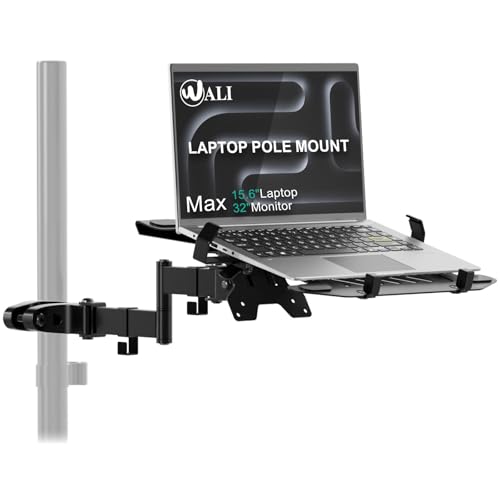
- Attaches to poles from 1.1 to 2.36 inches in diameter
- Supports 10- to 15.6-inch laptops up to 15.4 pounds
- Full-motion arm suits desks, RVs, and vehicle setups
Best For: Mobile workstations and space-constrained installations
Best Overall – HUANUO 2-in-1 Laptop and Monitor Arm
For shoppers comparing adjustable laptop mounts, the HUANUO HNCM2 stands out as a flexible 2-in-1 desk arm. Its ventilated 14-by-12-inch tray supports laptops, while the removable monitor-compatible arm handles screens from 13 to 32 inches.
Best For: Users who want one adjustable mount for either a laptop or a VESA monitor.
Pros:
- Supports laptops on a ventilated tray with a 0.8-inch retaining lip.
- Offers tilt, swivel, rotation, and up to 17 inches of height adjustment.
- Includes C-clamp and grommet mounting options for compatible wooden desks.
- Integrated cable management helps keep wires organized.
Cons:
- Mounting hardware is specified for wooden desks only.
- Monitor and laptop weight must remain within the 22-pound capacity.
This is a well-rounded choice when flexibility matters. Confirm your desk material, device dimensions, VESA pattern, and weight before installation.
Best for Large Laptops – WALI Adjustable Laptop Desk Mount
The WALI M00LP is among the more accommodating adjustable laptop mounts for larger notebooks. Its tray fits laptops up to 17 inches and the arm also supports a compatible monitor, making it useful for changing between laptop and screen configurations.
Best For: Owners of laptops up to 17 inches who want broad desk-mounting compatibility.
Pros:
- Supports laptops or monitors weighing up to 22 pounds.
- Includes a ventilated 14-by-11-inch tray with a retaining lip.
- Provides up to 16 inches of height adjustment, plus tilt, swivel, and rotation.
- C-clamp and grommet options fit a range of compatible desk thicknesses.
Cons:
- The tilt range is limited to plus or minus 15 degrees.
- Compatibility depends on the laptop size, device weight, and monitor VESA pattern.
Choose this model if laptop size and mounting versatility are priorities. Its 10-year warranty is also a notable consideration for long-term use.
Best for Cooling – HUANUO Laptop Desk Mount with Ventilated Tray
Among adjustable laptop mounts, the HUANUO HNCM16 emphasizes airflow and setup flexibility. Its 240-hole tray fits laptops up to 17 inches, and the tray can be removed when you want to use the arm with a 15- to 32-inch VESA monitor.
Best For: Users who value a highly ventilated tray and frequently switch between laptop and monitor use.
Pros:
- Ventilated 13.8-by-11.8-inch tray includes 240 airflow holes.
- Supports laptops up to 17 inches or compatible monitors from 15 to 32 inches.
- Offers plus-or-minus 45-degree tilt, swivel, 360-degree rotation, and a 15-inch pole.
- Cable clips help route wires along the arm and pole.
Cons:
- Installation options are specified for compatible wood desks.
- The maximum supported load is 22 pounds.
This model is a practical pick for users who want cooling-focused laptop support without giving up monitor compatibility. Check the desk and device specifications before ordering.
Best Range of Motion – VIVO Adjustable Laptop Desk Mount
The VIVO STAND-V001L is a strong option for shoppers seeking adjustable laptop mounts with extensive positioning control. Its ventilated tray fits laptops up to 17 inches, while the articulated arm offers broad tilt, swivel, rotation, and extension adjustments.
Best For: Workspaces that need wide positioning flexibility and drill-free mounting.
Pros:
- Supports laptops up to 17 inches and 22 pounds.
- Provides plus-or-minus 90-degree tilt, 180-degree swivel, and 360-degree rotation.
- Tray extension reaches up to 16.5 inches, with height adjustment along a 17-inch pole.
- Includes C-clamp and grommet mounting options plus cable clips.
Cons:
- The included C-clamp and grommet mounts have different desk-thickness limits.
- Monitor compatibility requires a suitable mounting pattern and can extend beyond the stated laptop use.
With its especially broad articulation range, this VIVO mount suits users who regularly reposition their laptop. Verify desk thickness and device compatibility before assembly.
Best Heavy-Duty 2-in-1 – MOUNT PRO Laptop Arm Mount
This MOUNT PRO model is one of the more capable adjustable laptop mounts for users who want to alternate between a laptop tray and a VESA monitor arm. It supports laptops up to 17 inches and devices weighing from 4.4 to 22 pounds, with a gas-spring arm designed for flexible positioning.
Best For: Standing desks, dual-screen workstations, and users who need a higher weight capacity.
Pros:
- Supports laptops up to 17 inches and monitors up to 32 inches.
- Offers tilt, swivel, and rotation adjustments, including 360-degree rotation.
- Includes a ventilated tray with adjustable side clamps and integrated cable management.
- Provides both C-clamp and grommet mounting options.
Cons:
- Gas-spring tension must be adjusted to match the device weight.
- The larger arm and higher capacity may be more than needed for lightweight laptops.
Choose this model if adjustability and capacity are priorities. Its broad motion range and removable tray make it practical for switching between laptop-only and laptop-plus-monitor setups while freeing desk space.
Best Established Value – VIVO Laptop and Monitor Desk Mount
The VIVO STAND-V002C is a practical choice among adjustable laptop mounts for pairing a laptop with one monitor. Its vented tray fits laptops up to 17 inches, while the VESA arm supports compatible 13- to 32-inch monitors weighing up to 10 kilograms.
Best For: Home offices and users who want a straightforward laptop-and-monitor mount with a generous warranty.
Pros:
- Fits laptops up to 17 inches and monitors from 13 to 32 inches.
- Offers tilt, swivel, rotation, and height adjustment.
- Includes detachable cable clips and a vented laptop tray.
- Comes with a 3-year manufacturer warranty and tech support.
Cons:
- The listed monitor tilt range is limited to plus or minus 15 degrees.
- The grommet mount is optional rather than the primary mounting method.
This is a sensible all-purpose option when you need basic articulation, broad screen compatibility, and desk-clamp installation. The warranty and included assembly hardware add reassurance for a long-term office setup.
Best Space-Saving Setup – MOUNT PRO Universal Laptop Arm
This MOUNT PRO arm is a versatile option for adjustable laptop mounts when you want to switch between a laptop and a VESA monitor. The tray fits notebooks up to 17 inches, while removing it opens compatibility with 13- to 32-inch monitors weighing up to 19.8 pounds.
Best For: Compact workstations, students, home offices, and users who frequently change between laptop and monitor modes.
Pros:
- Works with laptops, MacBooks, Chromebooks, and compatible VESA monitors.
- Offers minus 45 to plus 90 degrees of tilt, 180-degree swivel, and 360-degree rotation.
- Uses a ventilated tray with anti-slip pads and Velcro straps.
- Supports clamp or grommet mounting and includes cable management.
Cons:
- The tray should not be rotated to a vertical position.
- Its maximum supported load is lower than the heavier-duty MOUNT PRO model.
For a tidy desk with flexible viewing angles, this model offers a strong balance of functionality and space savings. The removable tray is especially useful if your setup changes between a notebook and an external display.
Best with Extra Features – UPGRAVITY Adjustable Laptop Desk Mount
This UPGRAVITY mount is a versatile choice among adjustable laptop mounts, supporting laptops up to 17 inches or VESA-compatible monitors up to 32 inches. Its articulated arm, ventilated tray, and dual mounting options make it practical for ergonomic desk setups.
Best For: Users who want one adjustable mount for either a larger laptop or an external monitor.
Pros:
- Supports laptops up to 17 inches and monitors up to 32 inches.
- Offers 90° tilt, 180° swivel, 360° rotation, and height adjustment.
- Includes clamp and grommet mounting options plus cable clips.
Cons:
- The laptop tray is limited to the supplied 11.8-by-10.4-inch size.
- Monitor use requires a VESA 75x75mm or 100x100mm pattern.
With a 17.6-pound capacity and a detachable tray, this is a flexible desk mount for switching between laptop and monitor modes. The included hardware and cable-management features add convenience for a more organized workstation.
Best for Large Monitors – HUANUO 2-in-1 Laptop Mount
The HUANUO 2-in-1 is one of the more adaptable adjustable laptop mounts for users who may alternate between a notebook and a large external display. Remove the tray for monitors up to 34 inches, or keep it attached for laptops up to 17 inches.
Best For: Multitaskers who want a pre-assembled mount that can switch between laptop and monitor use.
Pros:
- Supports laptops up to 17 inches or VESA monitors from 13 to 34 inches.
- Provides ±45° tilt, ±90° swivel, 360° rotation, and an 18.1-inch arm extension.
- Ventilated tray includes anti-slip pads, a bottom guard, and Velcro straps.
Cons:
- The counterbalanced arm may rise when the laptop is removed.
- Monitor and laptop weight capacity varies from 4.85 to 19.8 pounds.
This model stands out for its broad monitor compatibility and secure tray design. Its C-clamp and grommet options accommodate a range of desk thicknesses, while the pre-assembled arm can simplify installation.
Best for Pole Mounting – WALI Adjustable Laptop Pole Mount
The WALI 011ARMLPN takes a different approach to adjustable laptop mounts by attaching to poles measuring 1.1 to 2.36 inches in diameter. Its compact, full-motion arm is suited to desk poles, RVs, vehicle headrests, and other space-constrained work areas.
Best For: Travelers, RV users, and anyone building a laptop workstation around an existing pole.
Pros:
- Fits 10- to 15.6-inch laptops with a maximum load of 15.4 pounds.
- Offers ±45° tilt, ±90° swivel, and a 10.1-inch arm extension.
- Works with compatible poles and includes a removable tray for monitor use.
Cons:
- It requires a suitable pole rather than mounting directly to a standard desktop.
- Laptop compatibility is limited to 15.6 inches.
- The supplied notes do not specify the monitor size range.
For mobile or unconventional setups, the WALI’s pole-based design can free valuable surface area while keeping the laptop firmly clamped. Its 10-year warranty is another useful advantage for a mount intended for frequent or varied use.
How We Picked the Best Adjustable Laptop Mounts
We focused on mounts that offer practical adjustability, broad laptop compatibility, and secure desk installation. The lineup includes single laptop arms, laptop-and-monitor combinations, and pole-style designs. We also compared stated weight capacities, supported screen sizes, mounting methods, tray dimensions, and the range of motion available for positioning the laptop.
Because desk layouts vary, we included both C-clamp and grommet-compatible options where specified. Product descriptions and specifications were also checked for laptop-size limits, VESA monitor support, and whether the tray is removable or designed as part of a 2-in-1 workstation.
Quick Comparison
| Feature | What to compare | Why it matters |
|---|---|---|
| Laptop capacity | Up to 15.6, 17, or larger notebook sizes | Ensures the tray safely supports your device |
| Monitor support | Typically 13–32 or up to 34 inches | Useful for dual-screen configurations |
| Weight rating | Often up to 22 pounds | Provides a safety margin for heavier laptops or monitors |
| Desk attachment | C-clamp, grommet, or pole mount | Determines installation compatibility and stability |
| Movement | Height, tilt, swivel, and extension range | Helps match the mount to your posture and desk depth |
Key Buying Factors for Adjustable Laptop Mounts
Size and Weight Compatibility
Check your laptop’s screen size, dimensions, and weight before choosing a mount. A tray listed for a 17-inch notebook may not fit every 17-inch model, especially if the laptop has a deep chassis or a bulky protective case. Keep the mount’s weight rating in mind when using a heavier gaming or workstation laptop.
Mounting Method and Desk Clearance
C-clamps are convenient for many desks and usually require no drilling, but they need adequate rear clearance. Grommet mounts can provide a clean, stable installation when your desk has a compatible cable hole. Measure the desktop thickness and inspect the underside for drawers, frames, or crossbars that could interfere with installation.
Adjustability and Stability
Look for height adjustment, tilt, swivel, and extension features that match how you work. A mount that moves easily but sags under load is not useful, so prioritize a sturdy arm and a tray with a reliable lip or retention design. Tighten all joints after positioning and follow the manufacturer’s installation instructions.
Monitor and VESA Compatibility
If you plan to mount a monitor as well as a laptop, confirm the display’s VESA pattern and weight. Most compatible monitors use a standard VESA layout, but the arm’s stated screen-size range and capacity still apply. A removable tray can also make the mount more versatile if your setup changes later.
Who Should Buy Which Adjustable Laptop Mounts?
Choose a single laptop mount if you mainly need to raise, reposition, or clear space around one notebook. A laptop-and-monitor combo is better for a dual-screen home office, creative workstation, or study setup. Consider a pole mount when you want a vertical, space-conscious arrangement or need to share a mounting point with another display.
For maximum flexibility, prioritize full-motion arms with broad height and tilt adjustment. For a simpler installation, select a model whose clamp fits your desk without adapters. Before ordering, verify the exact laptop dimensions, desk thickness, available clearance, and monitor VESA specifications.