A good monitor light bar can brighten your desk without consuming valuable space or creating distracting reflections. Curved displays need extra attention, though, because a poorly matched mount or beam pattern can leave uneven lighting or cause glare.
We compared 10 monitor light bars for curved screens across fit, adjustability, controls, color modes, RGB features, and everyday usability to help you find the right match for your setup.
Best 10 Monitor Light Bars for Curved Screens Picks for 2026
Best Overall for Large Ultrawides
Quntis ScreenLinear Curved RGB

- Fits 34-inch-plus curved displays with 800R–3000R curvature
- Dual foldable lighting with 15 RGB backlight modes
- RG0, Ra98, sensor, memory, and adjustable USB-C-powered clamp
Best For: Large ultrawide gaming and workstations
Best Smart Sensor Pick
LYMAX Curved Monitor Light Bar

- PIR sensor provides automatic on/off operation
- Remote and touch controls offer stepless dimming
- RG0, flicker-free, Ra97, and 2700K–6500K adjustment
Best For: Hands-free lighting for long work or gaming sessions
Best for Flexible Coverage
Quntis Curved Monitor Light Bar Glow
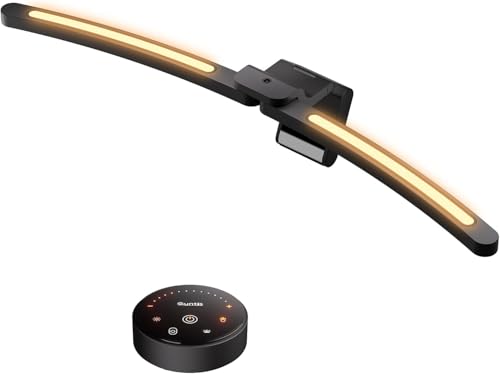
- 26-inch arc supports 800R–3000R ultrawides
- Two independently pivoting light bars
- Ra98 lighting with auto-dimming and memory
Best For: Ultrawide desks with changing lighting needs
Best Versatile Mid-Size Option
ONWAY Curved Monitor Light Bar

- Fits 27- to 34-inch curved and irregular-backed screens
- Remote-controlled white lighting plus 10 RGB modes
- Camera-mount compatibility and memory function
Best For: Mid-size home-office and gaming monitors
RGB Curved-Screen Setup
Quntis 17.7-inch RGB Light Bar

- 900-lux dimmable front light with adjustable color temperature
- 13 RGB presets plus 10 music-sync modes
- 17–34-inch curved and flat monitor compatibility
Best For: Gamers, streamers, and RGB-focused workstations
Simple Eye-Care Lighting
Laliled Curved Monitor Light Bar

- Asymmetrical, flicker-free desk illumination
- Stepless dimming with three color temperatures
- Snap-on clip fits 1–5 cm monitor thicknesses
Best For: Home offices, studying, reading, and basic gaming setups
Large Curved Monitor Fit

- Designed for 27–34-inch curved monitors
- Stepless 10%–100% dimming and 2900K–6500K adjustment
- Base-free clip-on design with wireless remote
Best For: Large curved-monitor work and gaming desks
Best Overall for Flexible Setups
Quntis Focus 20.1-Inch Monitor Light Bar

- Fits 17- to 32-inch flat, curved, and irregular monitors
- Remote-controlled dimming and color temperature adjustment
- Auto-dimming, timer, and glare-reducing asymmetrical light
Best For: Curved and ultrawide monitor users seeking broad compatibility
Best for Compact RGB Gaming Desks
KeoPuals Curved Monitor Light Bar

- Sized for 24- to 27-inch curved monitors
- Adds seven-color RGB gaming backlighting
- Touch dimming with three color-temperature options
Best For: Gamers wanting compact curved-monitor lighting with RGB ambiance
Best for Curved-Only RGB Setups
Geisofu Curved RGB Monitor Light Bar

- Combines front desk lighting with seven-color RGB backlighting
- Offers stepless dimming, three color temperatures, and memory
- Adjustable clamp fits monitors 0.2 to 2 inches thick
Best For: Curved-screen gaming desks with compatible monitor thickness
Best Overall for Large Ultrawides – Quntis ScreenLinear Curved RGB
For shoppers comparing monitor light bars for curved screens, the Quntis ScreenLinear stands out for large 34-inch-and-up displays. Its 26-inch curved bar, foldable dual lighting, and broad compatibility help provide more even desk illumination without screen glare.
Best For: Large ultrawide curved monitors, gaming setups, and users who want RGB bias lighting plus automatic brightness adjustment.
Pros:
- Designed for 34-inch-and-larger curved screens with 800R–3000R curvature.
- Provides stepless brightness and 3000K–6500K color-temperature adjustment, plus 15 RGB backlight modes.
- Offers RG0 low-blue-light certification, flicker-conscious lighting, and high Ra98 color rendering.
- Includes a sensor, memory function, adjustable clamp, and right-angle USB-C cable.
Cons:
- Its large 26-inch size may be excessive for smaller monitors.
- The feature-rich design may be more than users need for basic desk lighting.
The Quntis is a strong all-around choice when screen size, curved coverage, and customization matter most. Its dual-light design is especially useful for wide desks and late-night gaming or work.
Best Smart Sensor Pick – LYMAX Curved Monitor Light Bar
The LYMAX is a practical option among monitor light bars for curved screens when hands-free operation is a priority. It is designed for 34-inch-and-larger displays and combines a curved optical design with presence sensing, remote control, and adjustable white lighting.
Best For: Users who want automatic on/off operation, remote adjustments, and comfortable lighting for long work or gaming sessions.
Pros:
- Designed for 34-inch-plus curved monitors with 1000R–3000R curvature.
- PIR human sensor turns the light on when you sit down and off after you leave.
- Offers 0%–100% stepless dimming and 2700K–6500K color-temperature adjustment through touch controls or remote.
- Includes RG0 low-blue-light certification, flicker-free operation, Ra97 color rendering, and memory recall.
Cons:
- The listed manufacturer warranty is only one month.
- It requires a nonstandard battery for its included controls or operation.
- Its stated fit is focused on larger curved monitors rather than compact screens.
Choose the LYMAX if convenience is more important than RGB effects. The sensor and dual-control setup make it particularly well suited to users who frequently move between their desk and other tasks.
Best for Flexible Coverage – Quntis Curved Monitor Light Bar Glow
The Quntis Curved Monitor Light Bar Glow is built for shoppers seeking monitor light bars for curved screens with adjustable coverage. Its two independently pivoting curved bars can spread light across a wide desk or fold inward for more concentrated task lighting.
Best For: 34-inch-and-up ultrawide users who need flexible illumination for work, drawing, crafting, or mixed desk layouts.
Pros:
- Its 26-inch arc-shaped design supports 800R–3000R curved ultrawide monitors.
- Independently adjustable light bars let users change coverage and intensity on each side.
- High Ra98 color rendering and 112 LED beads support detailed, color-sensitive tasks.
- Includes auto-dimming, power-off memory, a stable clamp for monitors up to 3.35 inches thick, and USB-C power.
Cons:
- The 26-inch bar and 2.68-pound weight may be too large for smaller setups.
- It requires a powered USB-C connection rather than operating as a cordless lamp.
This model makes the most sense for users who regularly switch between broad desk lighting and focused work. Its independently pivoting sections offer more placement flexibility than a fixed straight bar.
Best Versatile Mid-Size Option – ONWAY Curved Monitor Light Bar
The ONWAY is a versatile choice for shoppers comparing monitor light bars for curved screens in the 27- to 34-inch range. It combines a curved-compatible clamp with remote control, adjustable white lighting, RGB modes, and a camera-mount-compatible design.
Best For: Home-office users, students, and gamers with 27- to 34-inch curved or irregular-backed monitors.
Pros:
- Designed for 27- to 34-inch displays with 1000R or 1800R curvature.
- Wireless remote provides access to brightness, color temperature, RGB, and dynamic rhythm modes.
- Offers stepless 3000K–6500K adjustment, 10 RGB backlight modes, and memory retention.
- Uses a 45-degree asymmetric optical design with Ra95 color rendering to reduce screen reflections.
Cons:
- Its specified curved-monitor range is narrower than models designed for 34-inch-plus ultrawides.
- The product details list a 230-volt AC specification, so buyers should confirm power compatibility.
- It does not list an automatic presence sensor.
The ONWAY is a good fit when you want remote control and RGB features without choosing a bar specifically aimed at very large ultrawides. Its camera-base compatibility can also help keep a webcam setup organized.
RGB Curved-Screen Setup – Quntis 17.7-inch RGB Light Bar
For shoppers comparing monitor light bars for curved screens, the Quntis combines front task lighting with customizable RGB backlighting. Its adjustable clip fits 17–34-inch curved or flat monitors, while the asymmetrical front light is designed to illuminate your workspace without screen glare.
Best For: Gamers, streamers, and remote workers who want both practical desk lighting and music-synced RGB ambience.
Pros:
- Offers 900-lux front lighting with five color-temperature settings and dimming control.
- Includes 13 RGB presets and 10 music-sync modes.
- Weighted adjustable clip fits curved, flat, thin, thick, and irregular monitor designs.
- Clip top can support a webcam, and the light includes Ra95 color rendering and memory settings.
Cons:
- RGB features may be unnecessary for shoppers seeking a simple work light.
- Requires corded USB power and is not waterproof.
This is the most feature-rich choice of the three, especially if you want a curved-monitor light bar that can transition from focused work lighting to an entertainment setup. Its flexible mounting and webcam-friendly clip add useful versatility.
Simple Eye-Care Lighting – Laliled Curved Monitor Light Bar
This Laliled model is a practical option among monitor light bars for curved screens, using asymmetrical optical design to direct light toward the desk rather than the display. Touch controls provide stepless brightness adjustment and three color temperatures for work, study, reading, or gaming.
Best For: Home offices and study areas that need straightforward, space-saving monitor lighting.
Pros:
- Asymmetrical lighting is designed to reduce screen glare and flicker.
- Provides stepless dimming and three color temperatures: 2900K, 4100K, and 6200K.
- 180-degree clip adjustment and 90-degree light-bar adjustment help direct illumination.
- Snap-on clip fits monitors from 1 to 5 cm thick and includes silicone padding.
Cons:
- Offers fewer lighting modes than the RGB-equipped Quntis.
- Its listed 15.6-inch curved format may be less suitable for larger ultrawide displays.
- Uses touch control rather than a remote.
Choose this light bar if glare reduction, simple controls, and minimal desk-space use matter more than decorative effects. The adjustable clip and angle range make it adaptable, but check your monitor size and thickness before buying.
Large Curved Monitor Fit – ELUTENG 27–34-Inch Light Bar
ELUTENG Curved Monitor Light Bar, Remote‑Controlled Eye‑Care Screen Lamp | PC Screen Lamp, 15 RGB
Check Price On AmazonThe ELUTENG is aimed at owners of larger curved displays who want monitor light bars for curved screens without adding a desk base. Its 15.75-inch clip-on design uses asymmetric surround lighting to send illumination toward the desktop while preserving a clean work or gaming area.
Best For: Users with 27–34-inch curved monitors who prefer remote operation and a base-free setup.
Pros:
- Designed specifically for 27–34-inch curved monitors.
- Offers stepless 10%–100% brightness and 2900K–6500K color-temperature adjustment.
- Asymmetric projection is intended to reduce screen glare and direct light toward the desktop.
- Includes a wireless remote and a 1.5-meter USB A-to-C cable.
Cons:
- Does not include RGB lighting or music-sync effects.
- Remote uses two dry-cell batteries, which are not included in the supplied details.
- Its compatibility focus is narrower than models designed for both curved and flat monitors.
For a larger curved display, the ELUTENG offers the clearest fit among these options and keeps the desk free of a lamp base. It is a good match for buyers who value adjustable white light and remote convenience over RGB extras.
Best Overall for Flexible Setups – Quntis Focus 20.1-Inch Monitor Light Bar
For shoppers comparing monitor light bars for curved screens, the Quntis Focus stands out for its broad compatibility and adjustable lighting. Its triple-fold weighted clamp fits most 17- to 32-inch flat, curved, and irregular monitors, while remote control, auto-dimming, and a 45° asymmetrical beam make it practical for focused desk lighting.
Best For: Users with curved, ultrawide, or irregular monitors who want remote-controlled eye-care lighting.
Pros:
- Fits many 17- to 32-inch monitors from 0.12 to 3.94 inches thick.
- Remote control offers stepless brightness and 3000K-6500K color adjustment.
- Auto-dimming, a two-hour timer, and a glare-reducing asymmetrical beam support long work sessions.
- Provides up to 1200 lux and uses a space-saving USB connection.
Cons:
- The remote requires desktop space and batteries, though battery details are not specified.
- The included hex key may be needed to tighten the adjustable hinge.
Choose this model when compatibility and hands-off control matter more than built-in RGB effects. Its wide size range and stable clamp make it one of the more adaptable options for curved-screen desks.
Best for Compact RGB Gaming Desks – KeoPuals Curved Monitor Light Bar
The KeoPuals CML-001 is a compact choice for shoppers seeking monitor light bars for curved screens in the 24- to 27-inch range. It combines stepless dimming and three color-temperature options for desk lighting with a seven-color RGB backlight for gaming ambiance.
Best For: Gamers with 24- to 27-inch curved monitors who want front lighting plus colorful backlighting.
Pros:
- Designed for mainstream curved monitors measuring 24 to 27 inches.
- Asymmetrical lighting directs illumination toward the desk and keyboard to limit screen reflections.
- Touch controls provide stepless brightness adjustment and three color temperatures.
- Seven RGB colors and a continuously changing mode add gaming atmosphere.
Cons:
- The 15.7-inch bar is intended for a narrower monitor-size range than some larger models.
- Its one-hour timer is shorter than the two-hour timer offered by some alternatives.
This is a sensible pick if RGB styling is a priority and your curved display falls within the stated size range. USB power keeps it convenient, while the touch controls avoid adding a separate remote.
Best for Curved-Only RGB Setups – Geisofu Curved RGB Monitor Light Bar
The Geisofu curved model is aimed specifically at shoppers looking for monitor light bars for curved screens with integrated RGB backlighting. Its touch controls manage seven RGB colors, stepless dimming, and three color temperatures, while the adjustable clamp is designed for monitors 0.2 to 2 inches thick.
Best For: Curved-monitor gaming setups that need adjustable front lighting and decorative RGB backlighting.
Pros:
- Provides separate front lighting and seven-color RGB backlighting.
- Offers stepless dimming, three color temperatures, and brightness memory.
- Adjustable clamp and light-bar angles support flexible positioning.
- Touch controls, USB-C power, and a one-hour timer simplify everyday use.
Cons:
- It is not recommended for flat-panel displays.
- Compatibility is limited to monitors 0.2 to 2 inches thick.
- The product recommends using the included 5V/2A power cord for proper operation.
Pick the Geisofu when you have a compatible curved display and want RGB effects without using desk space. Its angle adjustments are useful for positioning the beam, but the narrower compatibility requirements make measuring your monitor important before buying.
How We Picked the Best Monitor Light Bars for Curved Screens
We focused on the features that matter most with curved and ultrawide monitors: dependable screen mounting, adjustable light direction, brightness control, useful color-temperature settings, and compatibility with common display sizes. We also considered how each bar is controlled, including touch panels, wireless remotes, sensors, and USB power.
RGB backlighting was treated as a bonus rather than a substitute for useful front lighting. A strong option should illuminate your desk and keyboard while minimizing reflections on the display.
Quick Comparison
| Best For | Look For |
|---|---|
| Large ultrawide monitors | 34-inch-plus compatibility and a curve-matching pivot |
| Automatic brightness | Ambient-light sensor or auto-dimming |
| Gaming desks | RGB backlighting, music sync, and remote controls |
| Simple workstations | USB power, touch controls, and adjustable color modes |
| Mixed monitor setups | A versatile mount that supports curved and flat screens |
Key Buying Factors for Monitor Light Bars for Curved Screens
Monitor Size and Curvature
Check the stated screen-size range before buying. A bar designed for a 24- to 27-inch display may not spread light evenly across a 34-inch ultrawide. For strongly curved screens, a pivoting or curve-matching design can sit more securely and aim light where you need it.
Glare Control and Beam Direction
The front light should point toward your desk rather than directly into your eyes or across the panel. Look for independent angle adjustment, a shielded optical design, or a mount that keeps the light source above the screen. Matte displays generally tolerate more options than glossy panels, but positioning still matters.
Brightness and Color Temperature
Dimming lets you match the bar to changing room light, while warm, neutral, and cool settings suit different tasks. Warm light can feel more comfortable in the evening; neutral or cooler light may help with focused daytime work. Sensor-based dimming is convenient, but manual controls offer more predictable results.
Controls, Power, and Extras
Wireless remotes are useful when the bar is out of reach, while touch controls keep the desk minimal. USB power is convenient, but check cable length and whether your monitor, dock, or computer can provide sufficient power. RGB and music-sync effects are worthwhile for gaming or ambient lighting, but they should not outweigh stable mounting and usable white light.
Who Should Buy Which Monitor Light Bars for Curved Screens?
Choose a 34-inch-plus, curve-matching bar if you use an ultrawide monitor and want the most even coverage. Pick a sensor-equipped model if room lighting changes frequently or you prefer automatic adjustments. RGB-equipped bars make the most sense for gaming desks and users who want coordinated rear glow.
For office work, studying, or a clean minimalist setup, prioritize dimming, multiple color temperatures, glare control, and a secure mount over decorative effects. If you switch between displays, a model advertised for both curved and flat monitors offers greater flexibility. Finally, verify your monitor’s top bezel thickness and rear clearance before ordering; even a well-designed light bar cannot fit securely when the screen frame is too thin, too thick, or obstructed.