The best USB-powered monitor light bars brighten your desk without taking up valuable workspace or shining directly into your eyes. They can make reading, typing, and gaming more comfortable while reducing the need for a separate desk lamp.
This roundup compares 10 monitor light bars with practical features such as adjustable brightness, multiple color temperatures, low-glare designs, USB power, wireless controls, and RGB lighting.
Best 10 USB Powered Monitor Light Bars Picks for 2026
Best Eye-Care Pick
Quntis ScreenLinear Pro Monitor Lamp

- Auto-dimming responds to ambient brightness
- Stepless brightness and 3000K–6500K color adjustment
- Asymmetrical, high-CRI lighting for desk work
Best For: Long computer sessions and color-conscious desk work
Best RGB Ambience
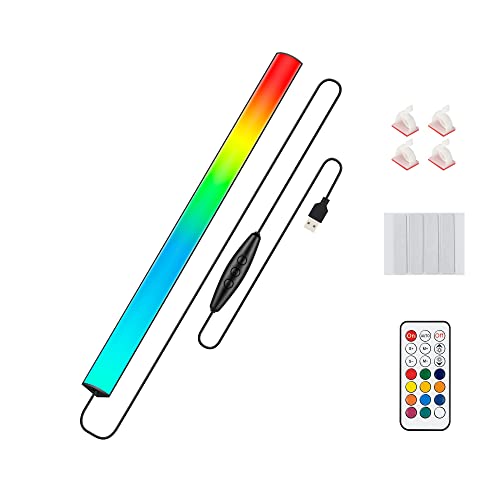
- 353 dynamic and 12 static color modes
- Wireless remote with brightness and speed controls
- USB powered with last-setting memory
Best For: Gaming desks and colorful ambient setups
Best Compact Clip-On

- Fits screens 0.2–0.4 inches thick
- Three color temperatures and 10 brightness levels
- USB powered with memory function
Best For: Small desks, laptops, and portable workspaces
Best Wide-Screen Value
Colorpanda 16.14-Inch Monitor Light Bar

- 16.14-inch width for broad desk coverage
- Fits screens from 0.12 to 2.2 inches thick
- Three color temperatures with touch adjustment
Best For: Home offices and gaming setups needing wide coverage
Best Portable Pick
CATPOWER USB Laptop Monitor Light Bar

- Three color modes and 10 brightness levels
- USB-powered, lightweight, and portable
- Fits screens from 0.3 to 1.4 inches thick
Best For: Portable work, study, and reading setups
Best Premium Option
YEELIGHT USB Monitor Light Bar

- 250-lumen output with stepless adjustment
- Ra95 color rendering with 78 LED beads
- Fits flat and curved monitors
Best For: Work, gaming, and color-sensitive tasks
Best Remote-Controlled Pick

- Wireless remote plus touch control
- 2900K–6000K adjustable color range
- Fits screens from 0.2 to 1.8 inches
Best For: Flexible home-office, gaming, and study desks
Best Wide-Coverage Pick

- 900-lux central brightness with broad coverage
- Three color temperatures and stepless dimming
- Tool-free clip with USB power and memory function
Best For: Ultrawide monitors and large desks
Best RGB Option

- Front task light plus nine RGB backlight modes
- Three front-light color temperatures with dimming
- USB-C power and silicone-padded universal clip
Best For: Gaming and ambient lighting
Best Compact Choice
11.8" Dimmable USB Monitor Lamp

- 800-lux central brightness with 30" × 20" coverage
- Three color temperatures and memory function
- Compact tool-free design for USB-powered setups
Best For: Compact desks and standard monitors
Best Eye-Care Pick – Quntis ScreenLinear Pro Monitor Lamp
If you want usb powered monitor light bars for extended computer use, the Quntis ScreenLinear Pro emphasizes comfortable, controlled illumination. Its asymmetrical optical design directs light toward your desk, while auto-dimming, touch controls, and adjustable color temperature make it easy to customize.
Best For: Office workers, students, designers, and gamers who want feature-rich, eye-focused desk lighting.
Pros:
- Asymmetrical lighting helps reduce reflected screen glare.
- Auto-dimming adjusts output to surrounding brightness.
- Offers stepless brightness and 3000K–6500K color-temperature adjustment.
- High CRI Ra98 lighting is designed for vivid, accurate-looking colors.
Cons:
- Its advanced features may be more than casual users need.
- It requires a USB power connection and is not water resistant.
Choose this model when lighting comfort and fine control matter more than a simple plug-and-play lamp. The touch interface, memory-free manual customization, and automatic adjustment make it a versatile option for long sessions.
Best RGB Ambience – Under Monitor RGB Light Bar
Among usb powered monitor light bars, this 12-inch RGB model is aimed at atmosphere rather than focused task lighting. It offers extensive color effects, wireless remote control, and flexible placement behind or below a monitor for a gaming or desk setup.
Best For: Gamers and desk-setup enthusiasts who want customizable ambient lighting.
Pros:
- Provides 353 dynamic modes and 12 static color modes.
- Wireless remote and inline controls adjust color, brightness, and speed.
- USB powered and compatible with computer USB ports or a wall adapter.
- Memory function recalls the last lighting setting.
Cons:
- It is designed for ambient decoration rather than glare-free reading light.
- Adhesive mounting may be less convenient to reposition than a clip-on design.
- It has no water resistance.
This is the better fit for visual customization and room ambiance than for illuminating documents or a keyboard with neutral task light. Its lightweight aluminum housing and broad mode selection suit colorful gaming stations.
Best Compact Clip-On – Laptop Monitor Light Bar
This compact USB powered monitor light bar is a practical choice for laptops, small monitors, and limited workspaces. The tool-free clip attaches to screens between 0.2 and 0.4 inches thick, while its asymmetrical design aims light at the desk instead of the display.
Best For: Students, dorm rooms, small home offices, and users who need portable desk lighting.
Pros:
- Tool-free clip-on installation does not require a desk base.
- Three color temperatures and 10 brightness levels provide useful adjustment.
- USB power works with computers, chargers, power banks, and other USB devices.
- Memory function retains the previous brightness and color-temperature settings.
Cons:
- The stated clip range is limited to screens 0.2–0.4 inches thick.
- Its compact format may offer less coverage than wider monitor bars.
Consider this model when portability and simple installation are priorities. It delivers the core benefits of a monitor lamp without using desk space, but check your screen thickness before buying.
Best Wide-Screen Value – Colorpanda 16.14-Inch Monitor Light Bar
For shoppers comparing usb powered monitor light bars for home office or gaming use, the 16.14-inch Colorpanda offers broad coverage in a space-saving format. Its counterweight clip supports screens from 0.12 to 2.2 inches thick, and touch controls provide three color temperatures and adjustable brightness.
Best For: Home-office and gaming users who want a wider monitor lamp with a broad clip range.
Pros:
- 16.14-inch bar provides wide desk illumination.
- Asymmetrical optics and anti-blue-light design are intended to reduce screen glare and fatigue.
- Three color temperatures span 2700K, 4000K, and 6500K.
- Clip-on installation accommodates a broad range of screen thicknesses.
Cons:
- Its controls provide preset color temperatures rather than stepless adjustment.
- Only one year of manufacturer warranty is listed.
- It requires USB power and is not water resistant.
This model balances wide coverage, flexible mounting, and straightforward touch control. It is a strong practical option for users who want a monitor lamp that can fit unusually thick screens without occupying desk space.
Best Portable Pick – CATPOWER USB Laptop Monitor Light Bar
If you need usb powered monitor light bars for a laptop, monitor, or compact desk, the CATPOWER offers straightforward illumination without taking up extra workspace. It connects to a USB port and provides three color modes plus 10 brightness levels for reading, studying, or office tasks.
Best For: Portable users, students, and home-office setups needing adjustable lighting on screens up to 1.4 inches thick.
Pros:
- Three color temperatures and 10 brightness levels provide flexible control.
- USB power works with laptops, computers, power banks, and other USB-enabled devices.
- Flicker-free lighting and a space-saving clip-on design suit extended computer use.
- Slim, lightweight construction is convenient for travel and flexible positioning.
Cons:
- It is not waterproof, so it is intended for indoor use.
- The 0.3- to 1.4-inch screen-thickness range may not fit every monitor.
CATPOWER is a practical choice when portability and simple manual adjustment matter more than advanced controls. Its compact USB design makes it easy to move between workstations while keeping desk space clear.
Best Premium Option – YEELIGHT USB Monitor Light Bar
Among usb powered monitor light bars, the YEELIGHT stands out for its precise lighting control and premium construction. Its 250-lumen output, stepless dimming, adjustable 2700K–6500K color temperature, and low-glare design are aimed at comfortable work, gaming, and study sessions.
Best For: Users who want high color accuracy, broad lighting adjustment, and compatibility with flat or curved monitors.
Pros:
- Stepless brightness and color-temperature adjustment allows detailed customization.
- Ra95 color rendering and 78 LED beads support even, natural-looking illumination.
- Retractable clip fits monitors from 0.3 to 1.1 inches thick.
- Full-metal body, USB power, and camera-friendly low-profile design suit modern workspaces.
Cons:
- The narrower 0.3- to 1.1-inch fit range may exclude thicker screens.
- Its premium feature set may be more than needed for basic desk lighting.
YEELIGHT is the strongest fit for buyers who value refined control and color fidelity. The combination of glare-conscious illumination, flexible monitor compatibility, and full-metal construction makes it a polished workspace upgrade.
Best Remote-Controlled Pick – LYMAX USB Monitor Light Bar
The LYMAX is one of the more convenient usb powered monitor light bars for users who want to adjust lighting without reaching for the screen. It combines touch controls with a wireless remote, adjustable 2900K–6000K color temperature, and an asymmetrical downlight intended to reduce screen reflections.
Best For: Home offices, gaming desks, and study areas where wireless control and a wide monitor fit are priorities.
Pros:
- Wireless remote and touch controls provide convenient operation.
- Adjustable 2900K–6000K color range supports work, reading, and gaming.
- Gravity-damper bracket with silicone padding fits screens from 0.2 to 1.8 inches thick.
- Metal construction is lightweight, while the USB-C port supports computer or power-bank use.
Cons:
- The remote uses a disposable CR2450 battery.
- The product requires a 5V/1A USB interface according to the supplied notes.
- It is not waterproof and is intended for indoor settings.
LYMAX makes sense for anyone who prioritizes access from a distance and broad screen compatibility. Its stable bracket, glare-conscious downlight, and dual control methods give it useful flexibility across office, gaming, and study setups.
Best Wide-Coverage Pick – 15.7" Ultrawide USB Light Bar
If you need usb powered monitor light bars for a wide display or large desk, this 15.7-inch model emphasizes broad, even illumination. It offers three color temperatures, stepless dimming, USB power, and a counterweight clip for tool-free installation.
Best For: Ultrawide monitors, large desks, and long work or gaming sessions.
Pros:
- Provides up to 900 lux of central brightness across a stated 35" × 25" area.
- Uses 45° asymmetric lighting to direct illumination toward the desk and keyboard.
- Offers 3000K–6500K color temperatures, stepless brightness adjustment, and memory function.
- Works with computers, adapters, and power banks through USB power.
Cons:
- Its 15.7-inch length may be more than needed for compact monitors.
- The housing is plastic and the light uses a corded USB power connection.
Choose this model when coverage is the priority. Its longer bar and claimed wide lighting area make it particularly suitable for ultrawide screens, while the simple mechanical control keeps adjustments convenient.
Best RGB Option – Dual-Light USB-C Monitor Bar
Among usb powered monitor light bars, this model stands out by combining front task lighting with a separate RGB backlight. It is designed for users who want practical desk illumination for reading or work plus colorful ambient effects for gaming and movies.
Best For: Gaming setups, mood lighting, and desks that need both task and ambient illumination.
Pros:
- Combines a glare-reducing front light with nine RGB backlight modes.
- Provides three front-light color temperatures and independent controls.
- Uses a USB-C cable compatible with laptops, adapters, and power banks.
- Retractable silicone-padded clip fits thin, thick, flat, and curved monitors.
Cons:
- The listed maximum light output is 150 lumens, lower than the other supplied models.
- Two lighting systems and separate controls may be unnecessary for users seeking simple task lighting.
This is the most feature-rich choice for atmosphere. Select it if RGB effects matter as much as front lighting; otherwise, a single-light model may offer a simpler setup.
Best Compact Choice – 11.8" Dimmable USB Monitor Lamp
If you want usb powered monitor light bars without adding much width, this compact 11.8-inch screen lamp provides targeted desk lighting in a shorter format. It includes three color temperatures, dimming, USB compatibility, and a memory function for repeatable settings.
Best For: Standard-size monitors, compact workspaces, and users who prefer a smaller screen bar.
Pros:
- Delivers up to 800 lux of central brightness across a stated 30" × 20" area.
- Uses 45° lighting intended to illuminate the desk and screen without directing light toward the eyes.
- Supports 3000K, 4000K, and 6500K color temperatures with adjustable brightness.
- Installs without tools and works with computers, adapters, and power banks via USB.
Cons:
- The 11.8-inch bar offers less physical coverage than the 15.7-inch alternatives.
- It has one light source and no RGB backlight for ambient effects.
This model is a sensible fit when desk space or monitor width is limited. It retains the key eye-care-oriented lighting features and controls while using a more compact bar than the other options.
How We Picked the Best USB Powered Monitor Light Bars
We focused on monitor light bars that provide useful, even illumination while keeping the screen relatively free from reflections. The comparison considers brightness control, color-temperature options, mounting stability, power requirements, control methods, monitor compatibility, and the overall usefulness of each design for work, study, reading, or gaming.
Models with features such as auto-dimming, touch controls, wireless remotes, front-and-back lighting, and RGB effects were included to cover different desk setups. Because USB power is central to this category, we also considered how easily each light can connect to a computer, monitor, docking station, power bank, or wall adapter.
Quick Comparison
| Best For | Features to Prioritize | Recommended Type |
|---|---|---|
| Office work and studying | Low glare, adjustable brightness, neutral color modes | Eye-care front-light bar |
| Gaming setups | RGB effects, rear bias lighting, remote or touch control | RGB or dual-light bar |
| Laptops and portable desks | Compact clip, USB compatibility, lightweight construction | Portable laptop monitor light |
| Wide or ultrawide monitors | Long bar, stable clamp, broad light distribution | 15- to 16-inch ultrawide model |
| Shared or changing environments | Auto-dimming and multiple color temperatures | Sensor-equipped adjustable bar |
Key Buying Factors for USB-Powered Monitor Light Bars
Glare Control and Beam Direction
Look for an angled light source designed to illuminate the desk rather than the display. A stable mount and adjustable tilt can help prevent reflections, especially on glossy screens. Low-glare claims are useful, but your monitor’s finish and viewing angle still affect performance.
Brightness and Color Temperature
Dimming lets you match the light to the room and time of day. Warm settings are comfortable for evening reading, while neutral or cooler settings can suit detailed office work. Stepless adjustment offers finer control than a few fixed levels, but clearly spaced presets are often easier to use.
Power and Controls
Most USB-powered monitor light bars can draw power from a computer, monitor, hub, or adapter. Check cable length and connector type before buying. Touch controls keep the desk tidy, while a wireless controller is more convenient when the light is mounted out of reach.
Monitor Fit and Stability
Measure the monitor’s top edge, bezel depth, and rear clearance. Curved, very thin, or unusually shaped displays may need a flexible clip or counterweight. A wider bar can spread light more evenly, but it also needs a strong mount to remain balanced.
Who Should Buy Which USB Powered Monitor Light Bars?
Choose a simple dimmable bar if you want focused desk lighting for work or study. Pick a model with three color temperatures if you regularly switch between daytime tasks and evening reading. A portable clip-on design is better for laptop users, travel, and temporary workspaces. For gaming rooms, RGB or dual-light models add visual atmosphere, while an auto-dimming model is the most convenient choice for changing ambient light. Ultrawide-monitor owners should favor longer bars with broad coverage and a secure clamp.