A dependable laptop lock can help deter opportunistic theft in offices, classrooms, coworking spaces, libraries, and other shared environments. The best laptop locking cables balance strong construction with a lock type and attachment method that fit your computer.
This roundup compares 10 laptop locking cables, including combination and keyed models, universal designs, and adhesive-anchor options for devices without a built-in security slot.
Best 10 Laptop Locking Cables Picks for 2026
Best Standard-Slot Pick
Kensington T-Bar Combination Lock

- Resettable four-digit combination
- Six-foot carbon-steel cable
- Fits standard Kensington slots
Best For: Compatible standard-slot laptops and office equipment
Best Adhesive-Anchor Set

- Two adhesive anchor plates included
- Six-foot galvanized-steel cable
- Works with laptops, tablets, and phones
Best For: Multiple devices without built-in security slots
Best for Thin Laptops
Kensington Nano Combination Lock

- Slim head for Nano slots
- Resettable four-digit code
- Five-foot rotating carbon-steel cable
Best For: Thin laptops with Nano-sized security slots
Best Retractable Keyed Option
Portable Retractable Cable Lock Kit
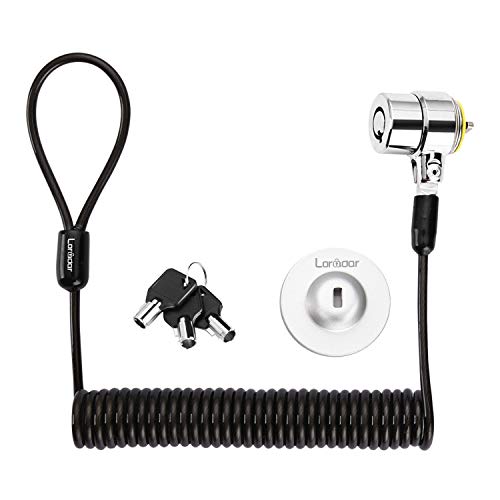
- Six-foot-two-inch maximum reach
- Retractable, space-saving cable
- Three keys and adhesive-anchor flexibility
Best For: Portable keyed security across compatible devices
Best Dell-Specific Pick
Kensington N17 Combination Lock

- Fits Dell and Alienware wedge slots
- Resettable 4-wheel combination
- 6-foot carbon steel cable
Best For: Dell and Alienware laptops with wedge-style security slots
Best No-Slot Flexibility
LORADAR Adhesive-Anchor Cable Lock

- Works with or without a security slot
- Includes 3 traceable replacement keys
- 6.7-foot cable with adhesive anchor
Best For: MacBooks, tablets, and devices without built-in lock slots
Best Universal Fit
Kensington Universal 3-in-1 Lock

- Fits standard, nano, and wedge slots
- Resettable 4-number combination
- 6-foot carbon steel cable
Best For: Mixed-device households and workplaces
Most Versatile Coverage
Universal Laptop Cable Lock with Anchor Plate

- Supports standard laptop slots and many devices without slots
- Includes a 6.5-foot coated steel cable
- 360-degree lock head and key operation
Best For: Mixed-device environments needing flexible attachment options
Simple Combination Pick
Sendt Black Notebook/Laptop Cable Lock

- Resettable four-dial combination with 10,000 possibilities
- Six-foot cable for everyday tethering
- Designed for Kensington security slots
Best For: Kensington-slot laptops used in schools, libraries, and offices
Best Slot Compatibility
AboveTEK 3-in-1 Universal Cable Lock

- Fits K-Slot, Nano, and wedge security slots
- Resettable four-digit combination with 10,000 codes
- Includes six spacers and a 360-degree rotating head
Best For: Mixed laptop fleets with varied security-slot formats
Best Standard-Slot Pick – Kensington T-Bar Combination Lock
For laptops with a Kensington standard-size security slot, this combination cable lock offers a straightforward way to secure equipment in offices, homes, and shared spaces. Its resettable four-digit code avoids the need for keys, while the six-foot carbon-steel cable anchors to a desk, table, or other fixed structure.
Best For: Users with compatible HP, Lenovo, Acer, Asus, or other devices that use a standard Kensington slot.
Pros:
- Resettable four-wheel combination with 10,000 possible codes
- Push-button design supports one-handed engagement
- Six-foot cut-resistant carbon-steel cable works with laptops and many other devices
- Also fits compatible monitors, TVs, projectors, docking stations, and hard drives
Cons:
- Not compatible with Dell and Alienware devices that use a Noble slot
- Requires a compatible standard-size Kensington security slot
This is a practical laptop locking cable when you want key-free operation and broad device compatibility. Check your computer’s slot type carefully, especially on newer Dell laptops and tablets, before buying.
Best Adhesive-Anchor Set – AboveTEK Keyed Security Cable
This AboveTEK kit is a flexible option for laptop locking cables when a device lacks a built-in security slot. It includes two adhesive anchor plates and a six-foot galvanized-steel cable, allowing the same security approach to extend to compatible tablets, smartphones, notebooks, and other flat-surface devices.
Best For: People securing multiple mobile devices, tablets, or laptops in cafés, libraries, retail spaces, and other public or commercial settings.
Pros:
- Includes two adhesive sticker-and-anchor sets for multiple devices
- Industrial-grade 3M adhesive is designed for most flat surfaces
- Six-foot cut-resistant galvanized-steel cable allows movement while secured
- Keyed design is simple to install and operate
Cons:
- Adhesive anchors require a suitable flat surface
- Uses keys rather than a combination, so the keys must be kept available
Choose this kit when broad device coverage and adhesive mounting matter more than a built-in slot connection. Its two-anchor setup is especially useful for securing more than one personal device.
Best for Thin Laptops – Kensington Nano Combination Lock
Designed for thin laptops with Nano-sized security slots, this Kensington laptop locking cable uses a slim lock head that helps the device sit flat and stable. The five-foot carbon-steel cable, rotating anchor, and pivoting head provide a compact setup for shared workspaces, cafés, and travel.
Best For: Thin laptops that specifically use a Nano-sized security slot.
Pros:
- Slim lock head supports compatible thin laptops
- Resettable four-wheel combination provides 10,000 possible codes
- Pivoting head rotates 360 degrees and cable rotates up to 90 degrees
- Five-foot carbon-steel cable includes an anti-shearing plastic sleeve
Cons:
- Compatible only with devices using a Nano-sized slot
- Five-foot cable is shorter than many six-foot alternatives
This is a focused choice for newer, slimmer laptops where a standard lock head may be unsuitable. Confirm that your device has the Nano slot shown for this model before ordering.
Best Retractable Keyed Option – Portable Retractable Cable Lock Kit
This retractable keyed cable lock combines a compact design with a six-foot-two-inch maximum reach for compatible laptops, monitors, tablets, and phones. It can connect directly to devices with a 3-by-7-millimeter Kensington-style hole or use the included adhesive anchor plate for devices without one.
Best For: Users who want a portable keyed lock with adjustable cable length and anchor-plate flexibility.
Pros:
- Includes three keys and a traceable number on the lock body and key
- Retractable cable extends to about six feet and rebounds to about four inches
- Rotating stainless-steel lock head supports flexible positioning
- Can work directly with compatible slots or with an adhesive anchor plate
Cons:
- Many listed device models require the adhesive anchor plate
- Newer Apple MacBooks are not compatible according to the supplied notes
- Compatibility varies by device slot shape and model
The retractable format makes this a convenient laptop locking cable for travel and occasional use, particularly when storage space matters. Review the model-specific compatibility notes carefully before relying on a direct slot connection.
Best Dell-Specific Pick – Kensington N17 Combination Lock
Kensington N17 Dell Laptop Computer Lock, Combination Security Locking Cable (K68008WW) Black
Check Price On AmazonIf your laptop has a Dell or Alienware wedge-shaped security slot, this Kensington N17 is a focused choice among laptop locking cables. It combines a resettable four-wheel combination with a six-foot carbon steel cable and push-button engagement for convenient everyday use.
Best For: Dell and Alienware laptops with wedge-type lock slots in offices, homes, or schools.
Pros:
- Designed to fit Dell and Alienware wedge-style security slots.
- Resettable four-wheel combination provides 10,000 possible codes.
- Push-button design supports one-handed attachment.
- Six-foot carbon steel cable anchors to a desk, table, or fixed structure.
Cons:
- Compatibility is limited to devices with the specified wedge-shaped slot.
- Combination locks require you to remember the current code.
This is a practical match for Dell and Alienware owners who want a branded, combination-based laptop lock without carrying a key. Verify that your device uses a wedge slot before buying.
Best No-Slot Flexibility – LORADAR Adhesive-Anchor Cable Lock
This LORADAR model is one of the more flexible laptop locking cables because it can connect directly to a standard Kensington 3×7mm keyhole or use an adhesive anchor plate when a device has no security slot. Its 6.7-foot cut-resistant cable and keyed locking system suit shared spaces such as cafés, libraries, and coworking areas.
Best For: MacBooks, tablets, iPads, Surface devices, and other electronics without a built-in security slot.
Pros:
- Works with standard Kensington keyholes or the included adhesive anchor plate.
- Includes three keyed-different keys with traceable codes for replacement support.
- 6.7-foot 7×19 braided steel cable has a stated 1800N joint pull strength.
- Adhesive anchor is rated for over 100 pounds after full curing.
Cons:
- The adhesive anchor requires 24–48 hours to fully cure.
- Using the adhesive option requires attaching an anchor plate to the device.
- It uses keys rather than a resettable combination.
Choose this lock when device compatibility is the main concern, especially for slim hardware without a security slot. Follow the adhesive installation and curing instructions before relying on the anchor.
Best Universal Fit – Kensington Universal 3-in-1 Lock
For households or workplaces with laptops from different generations and brands, the Kensington Universal 3-in-1 is a versatile option among laptop locking cables. Its interchangeable tips fit standard, nano, and wedge-shaped security slots, while the resettable four-number dial avoids the need to manage a key.
Best For: Users securing multiple laptops with different standard, nano, or wedge-shaped security slots.
Pros:
- One lock supports standard, nano, and wedge-shaped laptop slots.
- Resettable four-number dial offers 10,000 possible combinations.
- Six-foot carbon steel cable provides cut and theft resistance.
- Unused lock tips stay attached through the included tether.
Cons:
- It is intended for devices with one of the supported security slots.
- Users must change and manage the interchangeable tips when switching devices.
This is the strongest general-purpose pick in the group when slot compatibility varies. Its interchangeable design can reduce the need to buy separate locks, provided each device uses a supported slot type.
Most Versatile Coverage – Universal Laptop Cable Lock with Anchor Plate
This option stands out among laptop locking cables because it can support many devices with or without a standard security slot. It includes an adhesive anchor plate for compatible tablets, phones, and other devices, while laptops with standard slots can connect directly.
Best For: Households, classrooms, and offices securing a mix of laptops, tablets, phones, monitors, or projectors.
Pros:
- Works with standard laptop slots and includes an adhesive anchor plate for devices without one.
- Includes a 6.5-foot cut-resistant twisted steel cable with PVC coating.
- Stainless steel lock head rotates 360 degrees.
- Key-based locking system is included.
Cons:
- Some devices require using the included adhesive security plate.
- Users who prefer combination locks may not want a key-operated design.
The main advantage is broad device compatibility, but buyers should confirm whether their device needs the adhesive plate and be comfortable attaching it to the device’s hard surface.
Simple Combination Pick – Sendt Black Notebook/Laptop Cable Lock
For users seeking straightforward laptop locking cables, the Sendt model offers a six-foot cable and a resettable four-dial combination lock. Its compatibility is focused on devices with a standard Kensington security slot.
Best For: Laptops and notebooks with a Kensington security slot in libraries, schools, colleges, and offices.
Pros:
- Four-dial lock provides up to 10,000 user-settable combinations.
- Six-foot cable offers useful reach for securing a laptop to a fixed object.
- Design helps prevent accidental combination resets.
- Backed by a one-year limited warranty against manufacturing defects.
Cons:
- Does not fit Dell laptops, Kensington Nano slots, or Noble wedge slots.
- Requires a compatible Kensington security slot.
This is a focused, no-key solution, but its narrower compatibility makes checking the laptop’s slot type essential before purchase.
Best Slot Compatibility – AboveTEK 3-in-1 Universal Cable Lock
The AboveTEK is one of the more adaptable laptop locking cables because its 3-in-1 design supports K-Slot, Nano, and wedge security slots. It combines a resettable four-digit lock with a rotating head for flexible positioning.
Best For: Users who manage laptops with different security-slot formats across offices, campuses, or travel situations.
Pros:
- Compatible with K-Slot, Nano, and wedge security slots.
- Resettable four-digit combination offers 10,000 possible codes.
- Galvanized steel cable has a vinyl protective coating and reinforced internal core.
- Includes six secure spacers and a 360-degree rotating ball joint.
Cons:
- Buyers should verify their laptop’s slot type before purchasing.
- Combination setup requires following the included instructions.
Its broad slot support makes it a strong choice for mixed laptop fleets, while the 12-month warranty adds useful purchase support. Compatibility should still be confirmed for the specific device.
How We Picked the Best Laptop Locking Cables
We focused on practical security, compatibility, and everyday convenience. The selection includes keyed and resettable combination locks, standard T-Bar, Nano, and wedge-slot compatibility, plus universal models that support multiple laptop security-slot formats. We also included adhesive-anchor kits for MacBooks, tablets, monitors, and other devices without a dedicated lock slot.
Other considerations include cable length, steel-cable construction, portability, reset or key management, and whether the design suits a fixed desk or frequent travel. These locks are theft-deterrence tools, not guarantees against determined attacks, so proper installation and sensible device handling still matter.
Quick Comparison
| Lock Type | Best For | Main Advantage | Watch For |
|---|---|---|---|
| Combination | Shared offices and classrooms | No key to carry | Remembering the code |
| Keyed | Personal workstations | Simple, familiar operation | Safeguarding spare keys |
| Universal | Mixed-device environments | Supports several slot formats | Usually costs more |
| Adhesive anchor | Slot-free laptops and tablets | Works with compatible flat surfaces | Surface preparation and cure time |
Key Buying Factors for Laptop Locking Cables
Check the Security-Slot Format
Before buying, identify whether your laptop has a standard T-Bar slot, Kensington Nano slot, Dell wedge slot, or no slot at all. A universal lock may be the easiest choice for households or offices with several device types, but confirm the included tips match your equipment.
Choose Keyed or Combination Operation
Combination locks are convenient when multiple people need access or keys would be easy to lose. Keyed locks can be faster for personal use and avoid forgotten codes. For combination models, choose a resettable design and record the code securely.
Consider Cable Length and Routing
A six-foot cable is common and works well around many desks, but measure the distance to the anchor point before ordering. The cable should wrap around a sturdy, immovable object without excessive slack. Longer cable is useful in flexible setups, while shorter cable can be easier to manage while traveling.
Evaluate Adhesive Anchors Carefully
For slot-free devices, adhesive anchors can expand compatibility, but they require a clean, suitable surface and careful installation. Follow the manufacturer’s directions, allow the adhesive to bond fully, and check whether removing the anchor could affect the device’s finish or warranty.
Who Should Buy Which Laptop Locking Cables?
Office and classroom users: Choose a resettable combination lock when several people may need access and key management would be inconvenient.
IT departments and mixed-device workplaces: A universal 3-in-1 model can simplify deployment across standard, Nano, and wedge-slot laptops.
MacBook, tablet, and slot-free device owners: Select a cable lock with a compatible adhesive anchor, and verify the device surface is suitable before installation.
Frequent travelers: Look for a compact keyed or combination model with a manageable cable length and simple setup. Travelers should also confirm that the destination’s desk or furniture provides a genuinely secure anchor point.